Technical SEO
How to Test Structured Data Before You Publish
How to test structured data before you publish: check syntax, run Google's Rich Results Test, use URL Inspection and watch Search Console…
Read article
This guide is for site owners, developers and SEOs who have a page missing from Google and want to know whether Google is even allowed to index it. You will learn how to check if a page can be indexed in four steps, what each field in the URL Inspection tool means, and which free checkers to use when you cannot access Search Console.
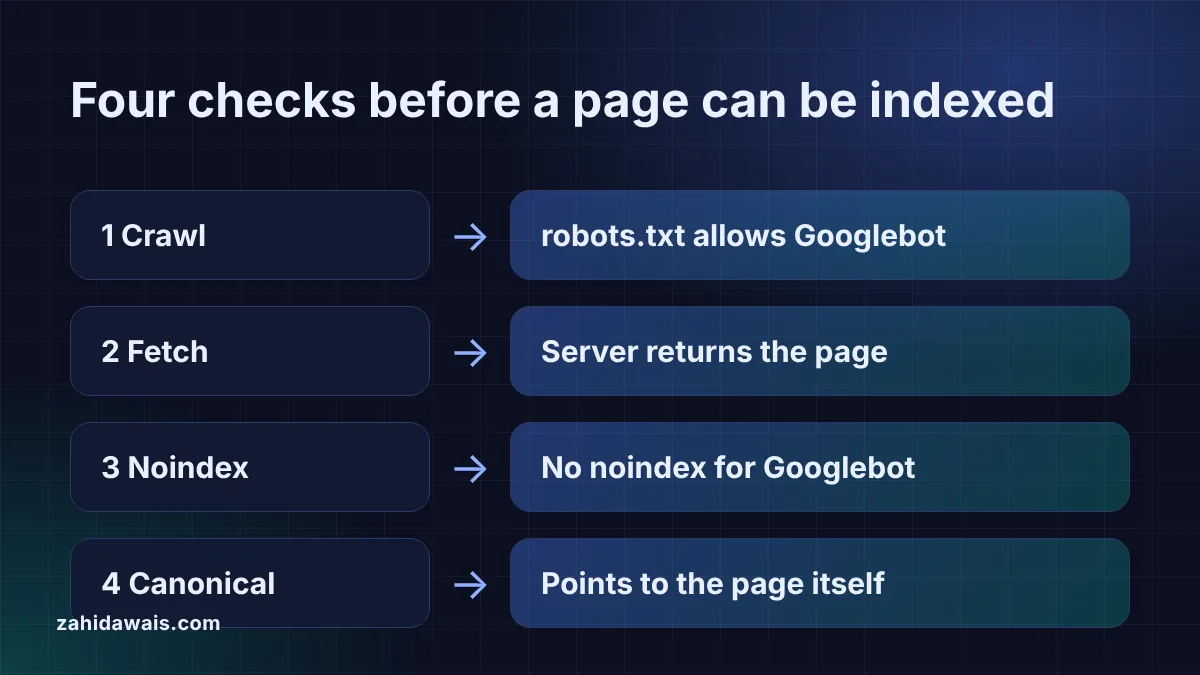
To check if a page can be indexed, confirm four things: robots.txt allows Googlebot to crawl the URL, the server returns the page, no robots meta tag or X-Robots-Tag header says noindex, and the canonical points to the page itself. The URL Inspection tool in Search Console shows all four for one URL.
A page can be indexed when nothing on your side stops Google from crawling it, reading it and keeping it as the main version of its content. That is a technical yes, not a promise: Google still decides whether the page is worth indexing, which is why a page can pass every check and still show up as crawled, currently not indexed.
Four gates decide the technical part. robots.txt must allow the crawl, the server must return the page, no noindex rule may apply to Googlebot, and the canonical should name the page itself rather than another URL. If any gate fails, fix it before you look at content quality or links.
Paste the full URL into the search bar at the top of Search Console and open the page indexing section. Google’s help page on the URL Inspection tool explains each field. “Crawl allowed?” shows whether robots.txt blocked the page, “Page fetch” shows “Whether or not Google could actually get the page from your server”, and “Indexing allowed?” shows whether the page explicitly disallowed indexing.
Two points catch people out. First, the default view shows “the most recently indexed version of a page, not the live version on the web”, so after a fix you need Test live URL. Second, the live test “only confirms if Google-InspectionTool can access your page for indexing”; it does not check sitemaps or referring pages, and it does not prove the page will be indexed.
| Check | URL Inspection field | Passes when | Free tool |
|---|---|---|---|
| Crawl | Crawl allowed? | robots.txt does not block Googlebot | Noindex checker, robots.txt tester |
| Fetch | Page fetch | Google could get the page from your server | HTTP status code lookup |
| Noindex | Indexing allowed? | No noindex in meta tags or X-Robots-Tag | Noindex checker |
| Canonical | User-declared and Google-selected canonical | Both name the page itself | Canonical tag checker |
| Live state | Test live URL | Live test finds no crawl, fetch or noindex blocker | Search Console only |
Find the group in robots.txt that applies to Googlebot and test the URL path against its rules. Google follows only the group for its own user agent, or the * group if none names it, and uses the longest matching rule, with the least restrictive rule winning a conflict, as its robots.txt documentation sets out. Paths are case sensitive, * matches any characters and $ marks the end of the URL.
Doing this by eye is error prone once a file has several groups and wildcards. The noindex checker shows the group and the exact rule that decides the result, and the robots.txt tester lets you try many paths at once. Remember that a block does not keep a URL out of results: Google can still index it from links, which Search Console reports as indexed, though blocked by robots.txt.
Look in two places: the robots meta tag in the HTML head and the X-Robots-Tag header in the HTTP response. Google says in its guide to blocking indexing with noindex that both forms “have the same effect”. Check meta tags named robots and googlebot, and headers with or without a user agent, such as X-Robots-Tag: googlebot: noindex. The value none counts too, because it equals noindex, nofollow.
The header is easy to miss because it never shows in View source; open the Network tab of your browser’s developer tools instead. If the page carries noindex and still appears in Google, the usual reason is that robots.txt blocks the crawl, so Google has never seen the rule. When Search Console already lists the page as excluded by noindex tag, it saw the rule and obeyed it.
Check that the page has one rel=canonical in the head, with an absolute URL that points to the page itself. A canonical to another URL tells Google this page is a duplicate, so Google indexes the other URL instead. Google only accepts the link element in the head and asks for absolute URLs, and it can ignore your choice when other signals disagree.
The canonical tag checker lists every canonical in the HTML and the Link header and flags tags in the body, relative URLs, http on an https page and trailing slash mismatches. In URL Inspection, compare the user-declared canonical with the Google-selected canonical. If they differ, read the guide to Google choosing a different canonical. Do not mix a canonical with noindex on the same page; the canonical vs noindex guide explains which to use.
Fix them in the order Google meets them: crawl, fetch, noindex, canonical. A robots.txt block hides everything else, so allow crawling first. Then make sure the URL returns the page; the HTTP status code lookup explains what each code means. Then remove any unwanted noindex, and finally point the canonical at the page itself.
After the fix, run Test live URL and, if the live test passes, click Request indexing. Google says “Submitting a request does not guarantee that the page will appear in the Google Index”, there is a daily limit on requests, and you “cannot request indexing if the page is considered to be non-indexable in the live test”. Without a request, Google picks up changes on its next crawl, which it says can take months for some pages.
Example: a blog post at https://www.example.com/blog/draft-post/ is missing from Google and the owner has no Search Console access. Pasting the head, headers and robots.txt into the noindex checker shows that Googlebot follows its own robots.txt group, where Allow: /blog/*-post/ (13 characters) beats Disallow: /blog/ (6 characters), so crawling is allowed. It also finds 1 noindex signal for Googlebot: a leftover <meta name="googlebot" content="noindex"> from when the post was a draft. An X-Robots-Tag: bingbot: noindex header is listed only as a note, because it does not apply to Google. Removing the googlebot tag clears the noindex. The canonical checker then confirms one self-referencing canonical in the head, so the page can be indexed once Google recrawls it.
No. Indexable only means nothing on your site blocks indexing. Google still decides whether to index the page. Search Console reports such pages as crawled, currently not indexed, and Google says they may be indexed later.
Yes, partly. Read robots.txt, the HTML head and the response headers yourself, or paste them into free checkers. Only the URL Inspection tool shows what Google itself saw and which canonical it chose, so verify the site in Search Console when you can.
The default report shows the most recently indexed version of the page, not the live version. Click Test live URL to fetch the page in real time and see whether your fix is visible to Google now.
Page fetch shows whether Google could actually get the page from your server. If it failed, Google had nothing to read, so fix server errors, redirects or access rules before you look at noindex or the canonical.
No. If robots.txt blocks the page, Google cannot crawl it and never sees the noindex, so the URL can still be indexed from links. To keep a page out of results, allow crawling and use noindex alone.
Google sets a daily limit on indexing requests and on live inspections per property, and the help page does not give the numbers. You also cannot request indexing for a URL the live test finds non-indexable, so fix the page first, then request once.
This guide is part of my technical SEO audit checklist.
Checked 23 Oct 2026. Facts checked against these official pages. Read how I check facts in my editorial policy.
Pages still not indexed after these checks? See my technical SEO service.
How to test structured data before you publish: check syntax, run Google's Rich Results Test, use URL Inspection and watch Search Console…
Read article
Hreflang in the sitemap or in the HTML? Google treats both the same. Learn which method suits your site, how to switch…
Read article
HTML sitemap vs XML sitemap: what each one does, what Google says about sitemaps and links, when a site needs one or…
Read articleSend your website and I will reply with a free audit.