Canonical Tag Generator
A canonical tag generator is a tool that builds the link rel="canonical" element telling search engines which…
Paste a page URL and its HTML head, and optionally the response headers, to see every canonical signal and any conflict between them.
The tool does not fetch anything. Paste the source and headers yourself; nothing leaves your browser.
| Source | Value | Resolves to |
|---|
The free canonical tag checker reads the HTML and HTTP headers you paste for a page and lists every canonical signal it finds: rel=canonical link tags, the Link header and og:url. It then flags duplicates, relative URLs, tags in the body and conflicts with the page URL or hreflang. It runs in your browser.
A canonical tag checker finds every rel=canonical signal on a page and tests whether they agree. Google only accepts the canonical link element in the head, asks for absolute URLs and warns against naming different canonicals with different methods. One self-referencing, absolute HTTPS canonical per page is the safe default for most pages.
A canonical tag checker looks for every place a page tells search engines which URL is the main version: the <link rel="canonical"> element, the Link HTTP header with rel="canonical", and related hints like og:url. Google's guide on how to specify a canonical URL calls rel=canonical "a strong signal", not a command, so mixed signals make Google more likely to choose a different URL.
This checker works on pasted source instead of fetching the page, so it also works for staging sites and pages behind a login. To write a fresh tag, use the canonical tag generator. If the page might also carry a noindex rule, run the noindex checker on the same source.
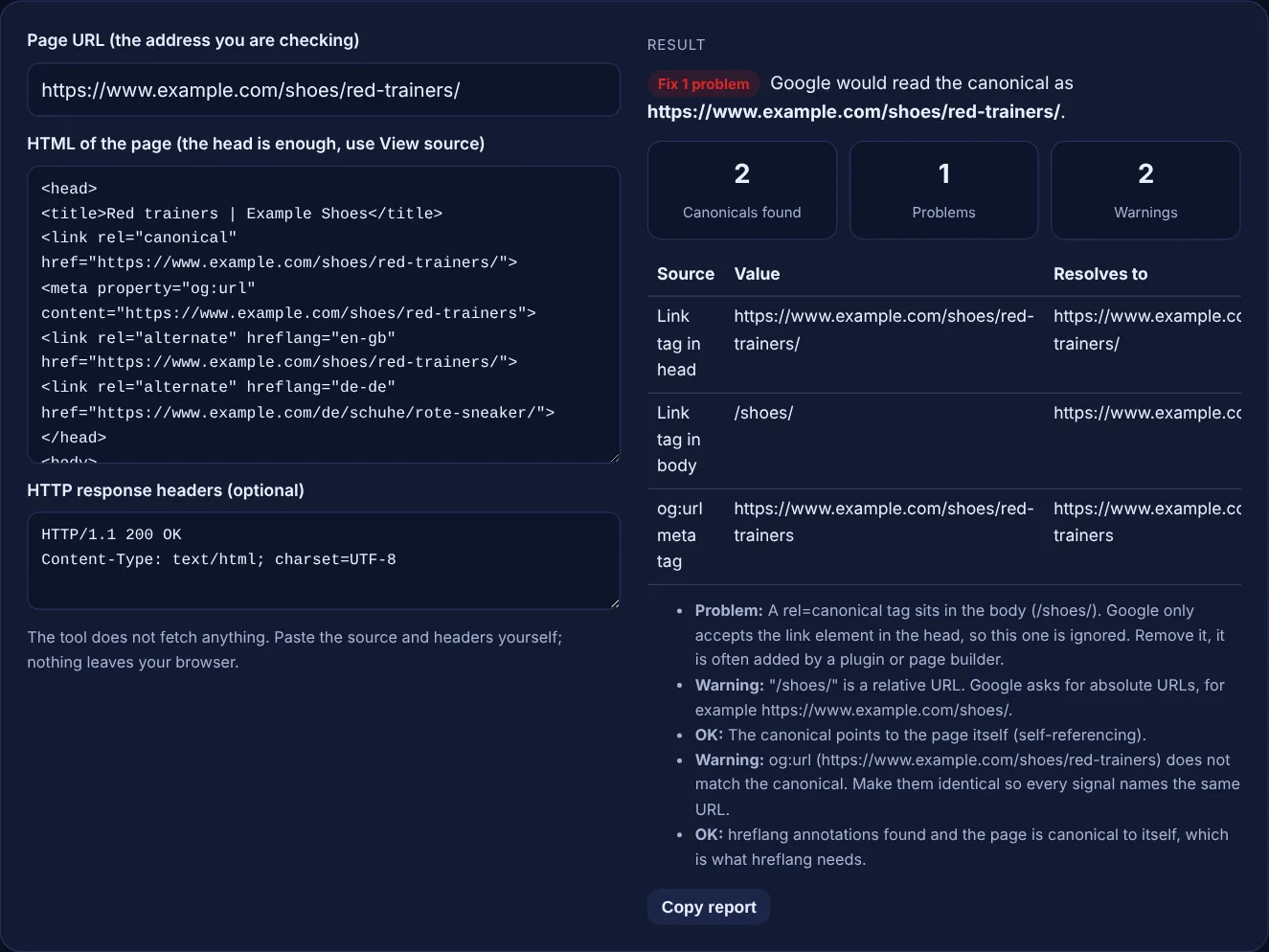
The canonical link element must be in the head of the HTML. Google says "The rel="canonical" link element is only accepted if it appears in the <head> section of the HTML". A tag that ends up in the body, often because a plugin or page builder prints it late, or because invalid markup closes the head early, is ignored. For PDFs and other files without HTML, send the canonical as a Link HTTP header instead.
Absolute. Google's documentation says "Use absolute paths rather than relative paths with the rel="canonical" link element", and asks for absolute URLs in the HTTP header too. A relative value such as /shoes/ still resolves against the page address, which is why the tool shows the resolved URL, but on staging copies, mirrors or http versions it can point somewhere you did not intend.
You lose control of the choice. Google says "Don't specify different URLs as canonical for the same page using different canonicalization techniques", for example one URL in the tag and another in the sitemap or HTTP header. With conflicting signals Google picks a canonical itself, and Search Console then reports the page as a duplicate where Google chose a different canonical than the user. Keep one canonical URL and make every other signal agree with it.
| Check | Why it matters | Fix |
|---|---|---|
| Canonical in the body | Google only accepts the link element in the head | Move it to the head or remove the duplicate |
| Relative URL | Google asks for absolute URLs | Use the full https URL |
| Two different canonicals | Conflicting signals, Google chooses for you | Keep one URL in tag, header and sitemap |
| http canonical on an https page | Google prefers HTTPS pages as canonical | Point to the https version |
| Trailing slash or www mismatch | The canonical names a different URL | Match the version that returns 200 |
| Canonical plus noindex | Mixed signals | Use one method for duplicates |
| hreflang page canonical to another language | Google asks for a canonical in the same language | Make each language version canonical to itself |
Example: the default sample is a product page at https://www.example.com/shoes/red-trainers/ with a correct self-referencing canonical in the head, an og:url without the trailing slash, en-gb and de-de hreflang links, and a second canonical tag, /shoes/, printed after the body starts. The checker finds 2 canonicals, 1 problem and 2 warnings. The problem is the tag in the body, which Google ignores. The warnings are its relative URL and the og:url mismatch. The hreflang setup passes because the page is canonical to itself, and Google would read the canonical as the page URL.
No. Google says none of the canonical methods are required, and it will choose a canonical on its own. A self-referencing canonical on each indexable page is still a cheap way to state your preference, especially when URLs pick up tracking parameters.
No. Google describes rel=canonical as a strong signal, not a rule it must follow. If other signals such as internal links, redirects or the sitemap point elsewhere, Google can pick a different canonical. Making all signals agree is the way to keep your choice.
You can, but Google recommends choosing one, because using both methods at the same time is more error prone. If you do use both, they must name exactly the same URL. The tool flags any difference between them as a problem.
Browsers block one site from reading another site's pages and headers, so a fully in-browser tool cannot fetch them. Pasting the source also lets you check staging sites, pages behind a login and the HTML exactly as your server sends it.
Use the URL Inspection tool in Google Search Console. In the page indexing section it shows the user-declared canonical, read from your page, and the Google-selected canonical. If they differ, your signals disagree or Google sees the pages as duplicates.
Yes, it is good practice. og:url is an Open Graph property for social sharing, not a Google canonical signal, but when it names a different URL it usually reveals a template bug. Keeping both identical avoids confusing shares and audits.
Checked 23 Oct 2026. Facts checked against these official pages. Read how I check facts in my editorial policy.
A canonical tag generator is a tool that builds the link rel="canonical" element telling search engines which…
Finds noindex in robots meta tags and X-Robots-Tag, and tests the URL against robots.txt.
A meta robots tag generator is a tool that writes the meta name="robots" element and the equivalent…
An HTTP status code lookup is a reference tool that explains each response code a server can send. The first…
Send your website and I will check it for you, free.
One short email when something new goes live: articles, free SEO tools, package updates, discounts and price alerts. No spam, unsubscribe in one click.