Robots.txt Generator
A robots.txt generator is a tool that writes the plain text file crawlers read at the root of your site…
Pick your indexing and snippet rules and get the meta tag plus X-Robots-Tag server code.
The free meta robots tag generator runs in your browser, needs no sign-up and never sends what you type anywhere.
This meta robots tag generator builds the robots meta tag and matching X-Robots-Tag header from the directives you tick, such as noindex, nofollow, max-snippet and max-image-preview. Key rule: the page must not be blocked in robots.txt, or Google never sees the tag, and use noindex rather than robots.txt to keep pages out of search.
A meta robots tag generator is a tool that writes the meta name="robots" element and the equivalent X-Robots-Tag HTTP header that control indexing and snippets. It joins the chosen directives into one comma separated list, optionally scoped to one crawler such as googlebot, and adds Apache and Nginx snippets for non-HTML files like PDFs.
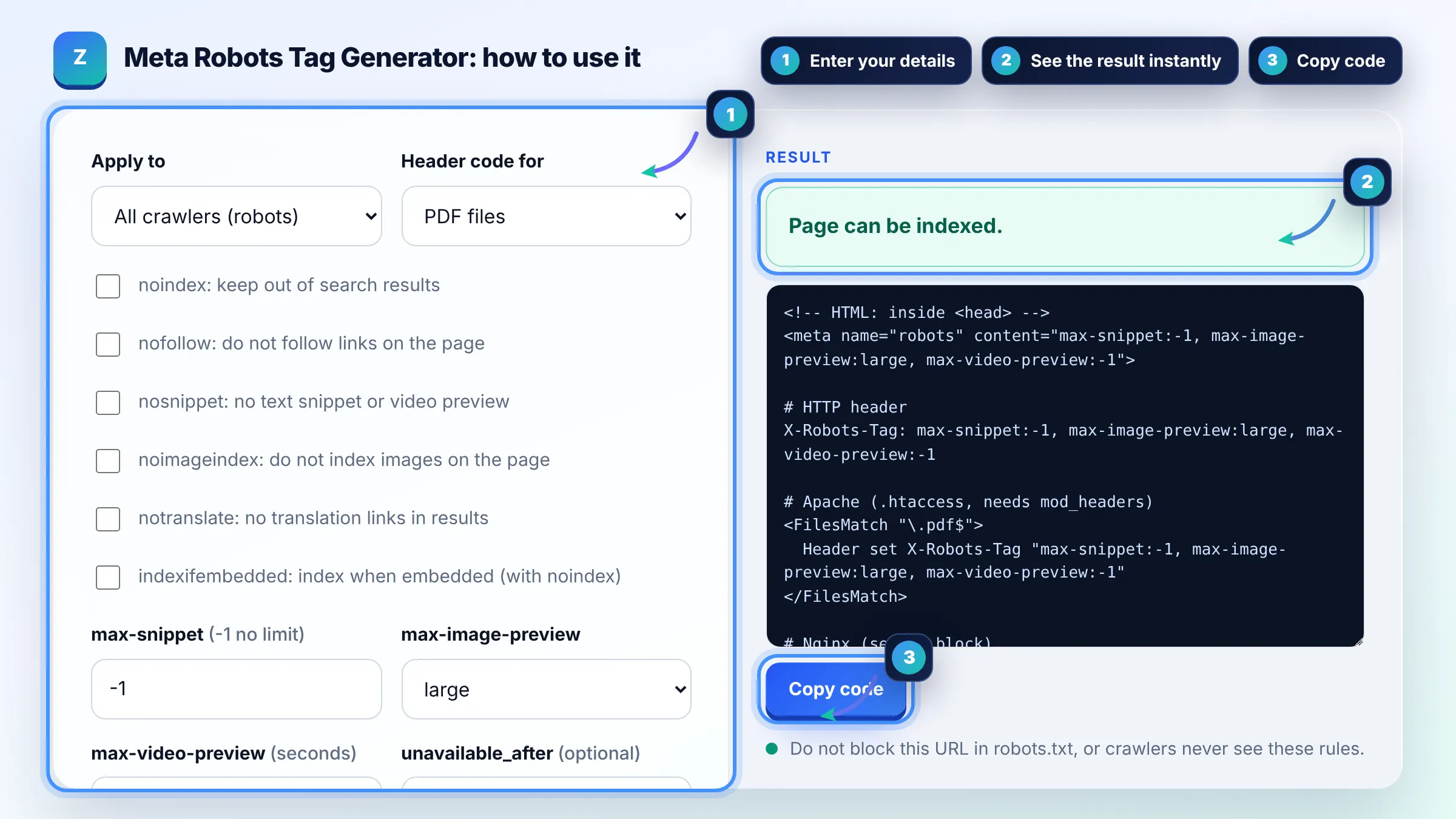
Add <meta name="robots" content="noindex"> to the head, or send an X-Robots-Tag: noindex header, and make sure the URL is not blocked in robots.txt. Google must crawl the page to see the rule, so a robots.txt block hides it. Details are in Google's guide to blocking indexing with noindex.
No, Google Search ignores noarchive because the cached page link no longer exists. It is harmless to keep for other search engines that still offer a cache. Google also ignores nocache, so neither affects how your page appears in Google.
max-image-preview:large allows Google to show a large image preview from your page, for example in Discover and image rich results. The other values are standard and none. Many publishers set large because bigger previews tend to attract more clicks.
| Directive | What it does | Typical use |
|---|---|---|
| noindex | Keeps the page out of search results | Thank you pages, internal search, thin tag pages |
| nofollow | Tells Google not to follow links on the page | Pages full of user submitted links |
| none | Same as noindex, nofollow | Private utility pages |
| nosnippet | No text snippet or video preview in results | Paywalled or sensitive text |
| max-snippet:[n] | Caps the text snippet at n characters; -1 means no limit | Control snippet length |
| unavailable_after:[date] | Stops showing the page after a date | Events and time limited offers |
Example: for a PDF price list that should drop out of Google, tick noindex, clear the three snippet fields and choose PDF files. The tool outputs Header set X-Robots-Tag "noindex" inside a FilesMatch block for .pdf files, because PDFs have no head section for a meta tag.
They support the same directives. The meta robots tag sits in the HTML head, so it only works for HTML pages. X-Robots-Tag is an HTTP response header, so it also works for PDFs, images and other files, and can be applied site wide in server config.
No. Index and follow are the defaults, so adding them has no effect. You only need a robots meta tag when you want to restrict something, such as noindex, or set snippet controls like max-image-preview:large. Leaving it out is perfectly fine.
Google applies the more restrictive rule. For example, if one tag says max-snippet:50 and another says nosnippet, nosnippet wins. Conflicts often come from a theme and an SEO plugin both printing robots tags, so check the final HTML for duplicates.
Yes. Use name="googlebot" instead of name="robots" and only Google follows it. For headers, prefix the rule with the user agent, such as X-Robots-Tag: googlebot: noindex. Other crawlers will ignore rules aimed at Googlebot.
Usually not. Paginated and category pages help Google discover products and articles, so noindexing them can cut off crawl paths over time. Noindex thin pages with no unique value instead, such as internal search results or empty tag archives.
Yes, it is free with no sign up. Everything runs in your browser and nothing you select is sent to a server. Copy the code into your theme, SEO plugin settings or server config, then test the live URL.
Facts checked against these official pages. Read how I check facts in my editorial policy.
A robots.txt generator is a tool that writes the plain text file crawlers read at the root of your site…
A canonical tag generator is a tool that builds the link rel="canonical" element telling search engines which…
An htaccess generator is a tool that writes per directory Apache configuration so you do not have to remember…
Send your website and I will check it for you, free.
One short email when something new goes live: articles, free SEO tools, package updates, discounts and price alerts. No spam, unsubscribe in one click.