SERP snippet preview tool
Free SERP snippet preview tool
Free, private and instant. Nothing you type leaves your browser.
This tester follows Google’s published rules: the most specific matching rule wins, and ties go to Allow. Always confirm important changes in Google Search Console.
The robots.txt tester is free, runs in your browser and needs no sign-up.
This free robots.txt tester checks whether a URL path is allowed or blocked for a crawler such as Googlebot. Paste your robots.txt, enter a path and user agent, and the tool applies Google’s matching rules, where the most specific rule wins and ties go to Allow.
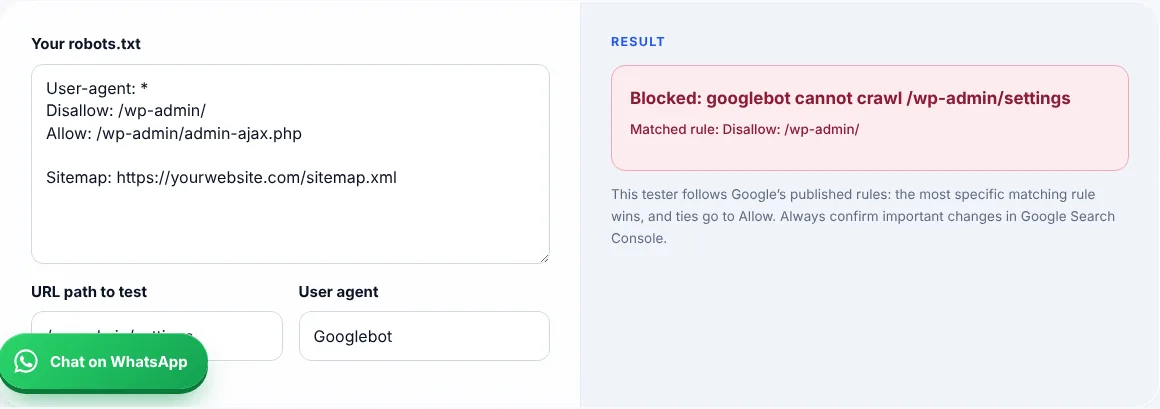
A robots.txt tester reads your robots.txt rules and tells you whether a given crawler may fetch a given URL path.
Google’s Google robots.txt specification says it uses the most specific rule based on path length, and when rules conflict it uses the least restrictive one.
No. It stops crawling, not indexing. A blocked page can still be indexed from links. Use a noindex tag to keep a page out of Google, and do not block that page in robots.txt. If Search Console already lists pages, follow my guide to fixing blocked by robots.txt.
The asterisk matches any sequence of characters, and the dollar sign marks the end of the URL. Google supports both.
| Rule | Meaning | Example match |
|---|---|---|
| Disallow: /wp-admin/ | Block the folder | /wp-admin/settings |
| Allow: /wp-admin/admin-ajax.php | Allow one file inside it | /wp-admin/admin-ajax.php |
| Disallow: /*? | Block URLs with parameters | /shoes?color=red |
| Disallow: /*.pdf$ | Block PDF files | /guide.pdf |
Example: with Disallow: /wp-admin/ and Allow: /wp-admin/admin-ajax.php, the path /wp-admin/admin-ajax.php is allowed because the Allow rule is longer and more specific.
It follows Google’s published matching rules. Always confirm important changes in Search Console.
It lives at the root of your domain, for example yourwebsite.com/robots.txt.
Google reads up to 500 KiB. Content after that is ignored.
That is a business choice. If you want AI tools to cite you, allow their crawlers.
No. The file is public. Use passwords or noindex for private content.
No. It runs entirely in your browser.
Facts checked on 8 October 2026 against these official pages. Read how I check facts in my editorial policy and disclaimer.
Free SERP snippet preview tool
Free FAQ schema generator
27 checks to audit your own site.
Send your website and I will check it for you, free.