
Technical SEO
Hreflang in the Sitemap or HTML? Which Method to Use
Hreflang in the sitemap or in the HTML? Google treats both the same. Learn which method suits your site, how to switch…
Read article
This guide is for site owners, developers and SEOs who add schema markup and want to catch mistakes before Google does. You will learn how to test structured data in four steps, which Google tool answers which question, and what each result really means for rich results.
To test structured data, first check that every JSON-LD block parses, then run the page or code through Google’s Rich Results Test for eligibility and the Schema Markup Validator for general schema.org errors. After publishing, use URL Inspection to confirm Google sees the markup and watch the rich result reports in Search Console.
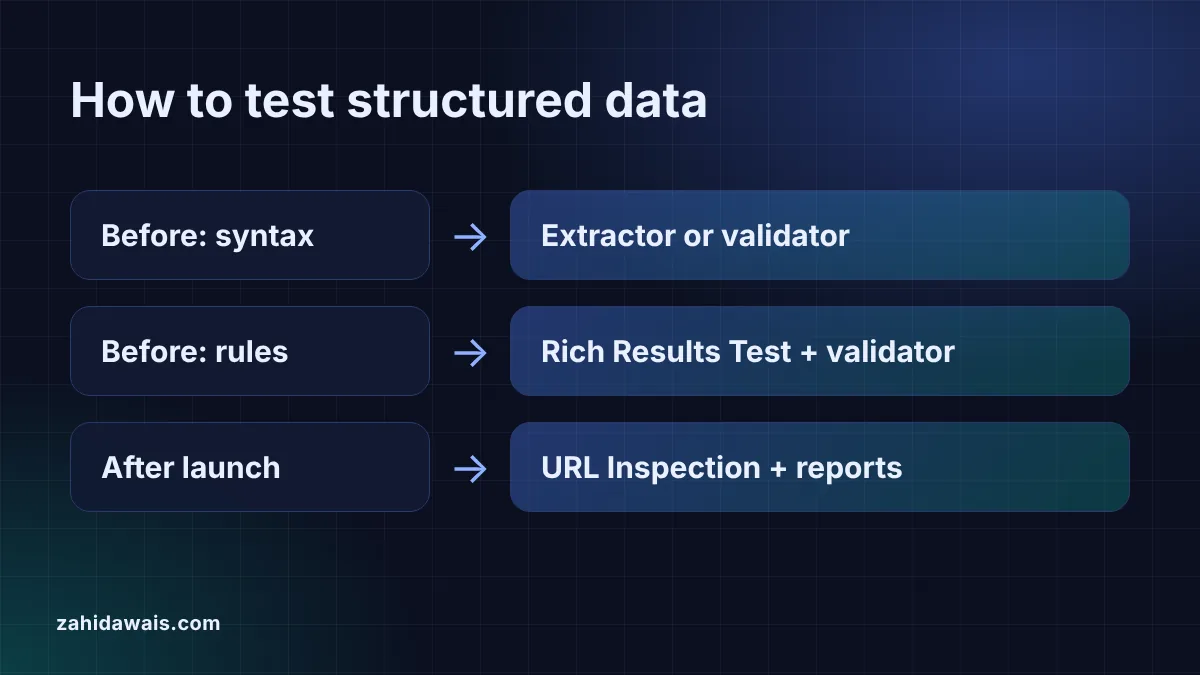
Four tools cover the job, and each answers a different question. A syntax check asks whether the code is valid JSON at all. The Rich Results Test asks whether Google can generate a rich result from it. The Schema Markup Validator asks whether the markup follows schema.org. URL Inspection and the Search Console reports ask what Google found after it crawled the live page.
Google’s own testing page says to start with the Rich Results Test, and describes the Schema Markup Validator as the place to check all schema.org markup without Google specific warnings. The validator is the successor of the old Structured Data Testing Tool, which Google moved to schema.org in December 2020 without its Google specific checks. Neither tool is a full replacement for the other, so use both.
| Tool | What it answers | Input | Use it when |
|---|---|---|---|
| Syntax check (structured data extractor) | Is every block valid JSON, and which types are present? | Pasted HTML source | Before any other test |
| Rich Results Test | Can Google generate a rich result, and which items are invalid? | Public URL or code, smartphone or desktop | Before and after publishing |
| Schema Markup Validator | Does the markup follow schema.org? | URL or code | For any type, including ones with no rich result |
| URL Inspection | What did Google find on the indexed page? | One URL in your property | After publishing or a template change |
| Rich result reports | How many items are valid or invalid across the site? | Search Console property | Ongoing, after Google recrawls |
Check syntax first, because a block with one broken character is ignored completely, and every later test only repeats that one error. The usual culprits are a comma after the last item in a list, curly quotes from a word processor, single quotes and a missing bracket. Search Console groups pages with this problem under Unparsable structured data.
Paste the page source into the structured data extractor to see every JSON-LD block, microdata item and RDFa item on the page at once, with each parse error placed on a line and column. It also lists every @type, which shows duplicates, such as a theme and a plugin both printing Product markup. For a single snippet, the JSON-LD validator does the same check on one block.
Use the Rich Results Test to see whether Google can generate a rich result from your markup and which items have problems. According to Google’s Rich Results Test help page, you can test a live URL or paste a code snippet, and choose a smartphone or desktop user agent, with smartphone as the default. The URL must be publicly reachable, so a page behind a login or firewall fails.
Read the result in two layers. Invalid items have a critical issue and cannot produce a rich result. Valid items can still carry warnings about missing recommended properties. If your markup is added by JavaScript, Google recommends the URL input rather than the code input, because the test then reads the rendered page. For a type the test does not support, Google says to check the rendered HTML instead.
The Schema Markup Validator checks any schema.org type against the schema.org vocabulary, including types that Google gives no rich result for. That makes it the right tool for Organization details, Service, Dataset properties that Google does not check and anything you add for other search engines or AI systems. It will not tell you whether Google shows a rich result, because it runs without Google’s feature rules.
A clean result in both tools still means only that the code is correct. Google’s general structured data guidelines add rules no tool can check, such as “Don’t mark up content that is not visible to readers of the page.” Compare the markup with the visible page yourself, line by line, before you publish.
Use the URL Inspection tool in Search Console, which shows the rich result types Google found on the indexed version of the page under detected items. Its live test fetches the current page, but Google’s URL Inspection help warns that a live test “only confirms if Google-InspectionTool can access your page for indexing”. Google also notes: “Not all rich result types are supported by the tool yet.” Each property has daily limits on inspections.
Then give Google time. The rich result reports in Search Console show one report per supported rich result type, count items rather than pages and show only a sample, with example tables limited to 1,000 rows. A report appears only once Google finds valid markup of a supported type. Watch for the number of valid items to rise and invalid items to stay flat after each template change.
Test the syntax and the schema.org structure, then check Google’s own page for the type. Dataset is a useful case. Google’s Dataset documentation tells you to validate the code with the Rich Results Test and fix critical errors, and lists name and a description of 50 to 5000 characters as required. The feature is documented for Google Dataset Search rather than for a special result in normal web search.
The dataset schema generator checks those required properties and the date format of temporalCoverage while you type, so most problems are gone before testing. For types Google does show, the list in which rich results Google still shows tells you which test result is worth chasing.
Example: a made up bakery blog adds Article and BreadcrumbList JSON-LD to a sourdough recipe post before it goes live. The structured data extractor finds 2 JSON-LD blocks and 1 parse error, “Trailing comma: remove the comma before ]” at line 26, column 113, after the second ListItem. Deleting that comma makes both blocks parse, and the type list grows from 7 to 9 types. The developer then pastes the code into the Rich Results Test, fixes any invalid item it reports, publishes the post, and a few days later checks URL Inspection to confirm Google detected the breadcrumb markup on the indexed page.
No. It shows that the page can be eligible. Google’s structured data guidelines say Google does not guarantee that structured data will show up in search results, and quality and policy factors still apply after the test passes.
Either the markup has a syntax error, it is added by JavaScript and you used the code input, or the type has no Google rich result. Check the syntax first, test the live URL, then use the Schema Markup Validator.
Not as a Google tool. In December 2020 Google moved it to schema.org without its Google specific checks, and it continues there as the Schema Markup Validator. Google points people to the Rich Results Test for Google features.
Google gives no fixed time. Reports update after Google recrawls the pages, and they show a sample of items. Use URL Inspection to check one important page directly instead of waiting for the report.
Yes, but the Rich Results Test needs a public URL, so paste the code instead or open the staging page and copy its rendered HTML. Test the live URL again on launch day, because templates often change in deployment.
No. Test one page of each template, such as one product, one article and one category page, plus any page with hand written markup. Then watch the Search Console reports for problems across the whole template.
This guide is part of my schema markup guide.
Checked 23 Oct 2026. Facts checked against these official pages. Read how I check facts in my editorial policy.
Want your schema checked across every template? See my technical SEO service.
Hreflang in the sitemap or in the HTML? Google treats both the same. Learn which method suits your site, how to switch…
Read article
HTML sitemap vs XML sitemap: what each one does, what Google says about sitemaps and links, when a site needs one or…
Read article
Which rich results Google still shows in 2026: the 25 features in Google's search gallery, the ones retired since 2023 with exact…
Read articleSend your website and I will reply with a free audit.