Structured Data Extractor
Pulls every JSON-LD, microdata and RDFa item out of pasted HTML and locates parse errors.
Describe a dataset once and get Dataset JSON-LD with creator, license, time and place coverage and download links, checked against Google's rules.
The defaults describe a made up dataset. Nothing you type leaves your browser.
The free dataset schema generator turns the details of one dataset into Dataset JSON-LD for the page that describes it, with creator, license, time and place coverage and download links. It checks Google's required properties as you type and runs entirely in your browser.
Dataset schema is JSON-LD that describes a dataset with the schema.org Dataset type. Google requires name and a description of 50 to 5000 characters, and recommends creator, license, temporalCoverage, spatialCoverage and distribution with contentUrl and encodingFormat. Google documents it for Dataset Search, so it helps data pages be found there.
Dataset schema is structured data that describes a collection of data, such as a table of measurements, a survey result or a set of files, using the schema.org Dataset type. It goes on the web page that describes the dataset, not inside the data files. Google's Dataset structured data documentation says "Datasets are easier to find in the Dataset Search tool when you provide supporting information" such as the name, creator and distribution formats.
Be clear about where it is used. Google's search gallery describes the Dataset feature as "Large data sets that appear in Google Dataset Search." It does not promise a special result in normal web search, so add it to pages that really host or describe data: research portals, government open data, company data downloads and statistics pages. A blog post that quotes a few numbers is not a dataset.
Only two: name and description, and the description "must be between 50 and 5000 characters long" in Google's words. If you add a distribution, each DataDownload needs a contentUrl, the direct link to the file. Everything else is recommended, including creator, license, identifier, keywords, temporalCoverage, spatialCoverage, variableMeasured, version and url. Recommended properties are what make a dataset findable by topic, place and date, so fill in every one you can support from the page.
Write time as ISO 8601: a single date such as 2025, a range such as 2020-01-01/2025-12-31, or an open ended range with two dots, such as 2020-01-01/.., which Google documents for data that is still growing. Write place as a name, such as Tahoe City, CA, or as coordinates. Google says to include spatialCoverage "only if the dataset has a spatial dimension". This tool turns a latitude and longitude pair into a Place with GeoCoordinates.
Yes, for real data pages. The markup is still documented by Google, and the documentation was last updated on 8 September 2026 when checked. Its stated purpose is discovery in Dataset Search, for fields from life sciences to government data. It will not add stars or extra links to a normal blog result, and Google says it "does not guarantee that features that consume structured data will show up in search results". If you publish data people download or cite, the markup costs little and helps them find it.
| Property | What to put in it | Google status |
|---|---|---|
| name | A descriptive, unique name | Required |
| description | A summary of 50 to 5000 characters | Required |
| distribution.contentUrl | Direct link to each download file | Required inside each download |
| distribution.encodingFormat | File format, such as CSV or JSON | Recommended |
| license | URL of a specific license version | Recommended |
| creator | Person or Organization, with ORCID or ROR in sameAs | Recommended |
| temporalCoverage | ISO 8601 date or interval, .. for open ended | Recommended |
| spatialCoverage | Place name or coordinates | Recommended if the data has a place |
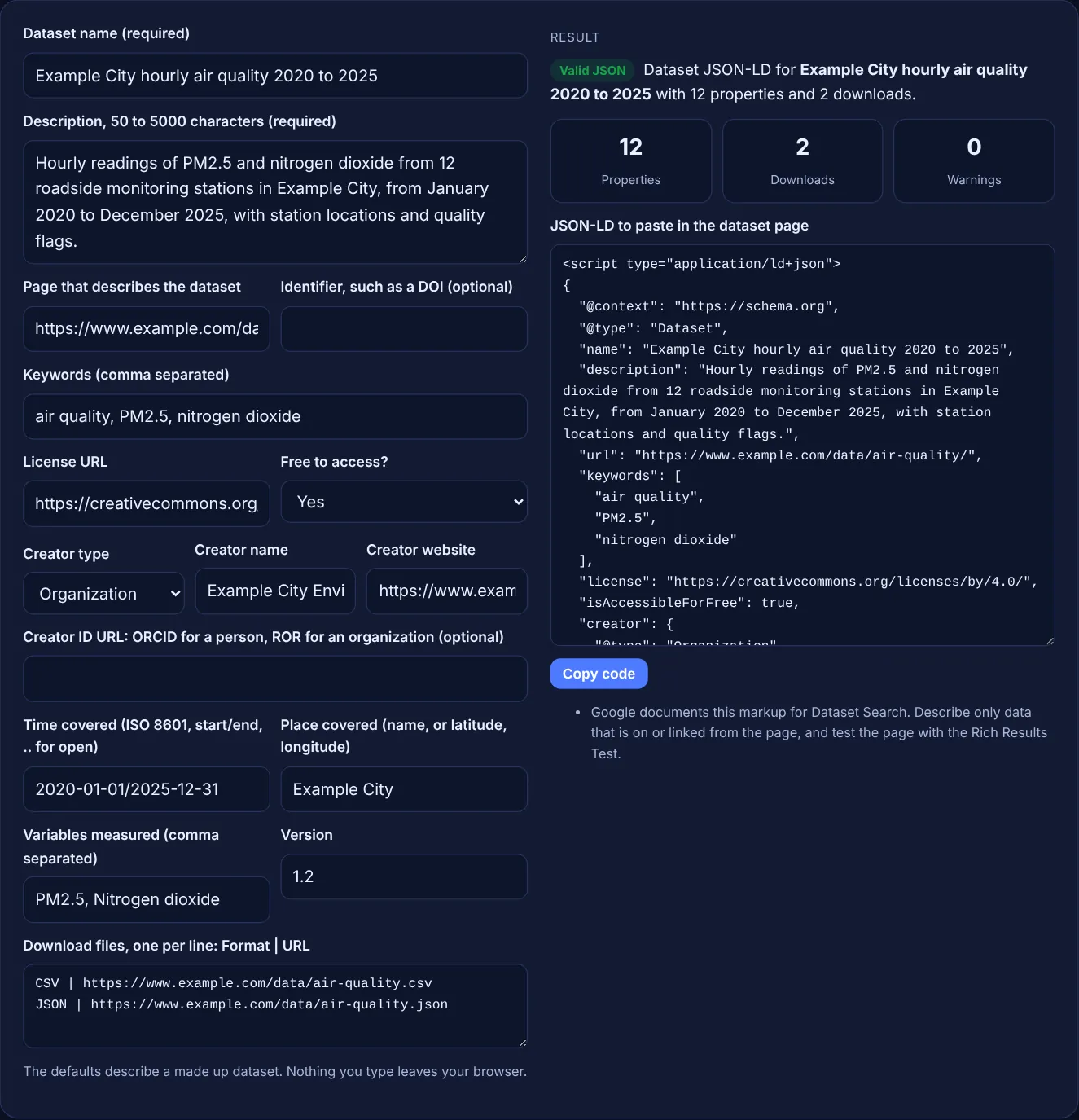
Example: a made up city environment office publishes hourly air quality readings. With the default values, the tool outputs a Dataset block with 12 properties: name, description (177 characters), url, keywords, license (CC BY 4.0), isAccessibleForFree true, creator Organization, temporalCoverage 2020-01-01/2025-12-31, spatialCoverage Example City, variableMeasured PM2.5 and Nitrogen dioxide, version 1.2 and 2 DataDownload items for CSV and JSON. The result reads "Valid JSON" with 0 warnings. If you shorten the description to "Air data.", the tool flags it as 9 characters, below Google's 50 character minimum.
Google documents Dataset markup for Dataset Search, and its search gallery describes it as large data sets that appear in Google Dataset Search. Do not expect stars or extra snippets in regular web results from it.
Put it on the page that describes the dataset, in the head or body. Use one Dataset block per dataset page. The download files themselves do not need markup; link to them with contentUrl.
A short file format name or a media type. Google's own example uses CSV and XML, and media types such as text/csv also describe the format clearly. Use the same format name for the same file type everywhere.
Google says to use the robots meta tag if you do not want a dataset to show in Dataset Search results. Removing the markup alone may not be enough if the page is still indexed.
Yes. Set Free to access to No, which outputs isAccessibleForFree false, and keep the description honest about how people get the data. Do not hide the price or access rules from the page.
No. The generator runs entirely in your browser with JavaScript. Nothing is uploaded or stored, so you can prepare markup for datasets that are not public yet.
Checked 23 Oct 2026. Facts checked against these official pages. Read how I check facts in my editorial policy.
Pulls every JSON-LD, microdata and RDFa item out of pasted HTML and locates parse errors.
A JSON-LD validator is a tool that checks structured data written in JSON for Linked Data. It first parses…
An article schema generator is a tool that writes schema.org Article structured data in JSON-LD. It collects…
An organization schema generator is a tool that writes schema.org Organization structured data. It gathers…
Send your website and I will check it for you, free.
One short email when something new goes live: articles, free SEO tools, package updates, discounts and price alerts. No spam, unsubscribe in one click.