JSON-LD Validator
A JSON-LD validator is a tool that checks structured data written in JSON for Linked Data. It first parses…
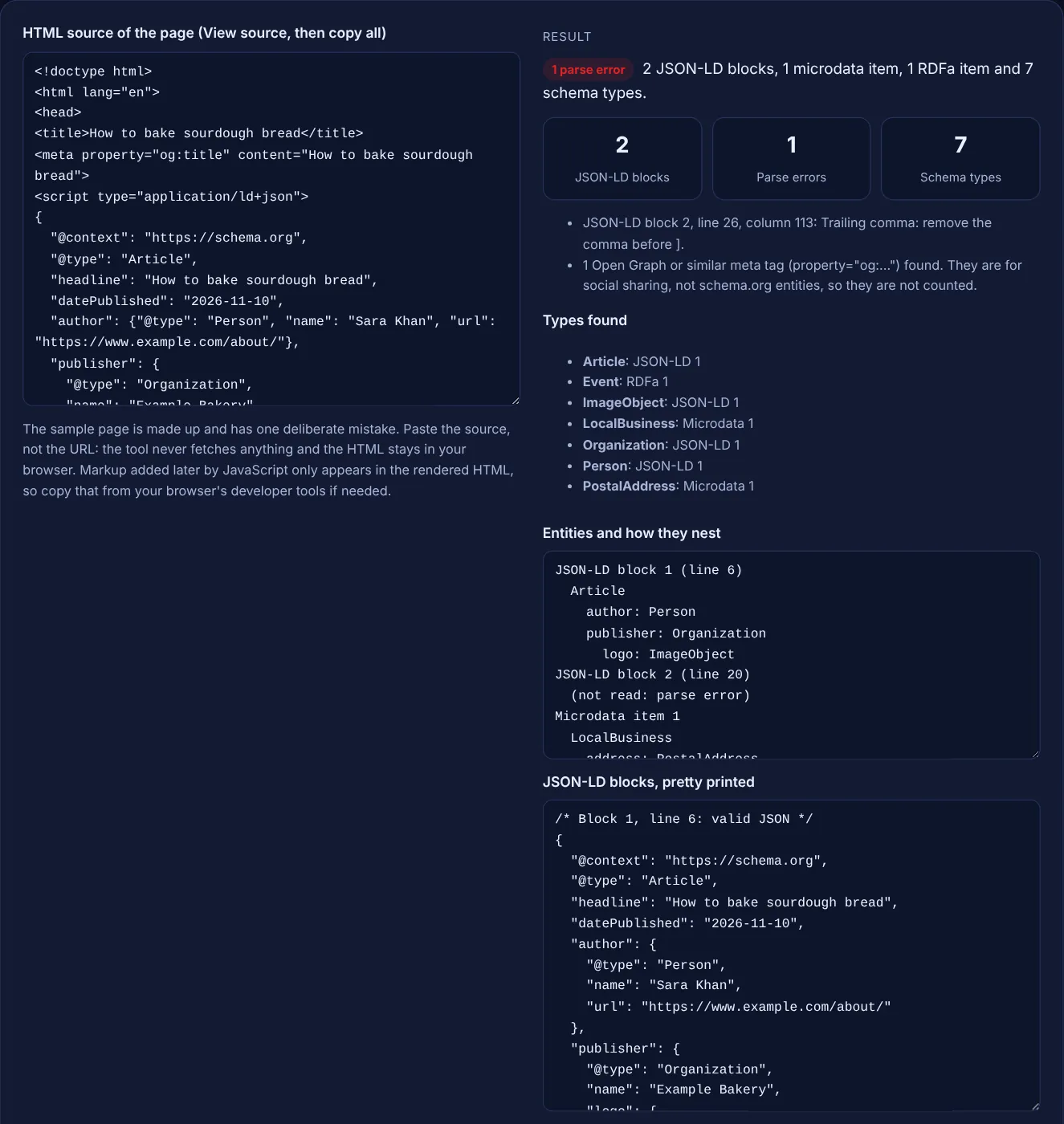
Paste the HTML source of a page and see every JSON-LD block, microdata item and RDFa item it contains, with each error pinned to a line.
The sample page is made up and has one deliberate mistake. Paste the source, not the URL: the tool never fetches anything and the HTML stays in your browser. Markup added later by JavaScript only appears in the rendered HTML, so copy that from your browser's developer tools if needed.
The free structured data extractor reads the HTML source of a page and lists every JSON-LD block, microdata item and RDFa item in it, with the schema types, how the entities nest and the exact line of any JSON error. It runs in your browser and fetches nothing.
A structured data extractor pulls the schema markup out of a page's HTML: JSON-LD script blocks, microdata (itemscope, itemtype, itemprop) and RDFa (typeof, property). It shows which types the page declares, how they nest and where a block fails to parse. Use it before Google's Rich Results Test, which checks eligibility for rich results.
A structured data extractor is a tool that finds the machine readable markup inside a web page and shows it in a readable form. Google's introduction to structured data lists the three formats Google Search supports, JSON-LD, Microdata and RDFa, and says "Google recommends using JSON-LD for structured data if your site's setup allows it." A real page often mixes them, for example JSON-LD from an SEO plugin plus old microdata left in a theme.
This extractor reads all three from pasted source code. Each JSON-LD block is parsed with a strict JSON reader, so a trailing comma, a curly quote or a missing bracket is reported with its line and column in your HTML, not just "invalid JSON". It then lists every @type and nested entity, so you can see at a glance whether the Article has an author, whether the publisher has a logo, or whether two plugins print the same type twice. To check a single JSON-LD snippet in more depth, use the JSON-LD validator.
Because View source shows the HTML the server sent, while some sites add structured data later with JavaScript. Google says it can read JSON-LD that JavaScript injects, and its guide to generating structured data with JavaScript recommends testing with the URL input of the Rich Results Test rather than the code input. If a block is missing here, copy the rendered HTML from the Elements panel of your browser's developer tools and paste that instead.
A parse error means the text between the script tags is not valid JSON, so no search engine can read any of the block. The usual causes are a comma after the last item in a list or object, curly quotes pasted from a word processor, single quotes instead of double quotes, a missing comma between two properties and an unclosed bracket. Search Console reports these pages under Unparsable structured data. This tool points to the exact character, so the fix normally takes one edit.
Use JSON-LD for new markup. Google supports all three formats and says they are equally fine when valid, but recommends JSON-LD where your setup allows it because it sits in one block apart from the visible HTML. Mixing formats is allowed. The real risk is duplication: a theme printing microdata for a Product while a plugin prints a JSON-LD Product with different prices. The types list shows each type with the format it came from, which makes such clashes easy to spot.
| Format | How it appears in HTML | What the tool reports |
|---|---|---|
| JSON-LD | <script type="application/ld+json"> block | Pretty printed JSON, @types, nesting, errors by line and column |
| Microdata | itemscope, itemtype and itemprop attributes | Each top level item with its properties and nested items |
| RDFa | vocab, typeof and property attributes | Each typeof item with its properties and nested items |
| Wrong script type | type="application/json" holding schema | A warning, because it is not read as JSON-LD |
| Open Graph | <meta property="og:..."> | A count only, as these are social tags, not schema.org entities |
Example: the made up sourdough page in the box has 2 JSON-LD blocks, 1 microdata item and 1 RDFa item. The Article block parses and shows Article with author Person and publisher Organization, whose logo is an ImageObject. The BreadcrumbList block fails with "Trailing comma: remove the comma before ]" at line 26, column 113, which is the comma after the second ListItem. The microdata gives LocalBusiness with a nested PostalAddress, and the RDFa gives an Event. That makes 7 schema types and 1 parse error; the og:title tag is noted but not counted. Delete that one comma and the BreadcrumbList and its two ListItems appear too.
No. It runs only in your browser and never makes network requests, so it cannot load other sites. Open the page yourself, copy the source with View source or from developer tools, and paste it in.
No. This tool checks syntax and structure, not Google's feature rules. Google's guidelines say it does not guarantee that structured data will show up in search results. Use the Rich Results Test for Google's eligibility checks.
The object has properties but no @type, so a reader cannot tell what it is. Schema.org values like an address work best as typed objects, for example PostalAddress. Add the type unless the property only expects plain text.
Yes. Items inside an @graph array are listed as separate top level entities, and an object that only holds an @id is shown as a reference, so you can follow how a WebSite points to its publisher Organization.
No. Parsing happens in your browser with JavaScript. The HTML is never uploaded, logged or stored, so you can safely check staging pages, client sites and pages that are not live yet.
Open Graph tags use the RDFa property attribute but describe how a page looks when shared on social networks. They are not schema.org entities and do not feed Google's rich results, so the tool counts them separately.
Checked 23 Oct 2026. Facts checked against these official pages. Read how I check facts in my editorial policy.
A JSON-LD validator is a tool that checks structured data written in JSON for Linked Data. It first parses…
Builds Dataset JSON-LD for Google Dataset Search, with downloads, license and coverage.
An article schema generator is a tool that writes schema.org Article structured data in JSON-LD. It collects…
A product schema generator is a tool that writes schema.org Product structured data. It combines product…
Send your website and I will check it for you, free.
One short email when something new goes live: articles, free SEO tools, package updates, discounts and price alerts. No spam, unsubscribe in one click.