Google Search Console errors
Validation failed in Search Console: why it happens and what to do
How to read a failed validation, find the URLs that caused it, fix the real cause and start a new validation without wasting weeks.
Read articleWhy Google skipped pages carrying a noindex rule, how to decide which ones matter, and the exact steps to remove it and validate.
This guide shows you how to read the excluded by noindex tag status in Google Search Console, decide which pages actually need fixing, and remove the rule safely. In my orders I see this status on almost every WordPress site I audit, and most of the time only a handful of the listed URLs are real problems.
Excluded by noindex tag means Googlebot crawled the page, found a noindex rule in a robots meta tag or an X-Robots-Tag header, and left the page out of the index. If you want the page in Google, remove the rule, run a live test in URL Inspection and click Validate fix.
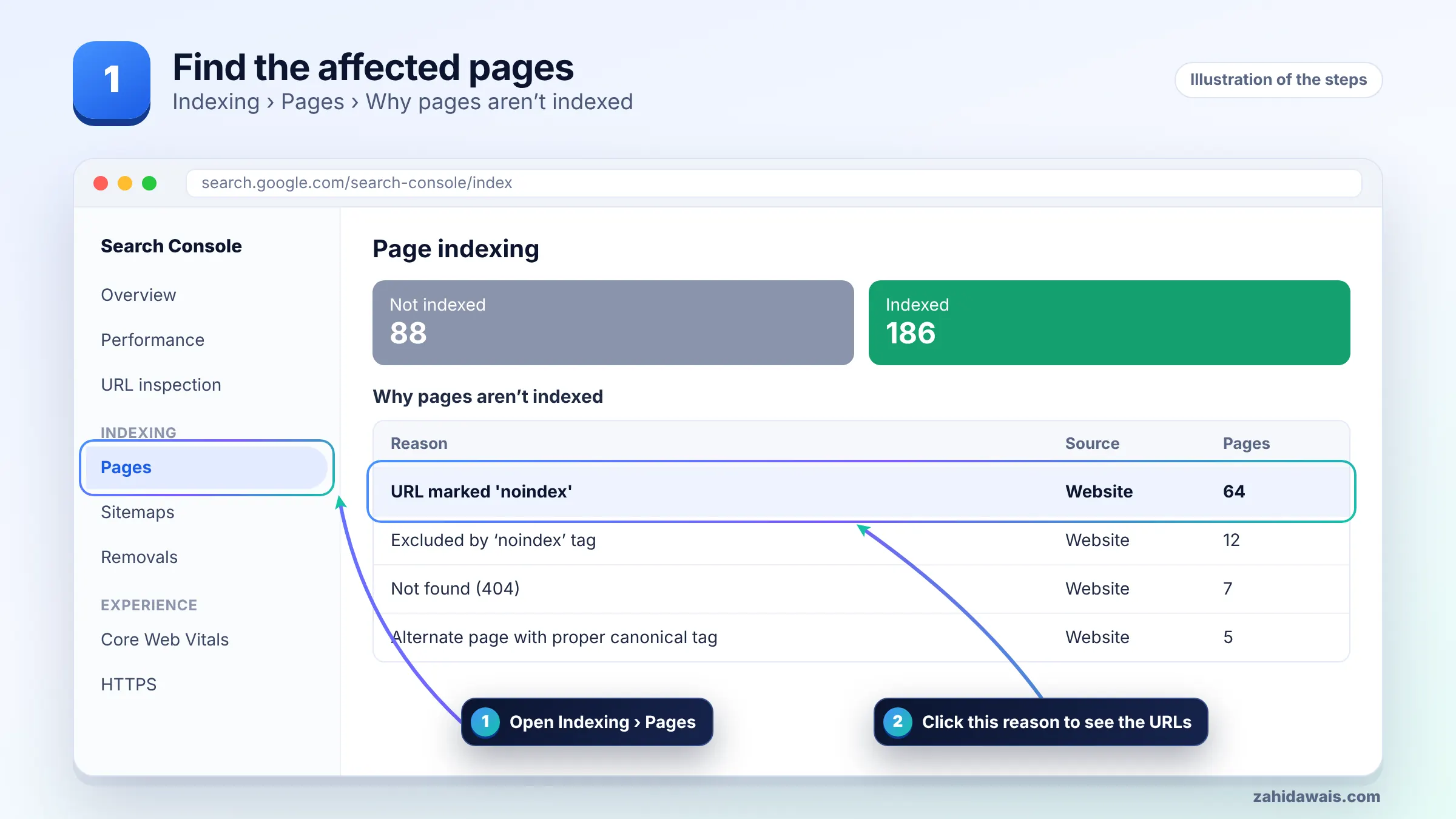
Your pages are excluded because Google found a noindex directive when it tried to index them, so it obeyed that instruction and kept them out of search results. Google’s help page for the Page indexing report lists this reason as “URL marked ‘noindex'” and explains that the directive must be removed if you want the page indexed.
The rule can live in two places. The first is a meta tag in the page head, such as <meta name="robots" content="noindex">. The second is an HTTP response header, X-Robots-Tag: noindex, which is common on PDFs and on sites where a server or CDN rule adds headers. Both methods are described in Google’s guide to blocking indexing with noindex.
The usual causes I find in client audits are:
You should only fix the pages you actually want to rank; noindex pages that you added on purpose are working as intended. Google’s own Page indexing report documentation notes that not indexed is not necessarily bad, and a healthy site often has many pages it deliberately keeps out of search.
I sort every URL in the report into one of three buckets before touching anything. This decision table is the same one I use in my technical SEO service:
| Type of URL | Typical example | Action |
|---|---|---|
| Money or content page | Service page, product, blog post | Remove noindex now |
| Useful archive | Main category page with unique intro text | Usually remove noindex |
| Thin archive | Tag pages, date archives, author page on a one-author blog | Keep noindex |
| Utility page | Cart, checkout, login, thank you page, internal search | Keep noindex |
| Staging or test URL | staging.example.com pages | Keep noindex and add password protection |
| Listed in your sitemap | Any noindex URL inside sitemap.xml | Either remove noindex or remove it from the sitemap |
The last row matters. A sitemap tells Google “please index this”, while noindex says the opposite. Sending mixed signals wastes crawling and makes the report harder to read, so keep the two lists consistent.
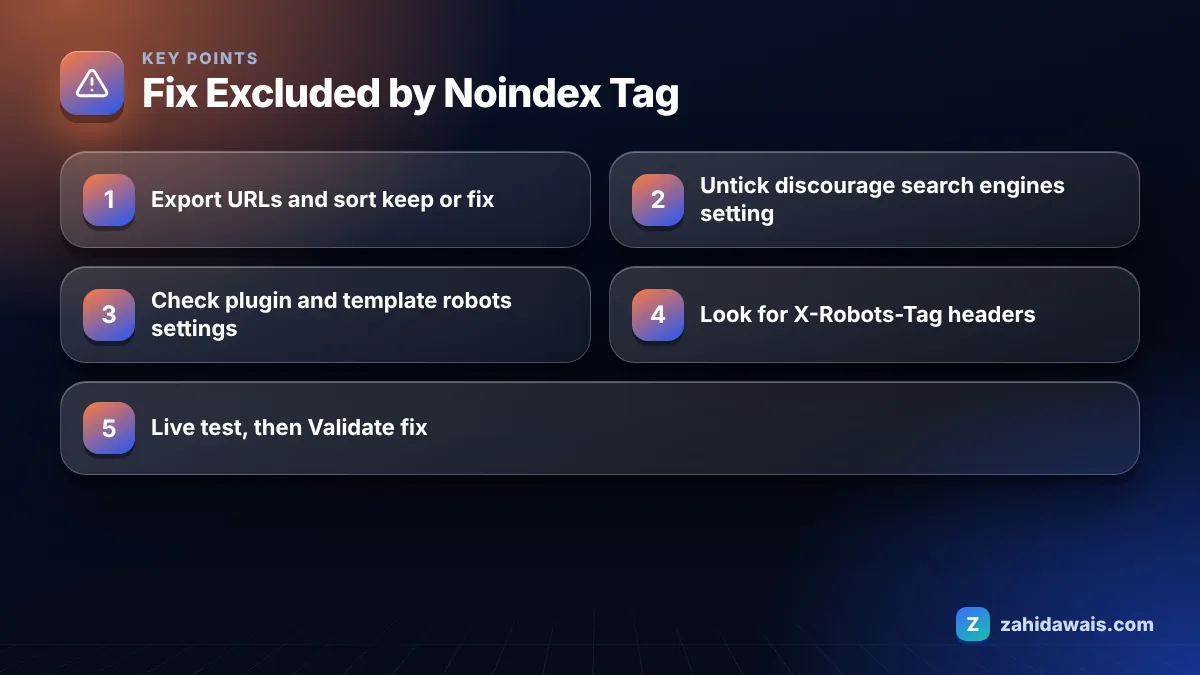
In WordPress you remove a noindex tag by turning off the site wide visibility setting and then checking the robots setting of each affected post in your SEO plugin. Work from the widest cause to the narrowest so you do not waste time editing pages one by one when one checkbox caused everything.
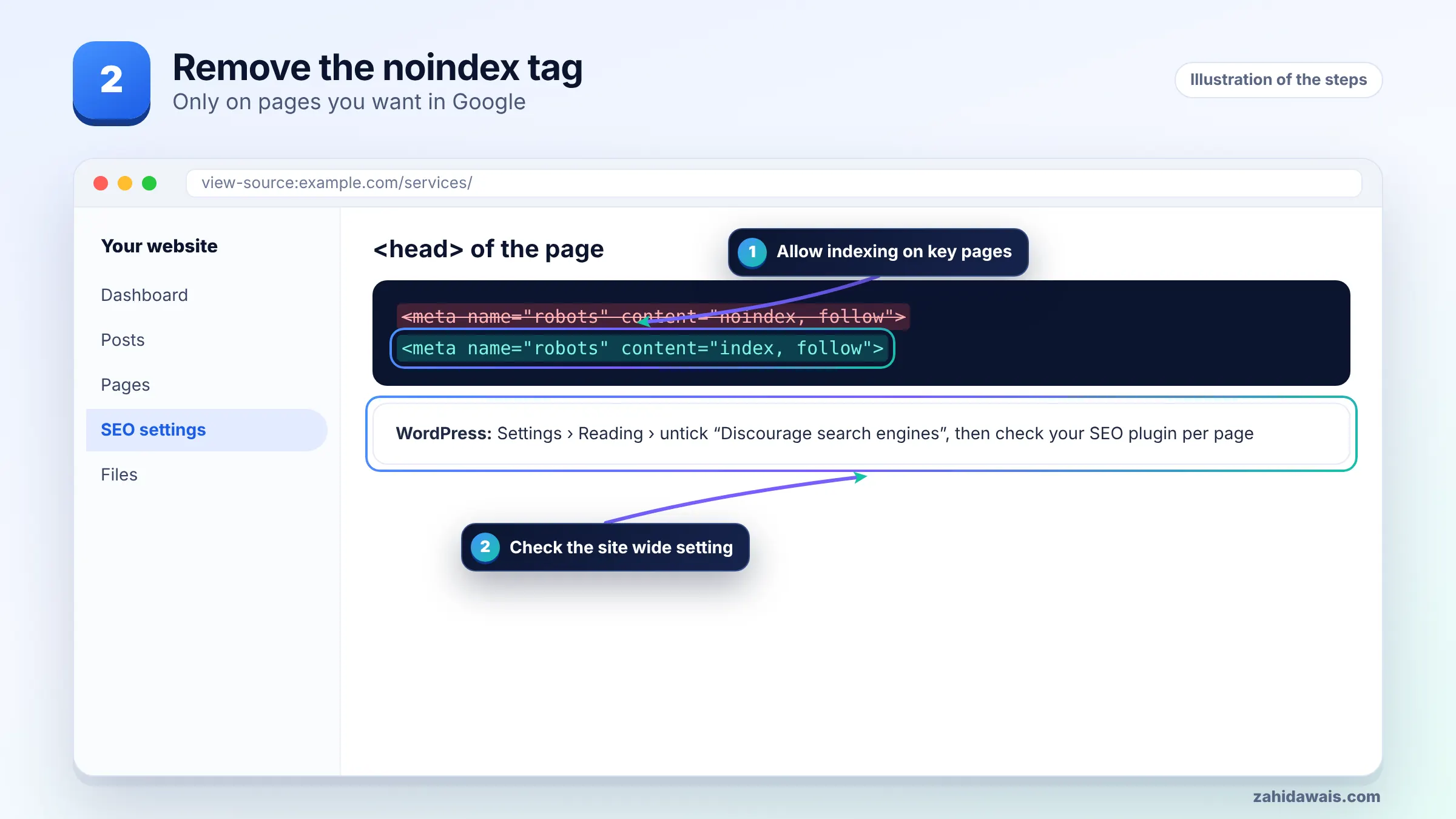
One warning from Google’s documentation: a noindex rule only works if Google can crawl the page. If you also block the URL in robots.txt, Googlebot never sees the tag. You can check that with my free robots.txt tester before you move on.
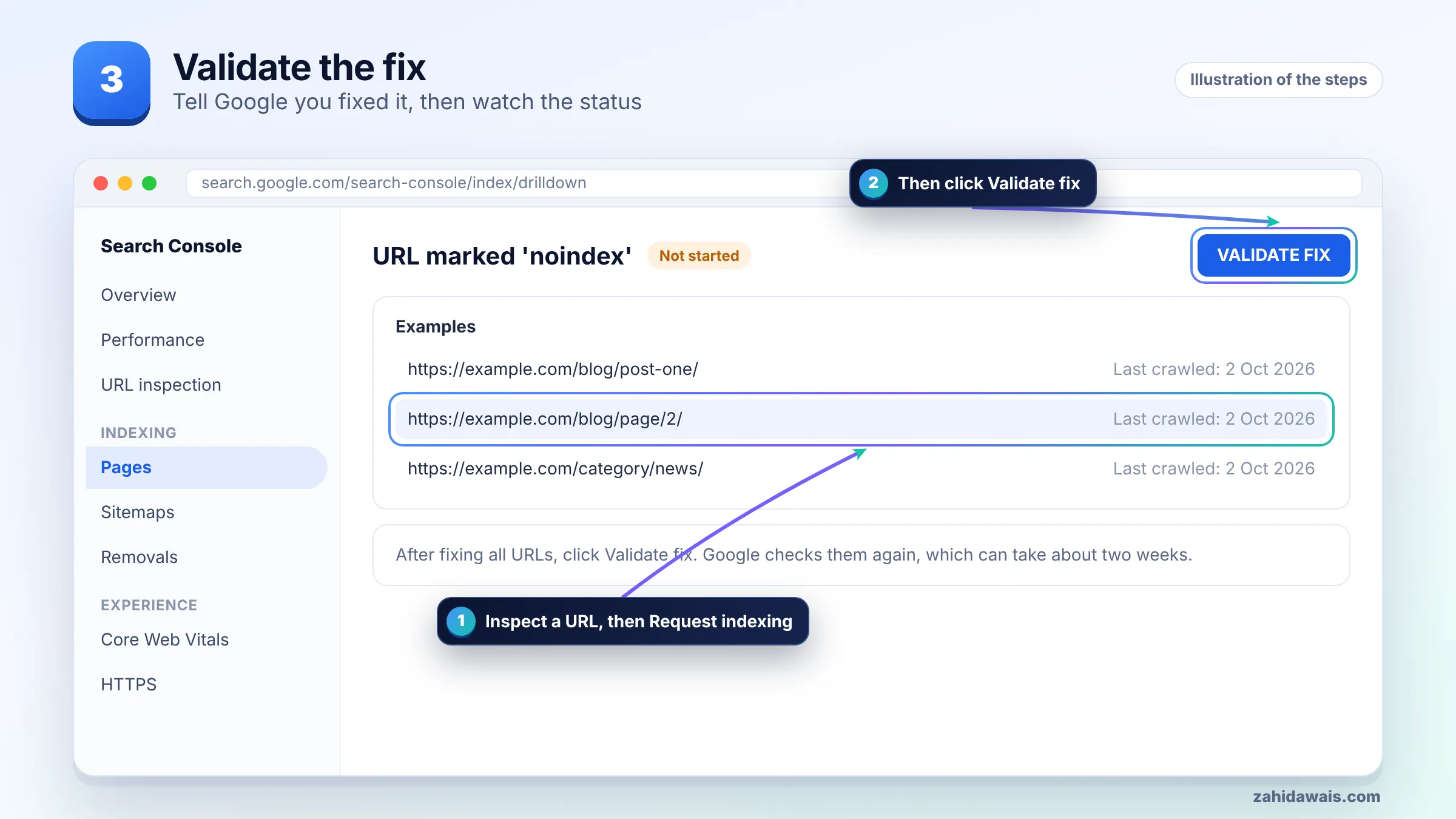
You validate the fix by testing one fixed URL live, confirming indexing is allowed, and then clicking Validate fix on the noindex issue in the Page indexing report. Doing it in that order avoids a failed validation caused by a page you missed.
Pages you chose to keep as noindex will remain in the report, and that is fine. Validation only fails when a certain share of the URLs Google rechecks still carry the issue, which is another reason to remove intentional noindex URLs from your sitemap first. If you see other statuses in the same report, my guide to Search Console indexing errors explains each one.
Here is a typical pattern, with round numbers for illustration. A small service business site shows 180 URLs under the noindex reason. After exporting and sorting: 120 are tag archives, 30 are attachment pages, 18 are author and date archives, and 12 are real pages: 4 service pages and 8 blog posts.
The 12 real pages all used one landing page template where the page builder had a “hide from search engines” toggle switched on. Turning it off fixed all 12 in one edit. The 168 archive URLs stayed noindex, but 40 of them were removed from the sitemap because the plugin was listing them. Validation then only needs to cover the 12 pages that matter, and the remaining 168 are expected exclusions, not errors.
The lesson: always group by template first. When I see ten or more real pages with the same problem, the cause is almost never ten separate mistakes. If you would rather have someone go through the report with you, the free audit request is the quickest way to start.
Use noindex to keep a page out of Google’s index, and use robots.txt only to manage crawling. Google states that robots.txt is not a way to keep a page out of search results, because a blocked URL can still be indexed if other pages link to it.
If a page is both disallowed in robots.txt and tagged noindex, Google cannot read the tag. To remove a page cleanly, allow crawling, keep the noindex rule until the page drops out, and only then decide whether a robots.txt block is useful for crawl control.
It means Googlebot crawled the URL, found a noindex directive in a robots meta tag or an X-Robots-Tag HTTP header, and did not index the page. Google’s help page lists this reason as URL marked noindex. The page will stay out of search until the rule is removed and Google recrawls it.
Not always. It is only a problem if the page should rank. Tag archives, login pages, cart pages and thank you pages are often noindexed on purpose. Check each URL and only fix pages you want visitors to find in Google Search.
There is no fixed time. Google has to recrawl the page and see the rule is gone, and its documentation notes recrawling can take a while. Requesting indexing in URL Inspection and adding internal links can help Google revisit the page sooner.
Usually a cache is serving the old HTML, a second plugin or theme prints its own robots tag, or the server sends an X-Robots-Tag header. Check the live source and response headers, purge every cache, then run a live test in URL Inspection.
A noindex tag only affects the URL that carries it. The risk comes from site wide settings, such as the WordPress option that discourages search engines, which can add noindex to every page at once. Check that setting after every launch or migration.
No. A sitemap lists URLs you want indexed, so including noindex URLs sends conflicting signals. Either remove the noindex rule from pages you want in Google, or remove the pages you keep noindexed from the sitemap.
Facts checked against these official pages. Read how I check facts in my editorial policy.
How to read a failed validation, find the URLs that caused it, fix the real cause and start a new validation without wasting weeks.
Read article
Not every 404 in Search Console is a problem. Some pages should be gone. Here is how to tell which 404s need a redirect, which need a fix, and which you can safely ignore.
Read article
A 5xx error means your server failed when Googlebot asked for a page. If it keeps happening, Google slows crawling and can drop the pages. Here is how to find the cause and fix it.
Read articleSend your website and I will reply with a free audit.