Open Graph Preview
An open graph preview is a mockup of the link card social platforms build from your Open Graph meta tags. The…
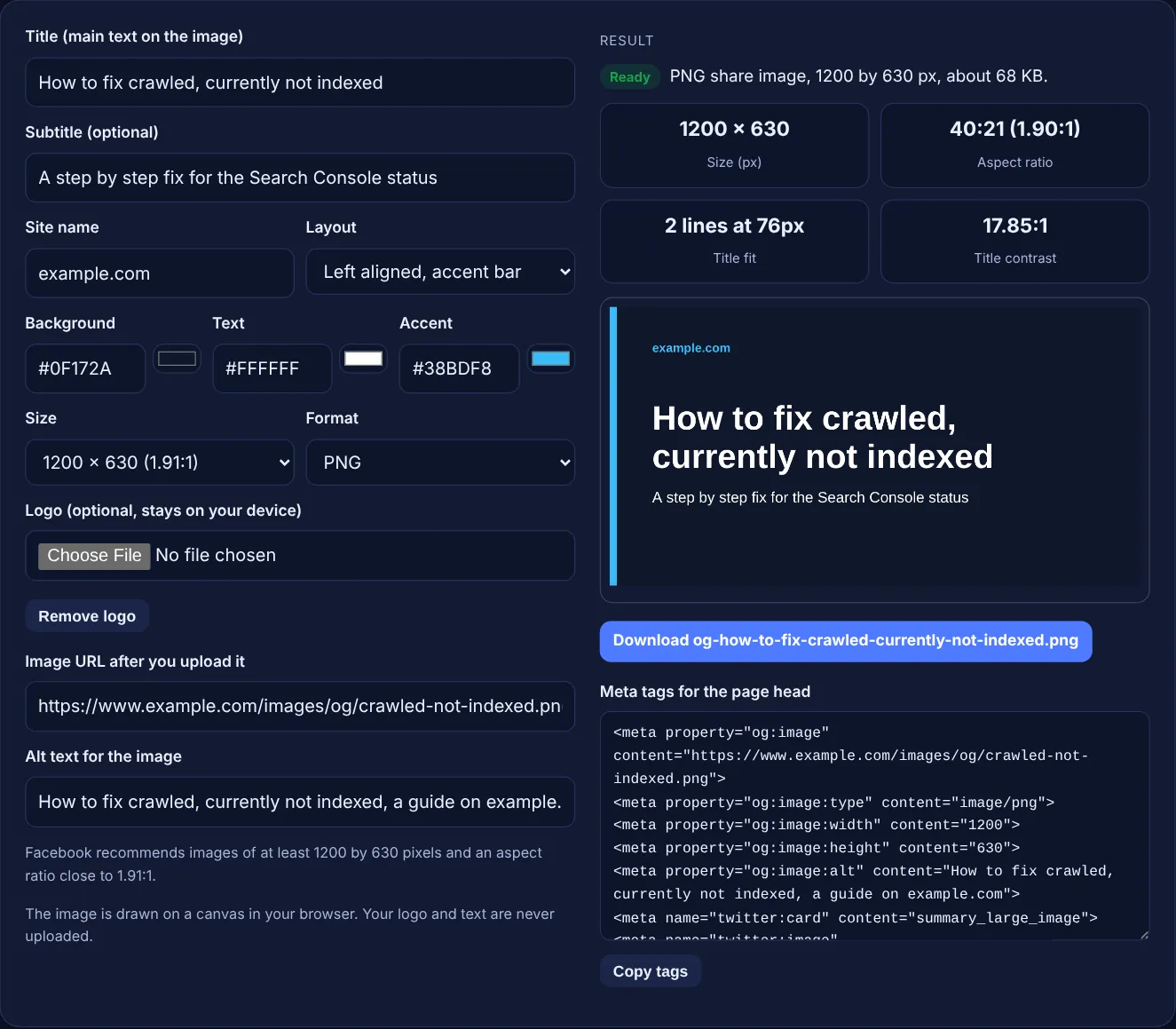
Type a title, pick colours and a layout, add your logo if you like, then download a 1200 by 630 share image and copy its meta tags.
The image is drawn on a canvas in your browser. Your logo and text are never uploaded.
The free OG image generator draws a social share image from your title, subtitle, site name and brand colours, with an optional logo, and gives you the og:image and twitter:image meta tags with the right width and height. Everything happens on a canvas in your browser.
An OG image is the picture shown when a page is shared on Facebook, LinkedIn, X and chat apps, set with the og:image meta tag. Facebook recommends at least 1200 by 630 pixels at about 1.91:1, and X documents 2:1 for large cards. Use short, high contrast text and add width, height and alt tags.
An Open Graph image is the image that social networks and messaging apps show in the preview card when someone shares a link. You choose it with the og:image meta tag in the page head, and X reads twitter:image for its own cards. Without one, the platform guesses an image from the page or shows a plain text card.
Facebook's guide to images in link shares says to "use images that are at least 1200 x 630 pixels" for the best display on high resolution devices, to stay "as close to 1.91:1 aspect ratio as possible", and that the file "must not exceed 8 MB". This tool draws the image at exactly that size by default, so the text you place is not cropped away. To see how a live page already looks when shared, use the Open Graph preview tool.
Use 1200 by 630 pixels for most sites. Facebook recommends at least that size and an aspect ratio close to 1.91:1, and says the minimum allowed is 200 by 200 pixels. X's documentation for the summary card with large image says the card supports "an aspect ratio of 2:1 with minimum dimensions of 300x157 or maximum of 4096x4096 pixels", and that images "must be less than 5MB in size".
The two ratios are close, so one 1200 by 630 image usually serves both. Keep important text away from the edges in case a platform trims a few pixels. If X matters most, pick the 1200 × 600 preset. Note that X says "SVG is not supported", which is why this tool exports PNG or JPEG only.
The width and height tags let the platform show the image on the very first share. Facebook explains that "using these tags will specify the image dimensions to the crawler", so it can render the image immediately instead of downloading and processing it first. Without them, the first person to share a new page may see a card with no image.
The tool fills these tags with the exact pixel size of the image it drew, plus og:image:type and alt text. If you later resize the file with the image resizer, change the numbers in the tags to match.
A good share image is readable at thumbnail size and recognisably yours. Use a short title of about 3 to 8 words, a large bold font, and a text to background contrast of at least 4.5:1, the WCAG minimum for normal text. Put your site name or logo in the same place on every image, so people learn to spot your posts in a busy feed.
Avoid stuffing the image with small text, screenshots of full pages or stock photos with no message. The title on the image does not have to match the page title word for word; it should make people want to click. For the text that appears under the image in the card, set og:title and og:description with the Twitter card generator or the meta tag generator.
| Platform | Size and ratio | File rules |
|---|---|---|
| At least 1200 × 630 recommended, close to 1.91:1; minimum 200 × 200 | Up to 8 MB | |
| Facebook, larger link previews | 600 × 315 named for larger previews | Up to 8 MB |
| X summary_large_image | 2:1, from 300 × 157 to 4096 × 4096 | Under 5 MB; JPG, PNG, WEBP, GIF (first frame); no SVG |
| X image alt text | twitter:image:alt | Maximum 420 characters |
Example: a blog post titled "How to fix crawled, currently not indexed" on example.com. With the default values, a #0F172A background, white text and a #38BDF8 accent, the tool draws a 1200 × 630 PNG with the title on 2 lines at 76px, a ratio of 40:21 (1.90:1) and a title contrast of 17.85:1. The download is named og-how-to-fix-crawled-currently-not-indexed.png and the meta tags include og:image:width 1200 and og:image:height 630. Switch to 1200 × 600, the band layout and JPEG, and paste a 15 word title: the ratio becomes 2:1 (2.00:1), the title shrinks to 3 lines at 56px, and og:image:type changes to image/jpeg.
No. The logo is read by your browser and drawn on a canvas on your device. Nothing is sent to a server, so you can use this tool for client brands and unreleased products without sharing any files.
Use PNG for flat colours and sharp text, which is what this tool draws. Use JPEG when the PNG is large or when you add a photo style logo. Both are supported by Facebook and X, and the tool sets og:image:type to match.
Social networks and chat apps keep a copy of link previews for a while. After you change the og:image, upload the new file under a new file name, update the tags, and ask the platform to fetch the page again if it offers a tool for that.
Not directly. Open Graph tags control how links look on social networks and in chat apps, not how Google ranks a page. A clear share image can earn more clicks and visits from social posts, which is the real benefit.
You can set a default image for the whole site, but a page specific image with that page's title usually gets more attention in a feed. Many sites use one template with the same layout and colours and only change the title.
Adding both is the safe choice. X documents its own card tags, and the twitter:card value summary_large_image is the one that asks for the large image card. The tool outputs both sets, so each platform finds the tags it reads.
Checked 23 Oct 2026. Facts checked against these official pages. Read how I check facts in my editorial policy.
An open graph preview is a mockup of the link card social platforms build from your Open Graph meta tags. The…
A Twitter card generator is a tool that writes the meta tags X uses to turn a shared link into a card with a…
Builds manifest.json with icons, maskable purpose, colours and display mode, then checks it.
A favicon generator is a tool that resizes one square source image into the icon sizes browsers, phones and…
Draws sized placeholder images with a label; download PNG, JPEG or WebP, or copy SVG.
Send your website and I will check it for you, free.
One short email when something new goes live: articles, free SEO tools, package updates, discounts and price alerts. No spam, unsubscribe in one click.