Hreflang Tag Generator
A hreflang tag generator is a tool that writes rel="alternate" hreflang annotations so search engines can…
Paste your page source to see every og: and twitter: tag and what to fix before sharing.
Parsed locally in your browser. Nothing is uploaded and no images are loaded.
| Tag | Value |
|---|
The free open graph checker runs in your browser, needs no sign-up and never sends what you type anywhere.
This Open Graph checker reads pasted HTML and lists every og: and twitter: meta tag with a pass, warning or error. Rule of thumb: every shareable page needs og:title, og:type, og:image and og:url, plus og:description and og:image:alt, with an absolute HTTPS image URL and an og:url that matches the canonical.
An Open Graph checker is a tool that extracts the og: meta tags social platforms use to build link previews and checks them against the Open Graph protocol. It parses your HTML in the browser, confirms the four required properties exist, tests that URLs are absolute, compares og:url with the canonical, and flags text that may be cut off.
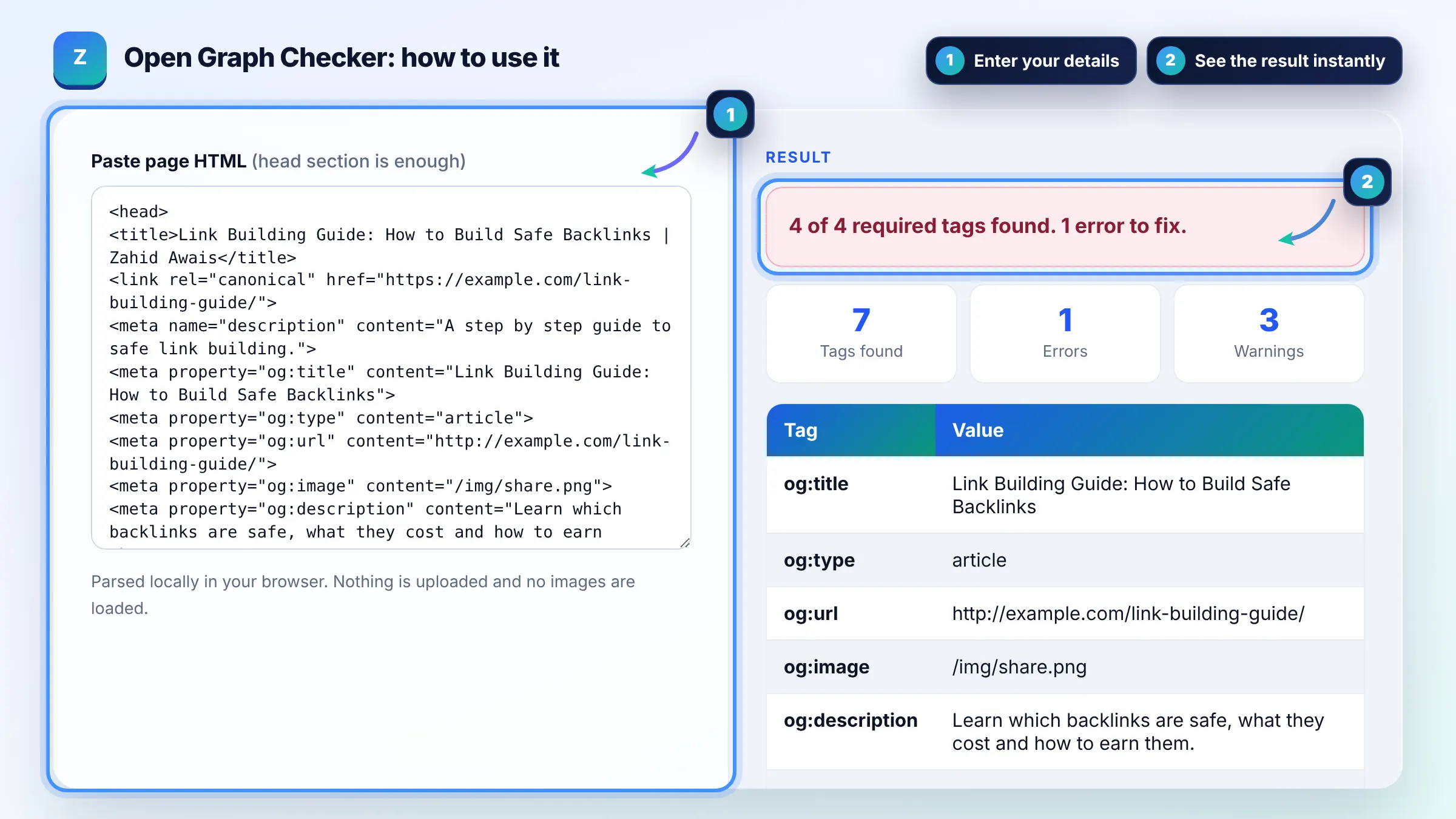
The Open Graph protocol requires 4 properties: og:title, og:type, og:image and og:url. og:description, og:site_name and og:image:alt are strongly recommended, and the spec says a page with og:image should also set og:image:alt. The full list is in the Open Graph protocol specification.
The usual causes are a relative or HTTP image URL, an image blocked by robots.txt or a login, or a cached old preview. Use an absolute HTTPS URL, keep the image publicly reachable, add og:image:width and og:image:height, then ask the platform debugger to scrape the page again.
Mostly no, because X falls back to og:title, og:description and og:image when twitter: tags are missing. The one tag worth adding is twitter:card, set to summary_large_image if you want the large image layout. Add twitter:site if you want your account credited.
| Tag | Status | Tip |
|---|---|---|
| og:title | Required | Use the headline without the site name; about 60 characters stays readable |
| og:type | Required | website for home and pages, article for posts |
| og:image | Required | Absolute HTTPS URL; 1200 x 630 px is a widely used size |
| og:url | Required | Same as the canonical URL |
| og:description | Recommended | One or two sentences, around 200 characters at most |
| twitter:card | Recommended for X | summary or summary_large_image |
Example: the default sample has og:title, og:type, og:url and og:image, so all 4 required tags pass. The checker flags og:image as a relative path (/img/share.png), notes that og:url uses http while the canonical uses https, and warns that og:image:alt, width and height are missing: 1 error and 3 warnings.
No. This tool checks the HTML you paste, offline in your browser, so it cannot see redirects, blocked images or the cache Facebook holds. Use it to fix markup quickly, then use the platform debugger to fetch the live page and refresh the cached preview.
There is no official limit in the Open Graph spec. As a guideline, keep og:title around 60 characters and og:description under about 200, because many platforms truncate longer text. Put the most important words first so the preview still makes sense when cut.
A 1200 by 630 pixel image at a 1.91 to 1 ratio is a widely used size that displays well on most platforms. Declare og:image:width and og:image:height so the preview renders on the first share, and keep the file reasonably small for fast scraping.
No, Open Graph tags are not a Google ranking factor. They control how links look when shared on social and messaging apps, which can raise click through from shares. Google uses its own signals such as the title element and meta description for search results.
Yes. The protocol allows arrays, so you can list several og:image tags and platforms usually take the first one. Put your preferred image first, and place each og:image:width, height and alt right after the image it describes.
No. The HTML is parsed locally with your browser DOMParser and never sent to a server. Images in your code are not loaded either, so the tool cannot confirm that the image URL works; open it in a new tab to check.
Facts checked against these official pages. Read how I check facts in my editorial policy.
A hreflang tag generator is a tool that writes rel="alternate" hreflang annotations so search engines can…
A canonical tag generator is a tool that builds the link rel="canonical" element telling search engines which…
A meta robots tag generator is a tool that writes the meta name="robots" element and the equivalent…
Coming 12 OctSend your website and I will check it for you, free.
One short email when something new goes live: articles, free SEO tools, package updates, discounts and price alerts. No spam, unsubscribe in one click.