Favicon Generator
A favicon generator is a tool that resizes one square source image into the icon sizes browsers, phones and…
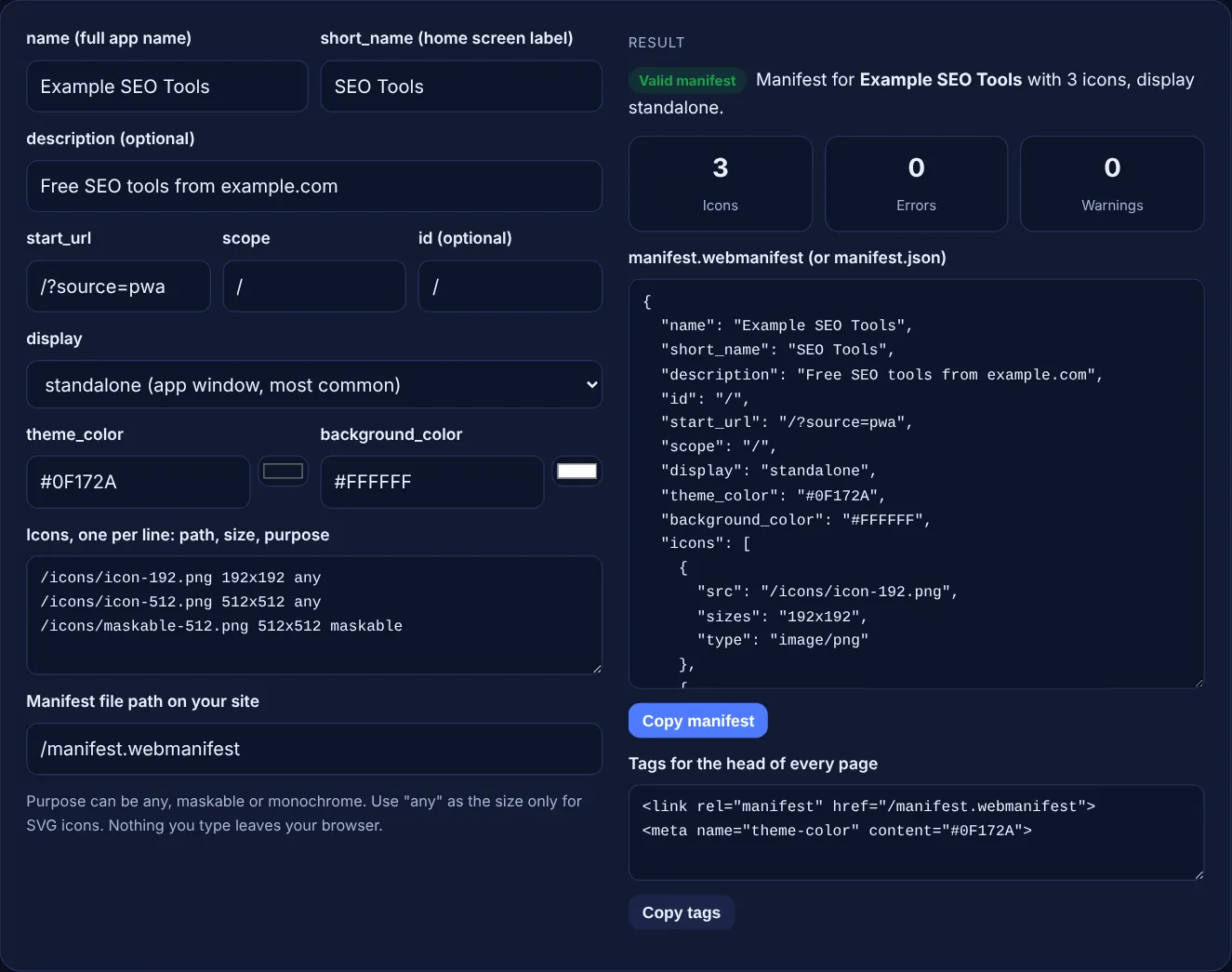
Fill in your app name, start URL, colours and icon list to get a checked manifest.json plus the link and theme-color tags for your head.
Purpose can be any, maskable or monochrome. Use "any" as the size only for SVG icons. Nothing you type leaves your browser.
The free manifest.json generator builds a web app manifest from a short form: name, short_name, start_url, scope, display mode, theme and background colours, and an icon list with sizes and purpose, including maskable icons. It checks the result against MDN and web.dev guidance as you type, in your browser.
A web app manifest is a JSON file that tells browsers your app name, start URL, display mode, colours and icons, so the site can be installed like an app. web.dev says it needs a name or short_name and a start_url inside the scope. Chromium needs 192x192 and 512x512 icons, plus a separate maskable icon.
A web app manifest is a small JSON file, usually called manifest.webmanifest or manifest.json, that describes a website as an installable app. MDN's manifest members reference describes name as the full name "usually displayed to users", short_name as the name used "when the full name is too long for the available space", and start_url as the URL "opened when a user launches your web application".
You link it from every page with <link rel="manifest">. web.dev's web app manifest lesson says "a web app manifest is required for your PWA to meet the installability criteria in every browser", and that the official extension is .webmanifest, though any name works when the file is served as application/manifest+json. Even a normal business site can use a manifest to set its icon and colours when someone adds it to a home screen.
Give at least a 192 by 192 and a 512 by 512 PNG icon, plus a separate maskable icon. web.dev's add a web app manifest article says Chromium needs these two sizes and scales them for other uses. The web.dev manifest lesson adds that "if you need to pick only one icon size, it should be 512 by 512 pixels".
Each icon entry has a src, a sizes value written as width x height, an optional type and an optional purpose. MDN says that for raster formats like PNG, exact sizes are recommended, while for SVG "you can use any to indicate scalability". This tool fills in type from the file extension. Make the image files themselves with the favicon generator.
A maskable icon is an app icon with padding, designed so the operating system can crop it to a circle, squircle or other shape without cutting off the logo. MDN says maskable marks an icon "designed with icon masks and safe zone in mind". web.dev's maskable icon guide says the important part must sit inside "a circular area in the center of the icon with a radius equal to 40% of the icon width".
Add it as its own line with purpose maskable. The same guide says "we don't recommend using multiple purposes for maskable icons", so this tool warns when one line says any maskable. A normal icon with transparent corners looks wrong when cropped, and a padded maskable icon looks small when shown uncropped, which is why they should be separate files.
Set theme_color to your main brand colour and repeat it in a theme-color meta tag. web.dev says "the theme_color should match the meta theme color specified in your document head". Use plain colours: the web.dev lesson advises against transparency, CSS variables and gradients. background_color is the placeholder colour shown before your styles load.
For display, web.dev lists fullscreen, standalone, minimal-ui and browser, and says most use cases implement standalone. For scope, use the folder that holds the app, usually /. web.dev is clear that "the start_url must be in the scope", so the tool shows an error when it is not. Add a matching share image with the OG image generator while you are setting up the head tags.
| Member | What it does | Example |
|---|---|---|
| name | Full app name, shown at install | Example SEO Tools |
| short_name | Label where space is limited | SEO Tools |
| start_url | Page opened on launch; must be in scope | /?source=pwa |
| scope | URLs that belong to the app | / |
| display | fullscreen, standalone, minimal-ui or browser | standalone |
| theme_color | Default colour for the app interface | #0F172A |
| background_color | Placeholder colour before styles load | #FFFFFF |
| icons | src, sizes, type, purpose for each icon | 192x192, 512x512, maskable 512x512 |
Example: a small tools site wants an installable home screen icon. With the default values, the tool outputs a manifest for "Example SEO Tools" with short_name "SEO Tools", start_url /?source=pwa, scope /, display standalone, theme_color #0F172A, background_color #FFFFFF and 3 icons: 192x192, 512x512 and a 512x512 maskable icon. It reports 0 errors and 0 warnings, and the head tags are a manifest link to /manifest.webmanifest and a theme-color meta tag. If the app lives in /app/ and you list an SVG with size any and one PNG marked "any maskable", you get 2 warnings: 192x192 is missing, and maskable icons should not share a line with another purpose.
Either works. web.dev says the official extension is .webmanifest, but any file name is fine when the server sends it as application/manifest+json or another JSON type. Many older sites use manifest.json. Just make the link tag point to the right path.
Not directly. The manifest controls how your site looks and behaves when it is installed or added to a home screen, not how pages rank. It is still worth adding, because it gives returning visitors a clean icon and your brand colours.
The manifest alone sets the name, icon and colours. Offline support and full progressive web app behaviour need a service worker, which is a separate JavaScript file. web.dev notes that users can install some web apps even without meeting Chrome's installability criteria.
Without a maskable icon, some devices place your normal icon inside a white shape, so it looks small. Add a separate maskable icon with your logo inside the central safe zone, a circle with a radius of 40% of the icon width.
Yes. Give it the size any and the type image/svg+xml. web.dev advises including a raster fallback, such as 192x192 and 512x512 PNG files, for browsers that do not support SVG icons.
No. The generator runs entirely in your browser with JavaScript. Nothing you type is uploaded or stored, so you can build the manifest for a client site or an app that is not live yet.
Checked 23 Oct 2026. Facts checked against these official pages. Read how I check facts in my editorial policy.
A favicon generator is a tool that resizes one square source image into the icon sizes browsers, phones and…
Draws a 1200 x 630 share image from your title and colours, with og:image tags to copy.
A meta tag generator is a tool that converts plain text fields into correctly escaped HTML tags such as…
Turns SVG code into a short URL-encoded or base64 data URI with CSS and img snippets.
Send your website and I will check it for you, free.
One short email when something new goes live: articles, free SEO tools, package updates, discounts and price alerts. No spam, unsubscribe in one click.