Meta Tag Generator
A meta tag generator is a tool that converts plain text fields into correctly escaped HTML tags such as…
Create favicon.ico, Apple touch and Android PNG icons plus link tags without uploading anything.
Images are processed in your browser only. Nothing is uploaded.
The free favicon generator runs in your browser, needs no sign-up and never sends what you type anywhere.
This favicon generator turns a letter or an uploaded image into favicon.ico (16, 32 and 48px) and PNG icons at 180, 192 and 512px, then writes the HTML link tags. Rule of thumb: use a square, simple design that stays readable at 16px, and make the source at least 512px so Google can show a sharp icon.
A favicon generator is a tool that resizes one square source image into the icon sizes browsers, phones and search engines request. It draws your image or letter onto a canvas at each size, exports PNG files, and packs the small sizes into a single .ico file.
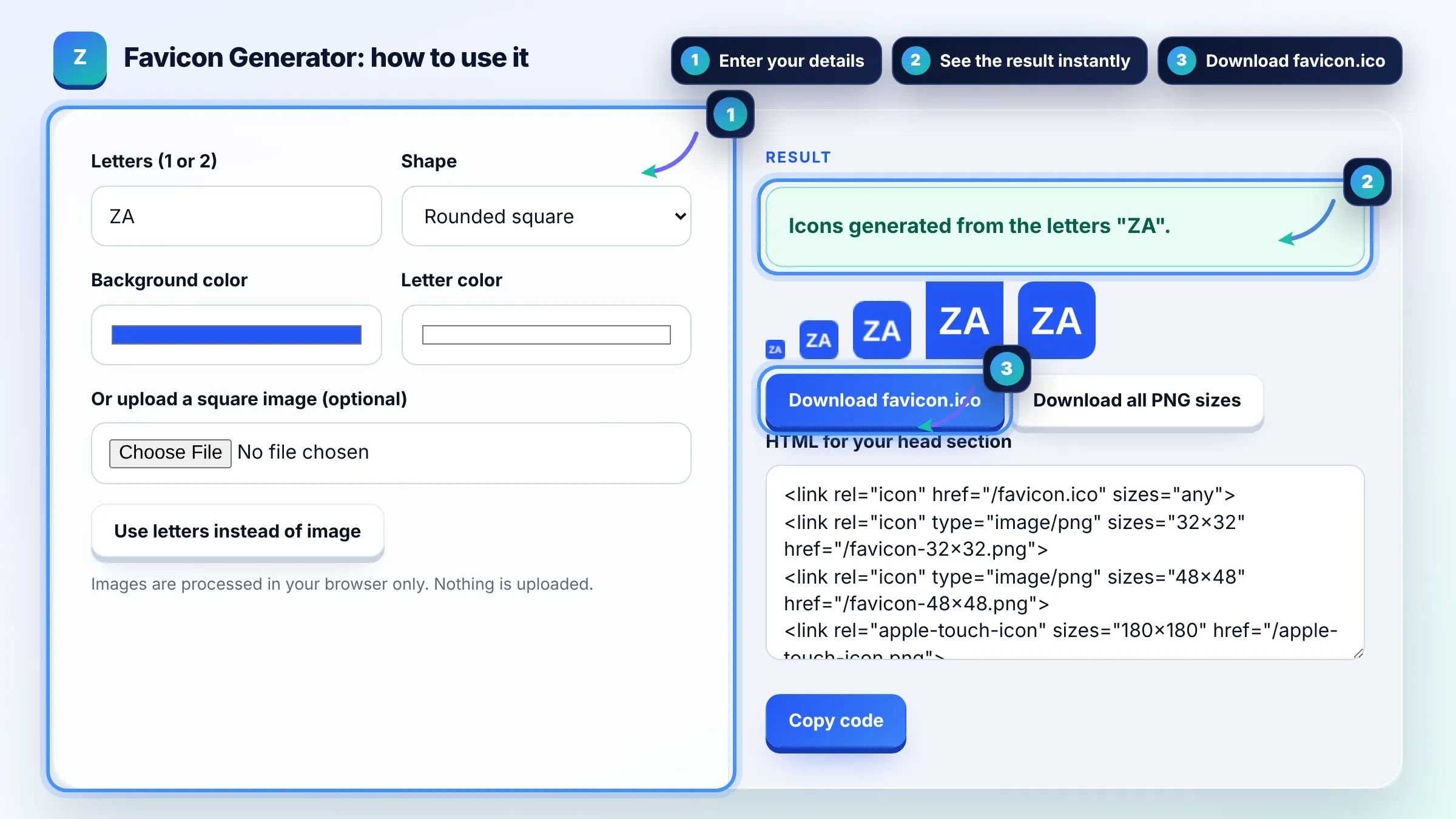
Make the master icon 512 by 512px and export 16, 32, 48, 180 and 192px versions. Google requires a square favicon of at least 8 by 8px and recommends larger than 48 by 48px, so 48px or more is the safe minimum for search. See Google's favicon guidelines.
Google usually needs a crawl of your home page before it updates the favicon, which can take days or weeks. The favicon file and home page must be crawlable, the icon must be square, and the link tag must be in the head of the home page. Requesting indexing in Search Console can speed it up.
Yes, keep a favicon.ico in your site root because some browsers and tools request /favicon.ico directly even without a link tag. Modern browsers also use the PNG sizes from your link tags, so ship both. A single .ico with 16, 32 and 48px images covers older cases.
| File | Size | Used by |
|---|---|---|
| favicon.ico | 16, 32, 48px | Browser tabs, /favicon.ico requests |
| favicon-32x32.png | 32px | Modern desktop browser tabs |
| favicon-48x48.png | 48px | Google Search results (at least 48px recommended) |
| apple-touch-icon.png | 180px | iPhone and iPad home screen |
| icon-192.png | 192px | Android and web app manifest |
| icon-512.png | 512px | Web app manifest and splash screens |
Example: a site called Zahid Awais uses the letters ZA in white on a blue #2457f5 rounded square. The tool exports favicon.ico at 16, 32 and 48px (about 3 KB total), a 180px Apple touch icon and 192px and 512px PNGs for the manifest, all from one design.
No. The image is read with the FileReader API and drawn on a canvas in your browser. Every PNG and the .ico file are built locally, so nothing leaves your device and there is no upload limit beyond your browser memory.
Yes, modern browsers accept an SVG favicon through a link tag with type image/svg+xml, and you can upload an SVG here to rasterize it. Still provide favicon.ico and PNG versions, because Safari and some crawlers need raster formats.
Google's Search Central documentation lists supported favicon file formats such as ICO, PNG, GIF, JPEG and BMP. PNG and ICO are the most widely used and the safest choices, and both are produced by this tool in every common size.
A transparent background works in browser tabs, but it can disappear on dark themes or in search results. A solid background color with good contrast is safer, which is why the letter mode always fills a background. Apple touch icons should not be transparent.
Upload them to your site root so the URLs are like /favicon.ico and /apple-touch-icon.png, then paste the generated link tags inside the head. On WordPress you can instead set a Site Icon in the Customizer, which outputs similar tags automatically.
Use one or two bold letters or a simple symbol, avoid thin lines and small text, and use strong contrast between foreground and background. Logos with taglines or fine detail turn into a blur at 16px, so crop to the icon part only.
Facts checked against these official pages. Read how I check facts in my editorial policy.
A meta tag generator is a tool that converts plain text fields into correctly escaped HTML tags such as…
A color contrast checker is a tool that compares the relative luminance of two colors. The ratio is (L1 +…
An image to Base64 converter is a tool that encodes the bytes of an image file as text using 64 safe…
Send your website and I will check it for you, free.
One short email when something new goes live: articles, free SEO tools, package updates, discounts and price alerts. No spam, unsubscribe in one click.