Aspect Ratio Calculator
An aspect ratio calculator is a tool that simplifies width and height into a ratio such as 16:9 by dividing…
Resize any image to exact pixels or a percentage and download it, right in your browser.
Your image is resized on your device with the browser canvas. Nothing is uploaded.
The free image resizer runs in your browser, needs no sign-up and never sends what you type anywhere.
An image resizer changes an image's width and height in pixels. To avoid stretching, keep the aspect ratio: new height = new width × original height ÷ original width. Resize to roughly the largest size your layout displays, add width and height attributes in HTML, and use WebP or JPEG for photos to keep files small.
An image resizer is a tool that redraws an image at a new pixel size. With the aspect ratio locked it scales the height by the same factor as the width (new height = new width × original height ÷ original width), or scales both sides by a percentage.
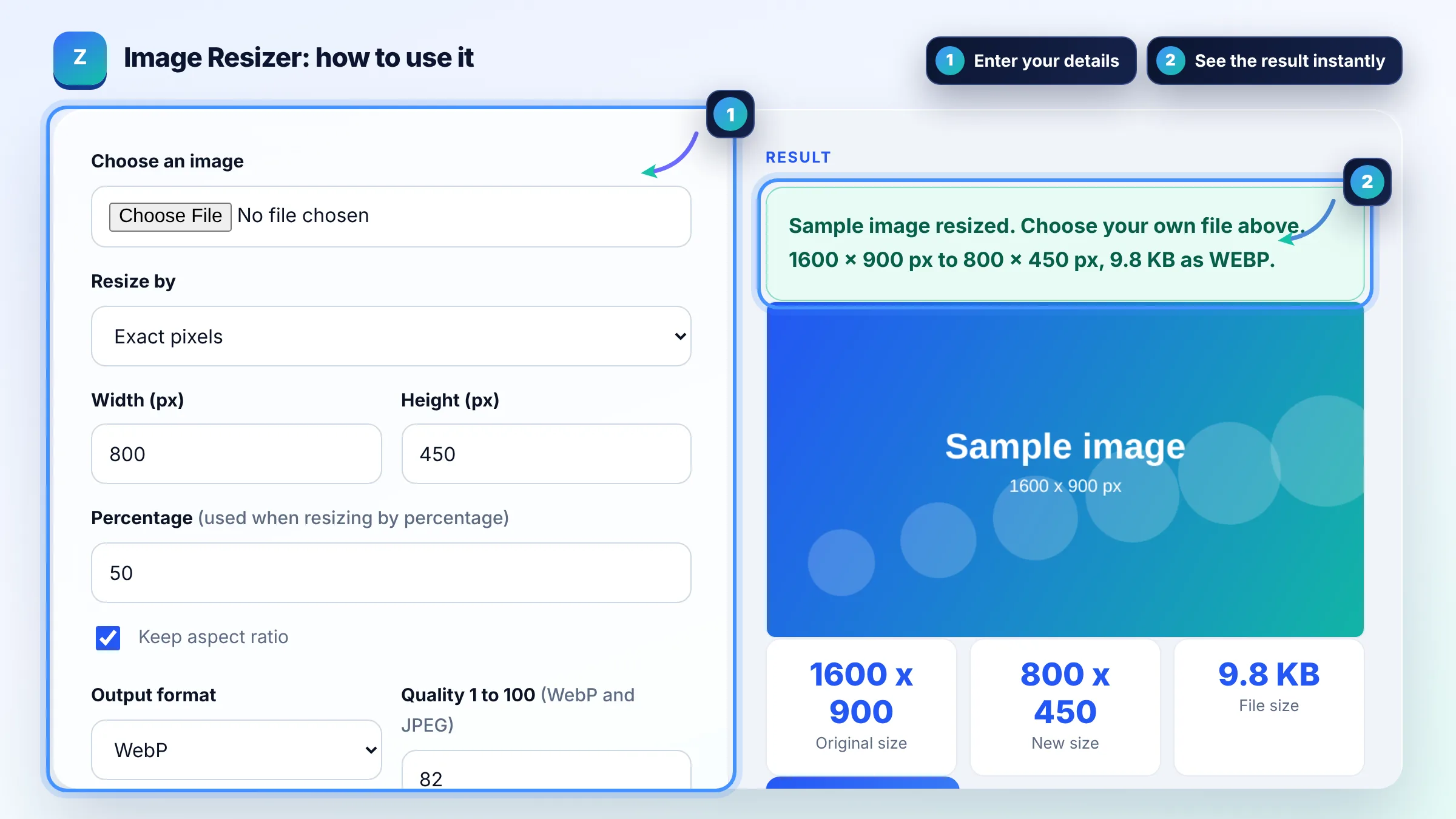
Keep the aspect ratio by scaling width and height by the same factor: a 1600 x 900 image resized to 800 px wide becomes 800 x 450. This tool does that when "Keep aspect ratio" is ticked. If you need a different shape, such as a square, crop first instead of forcing both numbers.
Serve images at about the largest size they are displayed, not bigger: a photo shown 800 px wide does not need a 4000 px file. For sharp results on high density screens, provide a 2x version through srcset. web.dev explains this in its guide to serving images with correct dimensions.
Yes, usually a lot: halving width and height leaves a quarter of the pixels, so the file often shrinks to roughly a quarter or less. The output format and quality setting matter too. WebP and JPEG at quality 75 to 85 are usually much smaller than PNG for photos.
| Use | Common size (px) | Aspect ratio |
|---|---|---|
| Blog featured image | 1200 x 675 | 16:9 |
| Open Graph share image | 1200 x 630 | 1.91:1 |
| Full width hero (desktop) | 1920 x 1080 | 16:9 |
| In content image | 800 x 450 | 16:9 |
| Square product or profile photo | 1080 x 1080 | 1:1 |
Example: a 4000 x 3000 phone photo (4:3) is shown 800 px wide in a blog post. Resize by width to 1600 px for 2x screens: height = 1600 × 3000 ÷ 4000 = 1200, so the new size is 1600 x 1200 px with 16% of the original pixels. Export as WebP at quality 82, then add width="800" height="600" to the img tag.
Yes. The resizer is free and runs fully in your browser using the canvas element. Your image never leaves your device, there is no upload, no account and no watermark on the downloaded file.
Yes. Choose Percentage under Resize by and enter a value, for example 50 to halve both sides. A 1600 x 900 image at 50% becomes 800 x 450 px, which keeps the original aspect ratio automatically.
Use WebP for most website images because it is usually smaller at similar quality. Use JPEG where WebP is not accepted, and PNG for screenshots, logos or images that need transparency. JPEG export fills transparent areas with white.
Making an image smaller keeps it sharp in most cases. Making it larger than the original cannot add detail, so upscaled images often look soft. Always start from the largest original you have and only scale down.
Image size affects page speed, and Google recommends optimized images as part of good page experience. Oversized images slow Largest Contentful Paint, while missing width and height attributes can cause layout shift. Smaller, correctly sized files help users and Core Web Vitals.
No. Redrawing the image on a canvas creates a new file without the original EXIF metadata such as camera details or GPS location. That is often useful for privacy, but keep the original if you need that data.
Facts checked against these official pages. Read how I check facts in my editorial policy.
An aspect ratio calculator is a tool that simplifies width and height into a ratio such as 16:9 by dividing…
An image compressor is a tool that reduces an image's file size by resizing it and re-encoding it with lossy…
A JPG to WebP converter is a tool that re-encodes JPG or PNG images as WebP, a format made by Google that…
Send your website and I will check it for you, free.
One short email when something new goes live: articles, free SEO tools, package updates, discounts and price alerts. No spam, unsubscribe in one click.