Meta Tag Generator
A meta tag generator is a tool that converts plain text fields into correctly escaped HTML tags such as…
Create X card meta tags with a live preview and length checks in seconds.
Approximate preview with a generic look, not the exact X design.
The free twitter card generator runs in your browser, needs no sign-up and never sends what you type anywhere.
This Twitter card generator builds the twitter:card, twitter:title, twitter:description, twitter:image and handle tags that X reads when someone shares your link. Choose summary_large_image for a wide picture card, keep the title under 70 characters and the description under 200, and use an image of about 1200 x 600 pixels.
A Twitter card generator is a tool that writes the meta tags X uses to turn a shared link into a card with a title, description and image. It checks your text against the 70 and 200 character limits from the X card documentation and outputs ready to paste HTML.
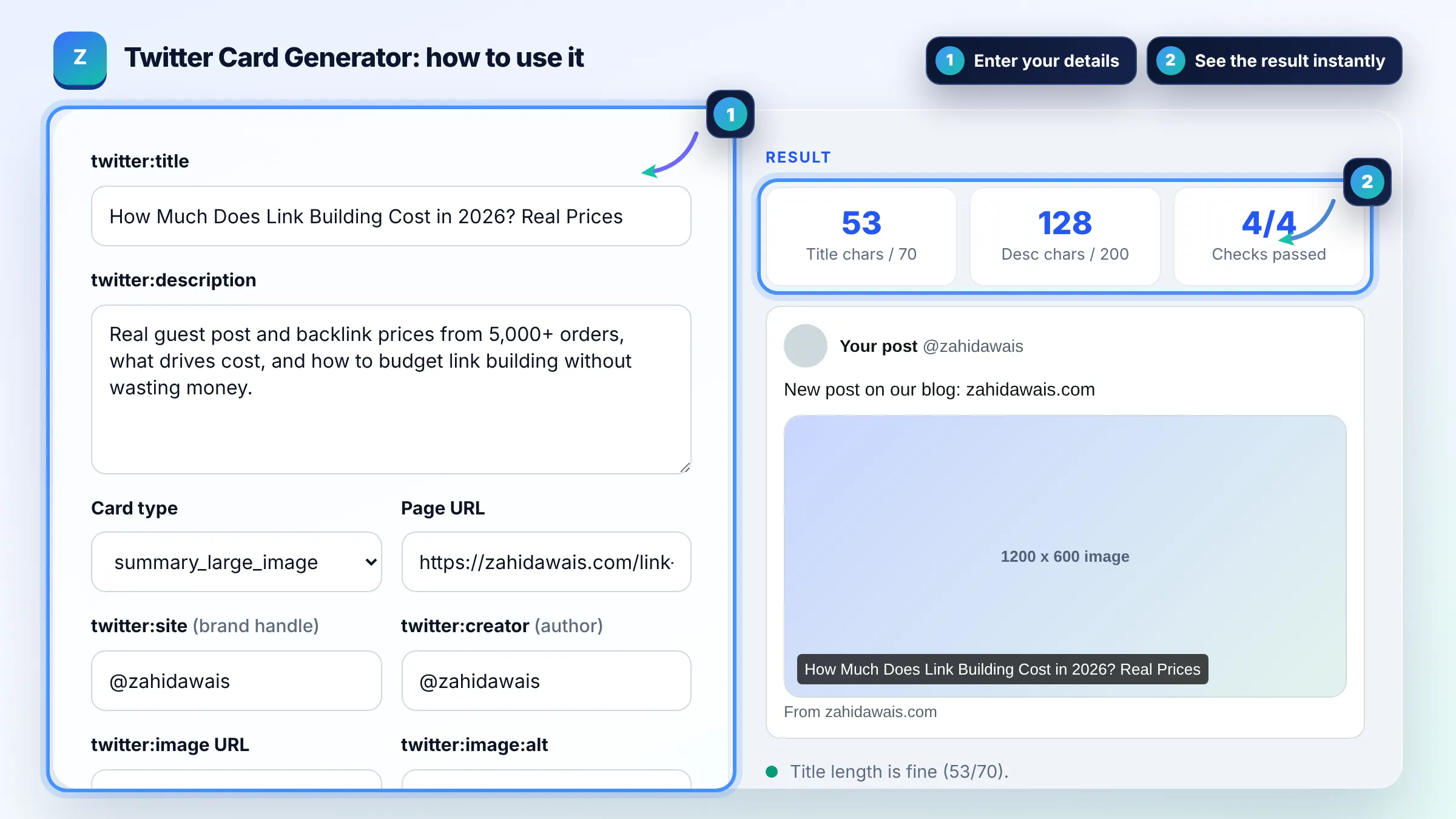
summary shows a small square thumbnail beside the text, while summary_large_image shows a wide image above it. Large image cards take up more space in the feed and usually get more attention, so use them for articles and landing pages with a good 2:1 image. Use summary for profile, product or utility pages.
You need at least twitter:card, because X falls back to og:title, og:description and og:image for the rest. Without twitter:card set to summary_large_image, links usually show a small card. Adding twitter:site also ties the card to your brand account. See the Open Graph protocol for the og tags X can reuse.
Use about 1200 x 600 pixels at a 2:1 ratio. X card documentation has listed a minimum of 300 x 157 pixels, a maximum of 4096 x 4096 and a file size under 5 MB, in JPG, PNG, WEBP or GIF. Keep important text away from the edges because the card may crop slightly.
| Tag | Required? | Limit or format |
|---|---|---|
| twitter:card | Yes | summary, summary_large_image, app or player |
| twitter:title | Yes (or og:title) | Max 70 characters |
| twitter:description | Optional | Max 200 characters |
| twitter:image | Optional | Absolute URL, under 5 MB |
| twitter:image:alt | Recommended | Max 420 characters |
| twitter:site | Optional | @handle of the website |
Example: the title "How Much Does Link Building Cost in 2026? Real Prices" is 53 of 70 characters and the description is 128 of 200, so both pass. With summary_large_image selected the tool outputs 7 meta tags; switching to summary drops the large image and shows a square thumbnail instead.
Put them inside the head section of the page you want to share, next to your other meta tags. In WordPress, most SEO plugins have a social or X tab where you can set them, or you can add them with a header code plugin.
Common causes are a missing twitter:card tag, a relative image URL, an image blocked by robots.txt, or an image that is too large. X also caches cards, so changes can take time to appear. Check the tags in your live page source first.
No. It is an approximate preview with a generic design. X changes how cards look, for example showing the title over the image or only the domain, so use the preview to catch length and image problems rather than as a pixel perfect copy.
No. The tool runs fully in your browser. The preview image you choose is read locally and never uploaded, and the meta tags are generated on your device. Nothing you type is sent to any server.
It can be, but a social title can be shorter and more conversational than your SEO title. Keep it under 70 characters, put the main benefit first and avoid adding your brand name if the card already shows your domain.
Not directly. Card tags do not change Google rankings. They make shared links more attractive on X, which can lift clicks and visibility, and that extra attention can lead to links and brand searches over time.
Facts checked against these official pages. Read how I check facts in my editorial policy.
A meta tag generator is a tool that converts plain text fields into correctly escaped HTML tags such as…
An open graph preview is a mockup of the link card social platforms build from your Open Graph meta tags. The…
An Open Graph checker is a tool that extracts the og: meta tags social platforms use to build link previews…
Coming 11 OctSend your website and I will check it for you, free.
One short email when something new goes live: articles, free SEO tools, package updates, discounts and price alerts. No spam, unsubscribe in one click.