Image Resizer
An image resizer is a tool that redraws an image at a new pixel size. With the aspect ratio locked it scales…
Set a size, colours and a label to make a placeholder image in your browser, then download it or copy it as a data URI or SVG.
Sizes from 1 to 4000 px. The image is drawn on a canvas in your browser; no external service is called.
The free placeholder image generator draws an image of any size from 1 to 4000 pixels with your colours and label, then lets you download it as PNG, JPEG or WebP or copy it as a data URI or SVG. It uses the canvas in your browser, so no external image service is involved.
A placeholder image generator makes a plain image of an exact size with a label, so you can build and test layouts before the real photos are ready. Download it as PNG, JPEG or WebP, or paste a data URI or SVG straight into the HTML. Replace every placeholder with the real image and alt text before launch.
A placeholder image is a temporary image with the same width and height as the final one, usually a flat colour with its size written on it. Designers and developers use placeholders in mockups, page templates and WordPress themes, so the layout, spacing and responsive breakpoints can be checked before the photography or graphics exist.
This tool draws the placeholder on an HTML canvas and exports it with the canvas toDataURL method. MDN's toDataURL reference notes that browsers must support PNG and that "many will support additional formats including image/jpeg and image/webp". If your browser cannot export a format, it returns PNG instead, and the tool tells you. The SVG output is plain text that scales to any size.
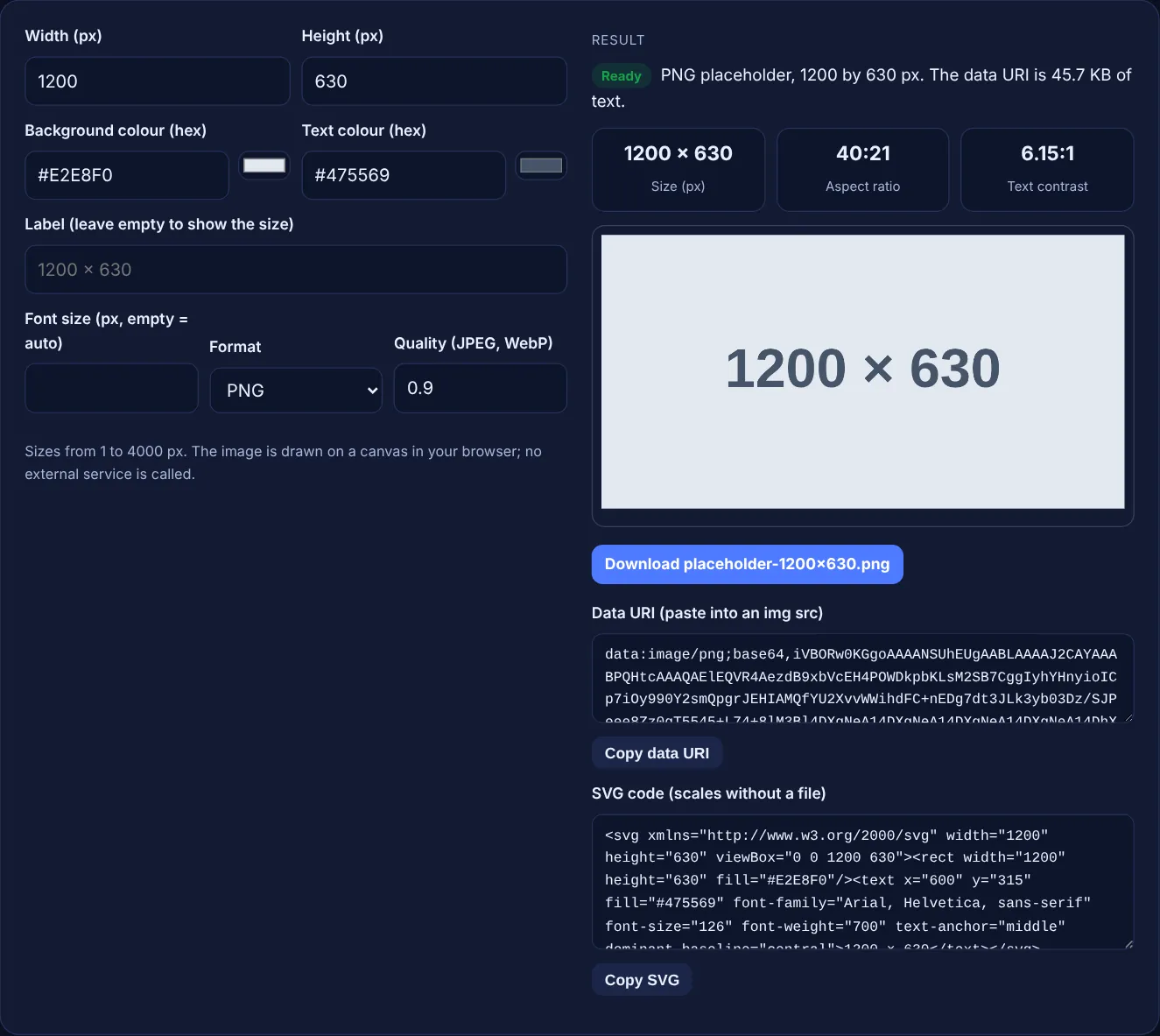
Use a downloaded file when the placeholder sits in a CMS or theme folder, a data URI when you want a self contained HTML mockup, and SVG when you want the smallest text that scales cleanly. A data URI puts the whole image inside the src attribute, so there is no extra request, but the text is larger than the binary file and is repeated on every page that uses it.
SVG placeholders are usually only a few hundred bytes, because they describe a rectangle and a line of text instead of pixels. The fonts in the SVG depend on the device that shows it, so the label can look slightly different from the PNG. For testing real file weights, export WebP or JPEG at the size you plan to use, then try the image compressor on the final photos.
A placeholder with the final dimensions shows whether the layout holds before the real image arrives, and its width and height attributes reserve the right space. web.dev's guide to optimising CLS says to "always include width and height size attributes on your images and video elements", because the browser uses them to set the aspect ratio before the file loads.
If the real photo will have a different ratio, the layout will change when you swap it in. Check the ratio first with the aspect ratio calculator, and plan the responsive versions with the srcset generator so every file in srcset shares that ratio.
A placeholder left on a live page does not help search, because it shows nothing about the topic and gives image search nothing useful to index. Google's image SEO best practices say Google uses alt text "along with computer vision algorithms and the contents of the page" to understand images, and a grey box labelled 1200 × 630 gives it little to work with.
Keep placeholders on staging sites and in drafts. Before launch, search the theme and content for placeholder file names and data URIs, swap in real images with descriptive file names and alt text, and check the page again on a phone.
| Output | Best for | Transparency | Notes |
|---|---|---|---|
| PNG | Flat colours and sharp text | Yes (not used here) | Supported by every browser canvas |
| JPEG | Testing photo file weights | No | Quality setting from 0.1 to 1 |
| WebP | Testing modern formats | Yes (not used here) | Falls back to PNG if your browser cannot export it |
| Data URI | Self contained HTML mockups | Same as the format | Text is larger than the file |
| SVG | Smallest scalable placeholder | Yes | Label font depends on the device |
Example: a designer needs a stand-in for a 1200 by 630 social share image. With the default values, a #E2E8F0 background, #475569 text and no label, the tool draws a PNG labelled "1200 × 630" with an automatic font size of 126px. The stats show an aspect ratio of 40:21 and a text contrast of 6.15:1, and the download button saves placeholder-1200x630.png. Change the size to 4000 by 50, the label to "Wide banner & ad" and the format to WebP, and the ratio becomes 80:1, the font size drops to 10px and the SVG output escapes the ampersand as &.
No. The image is drawn on a canvas in your browser and exported from there. No request goes to any server, so the placeholder works offline and nothing about your project is shared with a third party.
Up to 4000 by 4000 pixels. Very large canvases use a lot of memory, and some phones limit canvas size. For final hero images, 1600 to 2400 pixels wide is usually enough for screens with a pixel ratio of 2.
A data URI stores the image as base64 text, which takes about a third more space than the binary file. That is fine for small mockups, but real images should be separate files so browsers can cache them.
Yes, as url() with the SVG URL encoded, or saved as a file. Remember that Google says it does not index CSS images, so use an img element for images that should appear in image search.
Some browsers cannot export WebP from a canvas. MDN says that in this case the canvas returns PNG instead. The tool detects this, names the file .png and shows a note so the file extension always matches the format.
Aim for a text contrast of at least 4.5:1, the WCAG minimum for normal text. The tool shows the contrast ratio and warns below 4.5:1. The default grey on light slate scores 6.15:1.
Checked 23 Oct 2026. Facts checked against these official pages. Read how I check facts in my editorial policy.
An image resizer is a tool that redraws an image at a new pixel size. With the aspect ratio locked it scales…
An image to Base64 converter is a tool that encodes the bytes of an image file as text using 64 safe…
Builds srcset, sizes, width, height and picture sources, and previews the file a browser picks.
An aspect ratio calculator is a tool that simplifies width and height into a ratio such as 16:9 by dividing…
Send your website and I will check it for you, free.
One short email when something new goes live: articles, free SEO tools, package updates, discounts and price alerts. No spam, unsubscribe in one click.