
Technical SEO
How to Check if a Page Can Be Indexed by Google
How to check if a page can be indexed: test robots.txt, noindex, the canonical and the URL Inspection tool in order, with…
Read article
This guide is for site owners, developers and SEOs running a site in more than one language or region who need to decide where their hreflang annotations should live. You will learn what Google says about the HTML, HTTP header and hreflang sitemap methods, which one fits which kind of site, and how to move from one to another without breaking the return links between your pages.
Hreflang works the same in the sitemap or in the HTML. Google says HTML link tags, HTTP headers and sitemaps are equivalent, and using more than one brings no benefit. Use HTML tags on small sites and CMS setups, a sitemap for many languages or templates you cannot edit, and HTTP headers for PDFs.
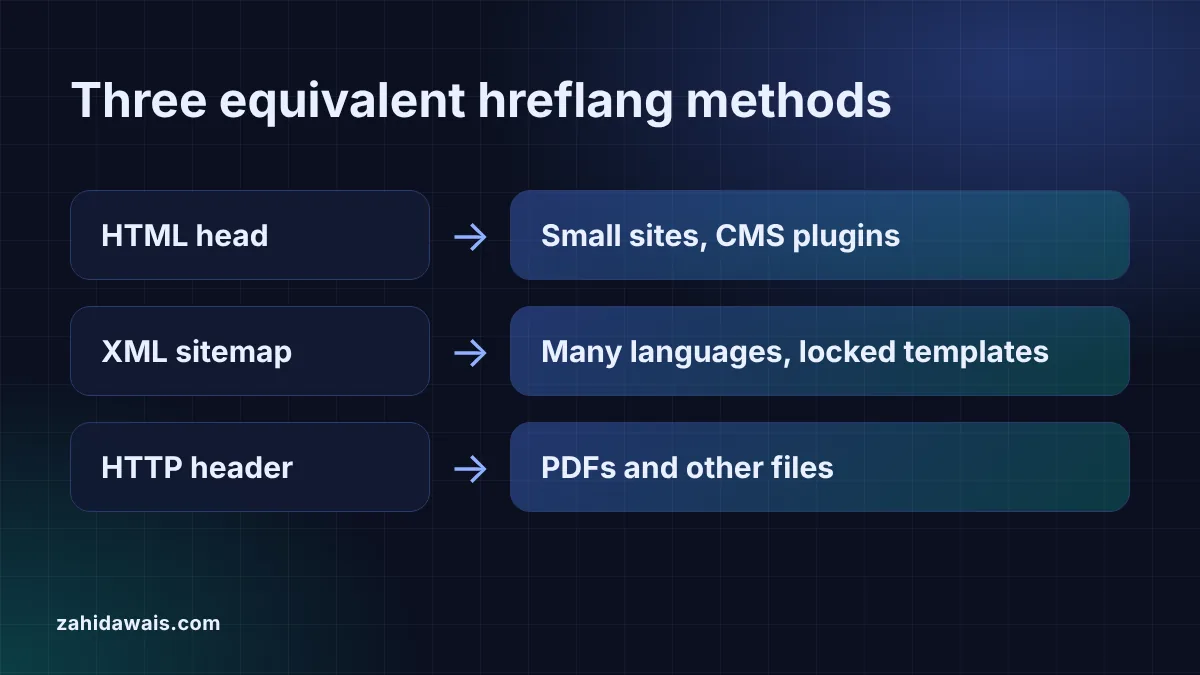
Either works, so choose the method you can keep accurate. Google’s guide to localized versions of your page lists three ways to tell Google about language and regional alternates: <link> tags in the HTML head, a Link HTTP header, and xhtml:link elements in an XML sitemap. It says “the three methods are equivalent from Google’s perspective”.
So the choice is about maintenance, not rankings. The right method is the one your CMS, templates and team can keep complete and consistent across every version of every page. The table compares them.
| Question | HTML link tags | XML sitemap | HTTP Link header |
|---|---|---|---|
| Where does it go? | In the head of every version | Under each url entry in a sitemap | In the response header of each URL |
| Best for | Small and medium sites, CMS plugins | Many languages, locked templates, several domains | PDFs and other non-HTML files |
| Self and return links needed? | Yes | Yes | Yes |
| How do you see it? | View page source | Open the sitemap file | Browser developer tools or a header checker |
| What grows with more languages? | The head of every page | The sitemap file | Every response header |
| Google’s view | Equivalent | Equivalent | Equivalent |
The same rules apply whichever method you pick. Google says “each language version must list itself as well as all other language versions”, and “if two pages don’t both point to each other, the tags will be ignored”. Codes must be ISO 639-1 languages, optionally followed by an ISO 3166-1 alpha-2 region, and “you can’t specify the country code by itself”. Alternate URLs “must be fully-qualified”, with http or https. An optional x-default value covers users whose language matches none of your versions.
The method only changes where those rules are written. A missing return link breaks a sitemap just as it breaks HTML tags, which is why the common mistakes in my guide to hreflang errors apply to both.
HTML link tags suit small and medium sites, sites where a CMS or plugin already writes the tags, and teams who want to see the annotations in the page source. Each version carries one <link rel="alternate" hreflang="..." href="..."> tag per version, including itself, and Google says the tags “must be inside a well-formed <head> section of the HTML”. It also says not to combine hreflang “with other attributes such as media” in a single tag.
The cost grows with the number of languages, because every page repeats the full set. With 3 versions each page needs 3 tags; with 20 versions it needs 20, on every page of every language. To audit existing tags, paste the head code of each version into the hreflang tag checker, which reports invalid codes, missing self-references and missing return links between the pages you paste. To write a new set, the hreflang tag generator builds the tags for one page.
A sitemap suits sites with many languages, templates you cannot edit, or versions spread across several domains. All the annotations live in one file, so the page HTML stays unchanged and one export can rebuild every set at once. In the sitemap, the urlset declares xmlns:xhtml="http://www.w3.org/1999/xhtml", and each url entry lists “every alternate version of the page, including itself”.
The hreflang sitemap generator writes that repeated block for every URL from simple code and URL lines, so return links cannot go missing. Two limits matter. Google says child elements “don’t count towards the URL limit for sitemaps”, but they do add bytes, so a sitemap with many languages can reach the 50MB uncompressed limit before 50,000 URLs, as explained in my guide to the sitemap size limit. And a sitemap can only list URLs in or below its own folder, unless you submit it cross-site; Google’s sitemap guide says to verify ownership of all the sites you add.
You can, but there is no reason to. Google says “while you can use all three methods at the same time, there’s no benefit in Search”. Two sources also create a risk: when a template change updates the HTML but not the sitemap, the two sets disagree, and you have to work out which one Google is reading. Pick one method per page set. If you switch, remove the old annotations or make sure both list exactly the same URLs and codes until the old ones are gone.
Keep canonical tags in line with either method. Google’s canonical URL guide says that with hreflang you should “specify a canonical page in the same language”, so each version should be canonical to itself and the hreflang set should list those canonical URLs.
Build the sitemap first, check it, then remove the tags. A safe order is:
Example: a shop on www.example.com has a home page and a pricing page in English, British English and German, plus an x-default on the home page. In the HTML, the home page versions each need 4 link tags and the pricing versions 3, written into 6 page heads. As a sitemap, the same data goes into the hreflang sitemap generator as 2 groups and comes out as 6 URL entries with 21 xhtml:link tags in one file. A stray en-UK line in the pricing group is skipped with a note to use en-GB, because Google ignores reserved codes such as UK. After uploading the sitemap, the shop removes the old tags and confirms with the hreflang tag checker that the heads now carry only canonical tags.
No. Google says the HTML, HTTP header and sitemap methods are equivalent, and using all three brings no benefit in Search. Pick the one you can keep complete and correct, then use it for every version of the page.
No. The xhtml:link elements go inside the url entries of a normal XML sitemap, so they can live in the sitemap you already submit or in a separate file. The urlset must declare the xhtml namespace.
No. Google says child elements do not count towards the URL limit for sitemaps, so only the url entries count. The links still add bytes, and a file over 50MB uncompressed must be split.
Yes. Google says alternate URLs do not need to be on the same domain. With the sitemap method, a file listing URLs from several sites needs cross-site submission, with ownership of every site verified in Search Console.
Use the HTTP Link header. PDFs have no HTML head, and Google says the header method is useful for non-HTML files like PDFs. Each PDF version must still list itself and every other version in its header.
Google does not document which source wins, so the result is hard to predict. Avoid the problem by keeping one method per page set, or by making both list exactly the same URLs and codes while you switch.
This guide is part of my technical SEO audit checklist.
Checked 23 Oct 2026. Facts checked against these official pages. Read how I check facts in my editorial policy.
Want your hreflang set up and checked across every language? See my technical SEO service.
How to check if a page can be indexed: test robots.txt, noindex, the canonical and the URL Inspection tool in order, with…
Read article
How to test structured data before you publish: check syntax, run Google's Rich Results Test, use URL Inspection and watch Search Console…
Read article
HTML sitemap vs XML sitemap: what each one does, what Google says about sitemaps and links, when a site needs one or…
Read articleSend your website and I will reply with a free audit.