Hreflang Tag Generator
A hreflang tag generator is a tool that writes rel="alternate" hreflang annotations so search engines can…
Paste the head code of one or more language versions and get a clear report of every hreflang problem, page by page.
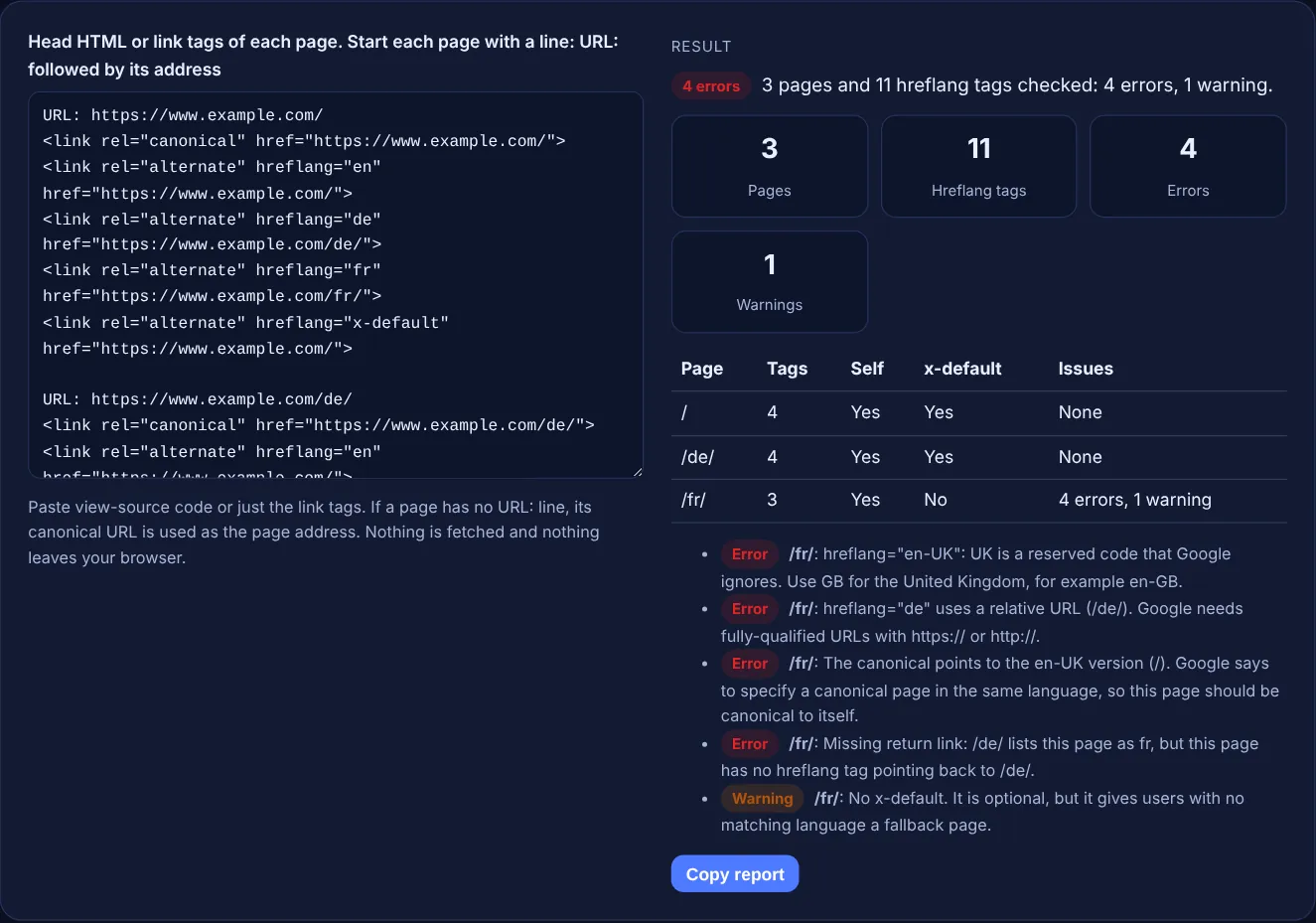
Paste view-source code or just the link tags. If a page has no URL: line, its canonical URL is used as the page address. Nothing is fetched and nothing leaves your browser.
| Page | Tags | Self | x-default | Issues |
|---|
The free hreflang checker reads the head code or link tags you paste for one or more language versions of a page and reports every problem: invalid language or region codes, missing self-references, missing return links between the pasted pages, relative URLs, a missing x-default and canonical tags that point to another language.
An hreflang checker tests whether the hreflang tags on your language versions follow Google's rules: ISO 639-1 language codes with optional ISO 3166-1 alpha-2 regions, fully-qualified URLs, a self-reference on every page and return links between all versions. Google may ignore annotations without return links, so fix those first.
An hreflang checker reads the <link rel="alternate" hreflang="..."> tags of each language version and tests them against the rules in Google's guide to localized versions of your page. This tool checks the syntax of each tag, every code against built-in ISO 639-1, ISO 3166-1 alpha-2 and ISO 15924 lists, whether each page lists itself, whether the pages you pasted link back to each other, and whether the canonical tag agrees with the hreflang set.
It does not fetch anything. Paste the head of each version from view-source, or only the link tags, with a URL: line above each page so the tool knows which address the code belongs to. That makes it work for staging sites, pages behind a login and templates you have not published yet. To write a correct set from scratch, use the hreflang tag generator.
Return links are the hreflang tags that point back from each alternate to the page that listed it. If page X lists page Y, page Y must list page X. Google says "if two pages don't both point to each other, the tags will be ignored", and lists missing return links first among the common mistakes. The rule exists so another site cannot claim your pages as its alternates. This checker compares every pasted page with every other one and reports each missing link on the page that lacks it.
The most common are a region code on its own, such as gb or jp, a reserved region such as en-UK, three letter language codes, underscores as in en_GB, and numeric regions such as es-419. Google says "you can't specify the country code by itself", that codes like es-419 "aren't supported", and that using EU, UN or UK "doesn't have an effect on Google Search". Some valid codes catch people out too: uk means Ukrainian and se means Northern Sami, so the tool adds a warning when it sees them.
Each language version should be canonical to itself, and the hreflang tags should list those canonical URLs. Google's canonical URL guide says: "If you're using hreflang elements, make sure to specify a canonical page in the same language, or the best possible substitute language if a canonical page doesn't exist for the same language." A French page that is canonical to the English page sends mixed signals, so the checker reports it as an error. It also flags hreflang placed on a rel="canonical" tag, which Google does not use for canonicalization.
| Check | Error when | Google rule |
|---|---|---|
| Codes | Not ISO 639-1, region alone, en-UK, es-419, en_GB | ISO 639-1 language, optional ISO 3166-1 alpha-2 region |
| URLs | Relative (/de/) or protocol-relative (//example.com/de/) | Alternate URLs must be fully-qualified |
| Self-reference | The page does not list its own URL | Each version lists itself and all others |
| Return links | A pasted page does not link back | Pages must point to each other |
| Duplicate codes | One code points to two URLs | One URL per code |
| Placement | Tag in the body, or combined with media | Inside a well-formed head; no media in the same tag |
| Canonical | Canonical points to another language | Canonical in the same language |
| x-default | Missing (warning only) | Optional fallback for unmatched languages |
Example: the default input has the English home page, the German page and the French page of www.example.com. The checker finds 3 pages, 11 hreflang tags, 4 errors and 1 warning, all on the French page. Its canonical points to the English page, its en-UK tag uses a reserved region code, its German link is the relative URL /de/, and so the German page has no return link from it. The English and German pages pass with no issues. The warning says the French page has no x-default.
Fetching other sites from a browser page is blocked by browser security rules unless a server helps, and this tool runs entirely in your browser. Pasting the code also lets you check staging sites and pages that are not public yet.
For a full return link check, yes. The tool checks return links only between pages you paste. Alternates you did not paste are counted in a note, so you know which pages still need checking.
No. Google treats x-default as optional. It is the fallback for users whose language or region matches none of your versions, and it suits language selector pages best. The checker reports a missing x-default as a warning only.
No. Google says the hreflang value is case-insensitive, so en-gb and en-GB both work. Writing the region in uppercase follows the ISO convention and is easier to read, so the tool shows codes in that form.
This tool checks HTML link tags. For sitemap hreflang, rebuild the file with the hreflang sitemap generator, which writes every alternate for every URL. Avoid keeping different hreflang sets in the HTML and the sitemap.
No. Google says it does not use hreflang or the HTML lang attribute to detect the language of a page. Hreflang tells Google which URLs are alternates, so it can show users the version that matches their language.
Checked 23 Oct 2026. Facts checked against these official pages. Read how I check facts in my editorial policy.
A hreflang tag generator is a tool that writes rel="alternate" hreflang annotations so search engines can…
Builds an XML sitemap with xhtml:link hreflang alternates and checks every language code.
A canonical tag generator is a tool that builds the link rel="canonical" element telling search engines which…
Send your website and I will check it for you, free.
One short email when something new goes live: articles, free SEO tools, package updates, discounts and price alerts. No spam, unsubscribe in one click.