Hreflang Tag Generator
A hreflang tag generator is a tool that writes rel="alternate" hreflang annotations so search engines can…
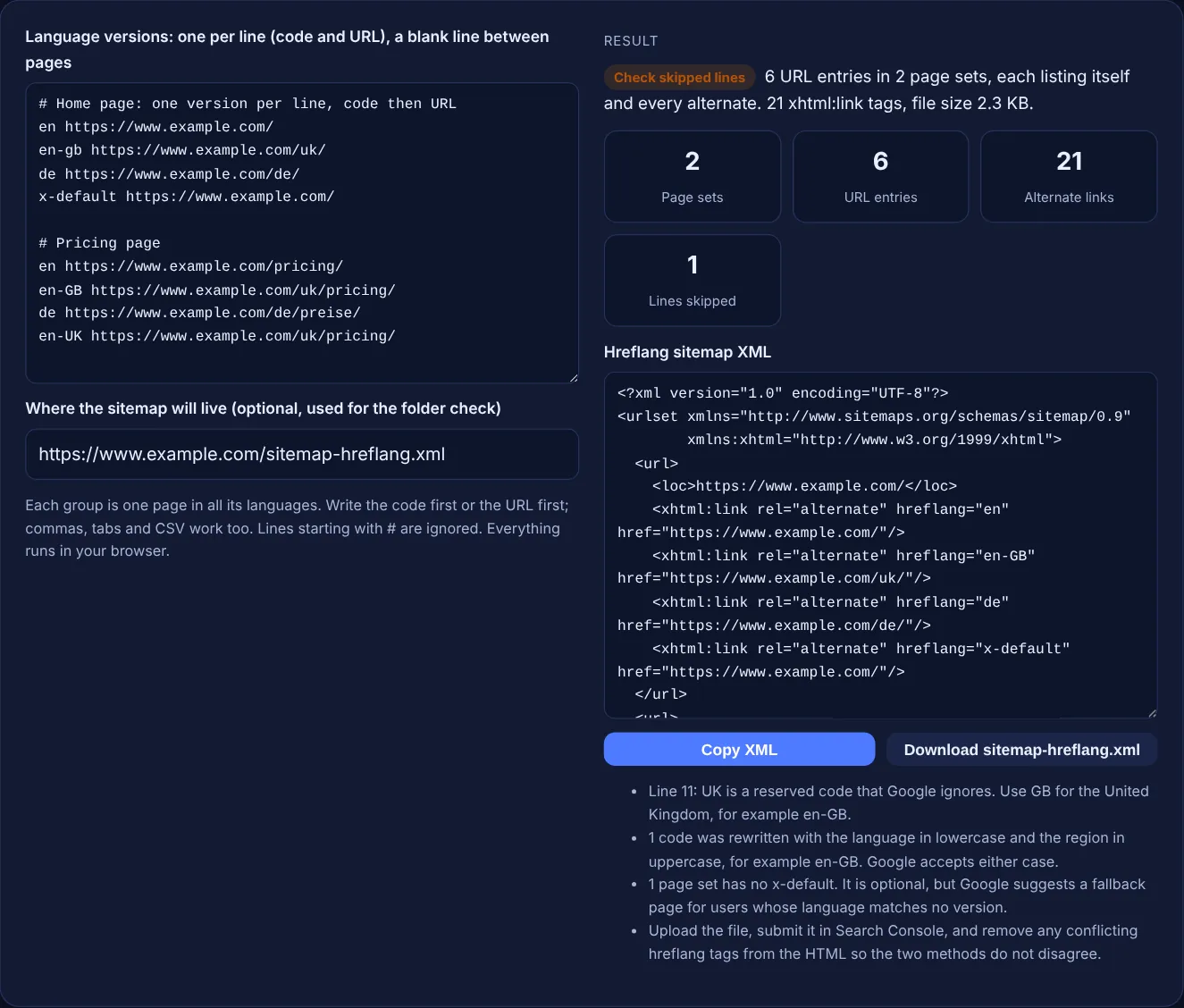
Paste the language and region versions of each page and get an XML sitemap where every URL lists itself and all its alternates.
Each group is one page in all its languages. Write the code first or the URL first; commas, tabs and CSV work too. Lines starting with # are ignored. Everything runs in your browser.
The free hreflang sitemap generator turns groups of alternate URLs, each with a language or language and region code, into an XML sitemap with xhtml:link tags. Every URL in a group lists itself and all the others, so return links are never missing, and every code is checked against the ISO lists Google supports.
An hreflang sitemap is an XML sitemap where each url entry has xhtml:link tags listing every language version of that page, including itself. Google treats it as equivalent to hreflang link tags in the HTML. Codes must be ISO 639-1 languages, optionally with an ISO 3166-1 alpha-2 region, and URLs must be fully-qualified.
An hreflang sitemap is a normal XML sitemap with extra xhtml:link elements that tell Google which URLs are language or regional versions of the same page. Google's guide to localized versions of your page lists three ways to give this information: HTML link tags, HTTP headers and a sitemap, and says "the three methods are equivalent from Google's perspective". The sitemap method keeps the markup out of your page templates, which helps when you have many languages or cannot edit the HTML easily.
The format has three rules. The urlset must declare xmlns:xhtml="http://www.w3.org/1999/xhtml". Each url entry has a loc for one version. Each entry then repeats an xhtml:link rel="alternate" for every version, because Google says each one must list "every alternate version of the page, including itself". This tool writes that repeated block for you, so a set of 3 versions becomes 3 entries with 3 links each. If you prefer tags in the page head, use the hreflang tag generator instead.
Google accepts a two letter ISO 639-1 language code, optionally followed by a two letter ISO 3166-1 alpha-2 region code, such as de or de-CH. Google says "only language codes listed in ISO 639-1 and region codes listed in ISO 3166-1 Alpha 2 are supported", and that "you can't specify the country code by itself". Codes like es-419 are not supported, and reserved codes such as EU, UN or UK have no effect. A script can be added for languages written in more than one, as in zh-Hant. The tool checks every code against the full built-in ISO lists, including the 15924 script list.
Because hreflang only works when the versions confirm each other. Google says "each language version must list itself as well as all other language versions", and "if two pages don't both point to each other, the tags will be ignored". This stops another site from claiming your pages as its alternates. In a sitemap, that means the same set of xhtml:link lines appears under every loc in the group. Writing it by hand is where most missing return links come from, which is why the generator builds the full block for every URL automatically.
Add x-default when you have a page for users whose language or region matches none of your versions, such as a language selector or a global English page. Google describes it as "used when no other language/region matches the user's browser setting" and says it "was designed for language selector pages". It is optional. The x-default URL can be the same as one of your language versions, in which case the tool writes one entry for that URL, not two. If the x-default page is a separate URL, such as a language selector, it gets its own entry with the full set of links.
| Rule | Correct | Wrong |
|---|---|---|
| Namespace on urlset | xmlns:xhtml="http://www.w3.org/1999/xhtml" | Missing or a different URL |
| Language code | ISO 639-1: en, de, zh | eng, jp, english |
| Region code | ISO 3166-1 alpha-2 after a language: en-GB | gb alone, en-UK, es-419 |
| Script | ISO 15924 after the language: zh-Hant | zh-Traditional |
| URLs | Fully-qualified: https://www.example.com/de/ | /de/ or //www.example.com/de/ |
| Self-reference | Each url lists itself too | Only the other versions listed |
| URL limit | 50,000 url entries; xhtml:link children do not count | One file over 50,000 entries or 50MB |
Example: the default input has two pages on www.example.com. The home page has 4 lines: en, en-gb, de and x-default, where x-default uses the same URL as en. The pricing page has en, en-GB, de and an en-UK line. The generator outputs 6 URL entries in 2 page sets with 21 xhtml:link tags: 3 entries with 4 links for the home page and 3 entries with 3 links for pricing. It rewrites en-gb as en-GB, skips line 11 because UK is a reserved code that Google ignores, and notes that the pricing set has no x-default.
No. Google says the HTML, HTTP header and sitemap methods are equivalent and that using all three brings no benefit. Choose the one you can keep accurate. Sitemaps suit large sites and templates you cannot edit; HTML tags are easier to see in the page.
Yes. Google says alternate URLs do not need to be on the same domain, so example.com and example.de can be alternates. A sitemap that lists URLs from several sites needs cross-site submission, with every site verified in Search Console.
No. Google says child elements do not count towards the URL limit for sitemaps. Only the url entries count. The links do make the file larger, so very large hreflang sitemaps can reach the 50MB uncompressed limit first.
No. The ISO code for the United Kingdom is GB, so use en-GB. Google lists UK among the reserved codes that have no effect in hreflang annotations, and the tool skips such lines with an explanation.
You can, but they must agree. Two sources that list different URLs or codes for the same page create conflicting signals. If you move hreflang to the sitemap, remove the old tags from the HTML or keep them identical.
No. The generator runs entirely in your browser with JavaScript, and the download is created on your device. You can safely use it for a staging site or a client project that is not live yet.
Checked 23 Oct 2026. Facts checked against these official pages. Read how I check facts in my editorial policy.
A hreflang tag generator is a tool that writes rel="alternate" hreflang annotations so search engines can…
Checks pasted hreflang tags for bad codes, missing return links, x-default and canonical conflicts.
A sitemap validator is a tool that parses sitemap XML and checks it against the sitemap protocol and Google's…
Splits a URL list or sitemap into files under 50,000 URLs and 50MB, plus a sitemap index.
Send your website and I will check it for you, free.
One short email when something new goes live: articles, free SEO tools, package updates, discounts and price alerts. No spam, unsubscribe in one click.