AI search (AEO and GEO)
How to Track Brand Mentions in AI Answers (Free Method)
Track brand mentions in AI answers from ChatGPT, Perplexity, Copilot and Google AI Mode with a prompt list, a monthly log, official…
Read article
This guide is for site owners, publishers and marketers who want to decide which AI systems may crawl, train on, quote or summarise their pages. You will learn the three sets of controls that exist today, what each AI company documents about its own bots, and how to control how AI uses your content without dropping out of AI search by mistake.
You control AI use of your content with three tools: robots.txt rules for each AI bot (GPTBot, OAI-SearchBot, ClaudeBot, Claude-SearchBot, PerplexityBot, Google-Extended), Google’s snippet rules (nosnippet, max-snippet, data-nosnippet) for AI Overviews and AI Mode, and optional llms.txt files that point AI tools to your best pages.
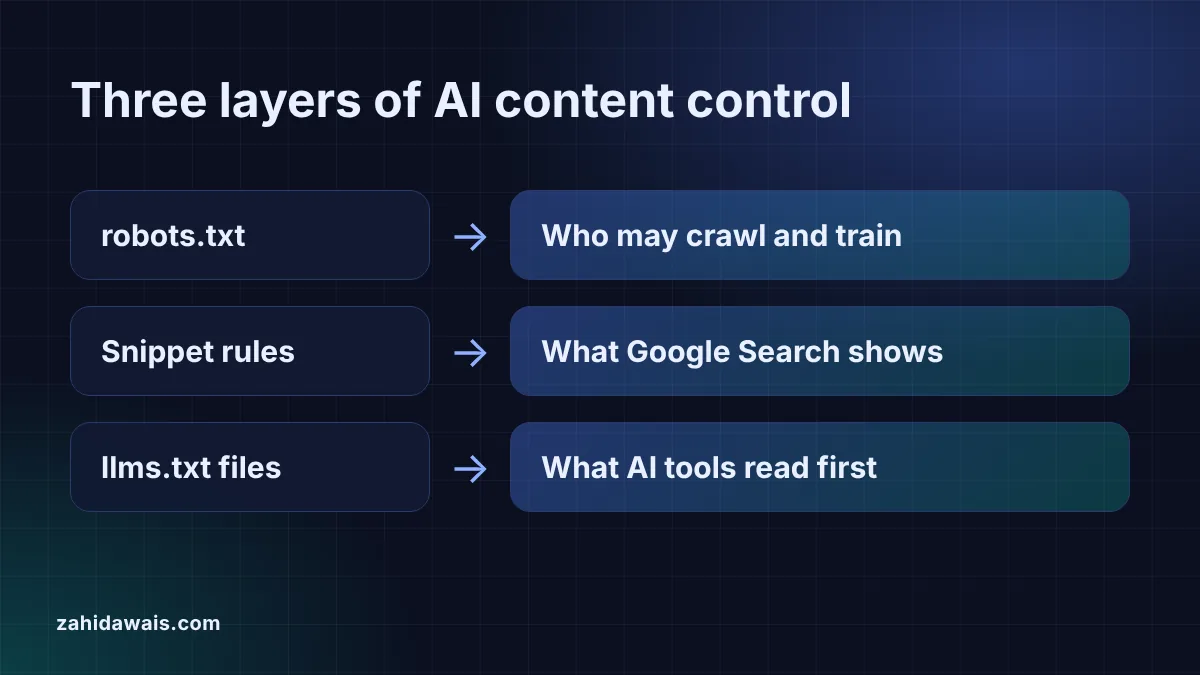
You have three layers of control, and each one does a different job. robots.txt decides which bots may crawl your site, and AI companies now publish separate tokens for training, search and user requests. Google’s snippet rules decide how much of a page Google Search, including AI Overviews and AI Mode, may show or use. Optional files such as llms.txt and llms-full.txt do not restrict anything; they only point AI tools to the content you want them to read.
The common mistake is to treat all AI bots as one. Blocking a training bot does not remove you from AI answers, and blocking a search bot can remove you from them even if training is still allowed. Decide first what you want: to be cited in AI search, to stay out of model training, or both. Then set each control on its own.
Each company documents its own tokens, and each token is independent. OpenAI’s crawler overview says a site can “allow OAI-SearchBot in order to appear in search results while disallowing GPTBot to indicate that crawled content should not be used for training”, and that “each setting is independent of the others”. Anthropic splits its bots the same way: ClaudeBot for training, Claude-SearchBot for search and Claude-User for user requests. Perplexity says PerplexityBot surfaces sites in its search and is “not used to crawl content for AI foundation models”.
User triggered fetchers are the exception. OpenAI says that for ChatGPT-User “robots.txt rules may not apply”, and Perplexity says Perplexity-User “generally ignores robots.txt rules”, because a person asked for the page. Build the rules with the AI crawler robots.txt generator and confirm them with the AI crawler robots.txt checker.
| Token | Company | What it is for, per the company | If you block it |
|---|---|---|---|
| Googlebot | Crawling for Google Search, including AI Overviews and AI Mode | Pages drop out of Google Search | |
| Google-Extended | Control token for Gemini training and grounding; no crawler of its own | No effect on Google Search | |
| GPTBot | OpenAI | Content that may train generative AI foundation models | Signals content should not be used for training |
| OAI-SearchBot | OpenAI | Surfacing websites in ChatGPT search | Not shown in ChatGPT search answers |
| ChatGPT-User | OpenAI | Visits a user asks ChatGPT to make | robots.txt rules may not apply |
| ClaudeBot | Anthropic | Content that may be used for training | Future content excluded from training |
| Claude-SearchBot | Anthropic | Indexing to improve Claude’s search results | Content not indexed for search |
| Claude-User | Anthropic | Fetching pages for a user’s question | Claude cannot retrieve your pages for users |
| PerplexityBot | Perplexity | Surfacing and linking sites in Perplexity search; not for training | Less visibility in Perplexity search |
| Perplexity-User | Perplexity | Fetching pages a user asks for | Generally ignores robots.txt |
Use Google’s snippet rules, not a special AI file. Google’s guide to AI features and your website says that robots.txt rules for Googlebot control crawling for Search, and: “To limit the information shown from your pages in Search, use nosnippet, data-nosnippet, max-snippet, or noindex controls.” Google’s robots meta tag documentation adds that nosnippet will “prevent the content from being used as a direct input for AI Overviews and AI Mode”, while max-snippet limits how much may be used.
Pick the narrowest rule that solves the problem. To keep one price or quote out, wrap it with data-nosnippet. To shorten every snippet, set max-snippet. Only use nosnippet when no part of the page should appear as a snippet, because it also removes your normal text snippet. The data-nosnippet generator builds all of these and explains each rule. For a full set of indexing rules, use the meta robots tag generator, or the X-Robots-Tag generator for PDFs and other files.
Google-Extended controls whether content Google crawls may be used to train future Gemini models and for grounding in some of Google’s other systems. Google’s common crawlers page says it “does not impact a site’s inclusion in Google Search nor is it used as a ranking signal in Google Search”, and that it “doesn’t have a separate HTTP request user agent string”. In other words, it is a robots.txt token, not a crawler, and you will never see it in your logs.
So blocking Google-Extended does not remove your pages from AI Overviews or AI Mode. Those features are part of Search and follow your Googlebot rules and snippet controls. Blocking Googlebot to stay out of AI Overviews would remove you from Google Search entirely, which is almost never what a business wants.
Add them only as a cheap extra for tools that read them. The llms.txt proposal at llmstxt.org defines a short Markdown index of your key pages; read what llms.txt is for the details. llms-full.txt is a community convention, not part of that proposal: one file that holds the full text of your key pages, each with its title and URL. Documentation platforms such as Mintlify publish it automatically.
Google does not need either file. Its AI features guide says: “You don’t need to create new machine readable files, AI text files, or markup to appear in these features.” If you want the files for coding assistants and chat tools, build the index with the llms.txt generator and the full file with the llms-full.txt generator, and update them when your pages change.
Check each layer where it acts. For robots.txt, paste the file into the robots.txt checker and confirm each bot gets the result you meant. For snippet rules, use the URL Inspection tool in Search Console to see the HTML Googlebot received, as Google suggests, and allow time: Google says crawling can take several days to several months. OpenAI and Perplexity both say their systems can take about 24 hours to reflect robots.txt changes.
Then look at real traffic. Your server logs show whether GPTBot, ClaudeBot or PerplexityBot still request pages after a change; the guide to finding AI bots in your server logs shows how. A CDN or firewall can block bots that your robots.txt allows, so check it too.
Example: a made-up consultancy at example.com wants to be cited in AI search but keep its writing out of model training, and keep its changing prices out of snippets. Its robots.txt gets three groups, User-agent: GPTBot, User-agent: ClaudeBot and User-agent: Google-Extended, each with Disallow: /. Googlebot, OAI-SearchBot, Claude-SearchBot and PerplexityBot stay allowed. The pricing line is wrapped as <span data-nosnippet>Prices start at 450 GBP per audit.</span>, and the page head carries max-snippet:160, max-image-preview:large. Finally, an llms-full.txt built from the audit, link building and contact pages comes to 3 pages, 93 words and 698 characters, small enough for any AI tool to read in one go.
No. OpenAI says GPTBot and OAI-SearchBot are separate and each setting is independent. Blocking GPTBot signals that content should not be used for training, while OAI-SearchBot decides whether your site can appear in ChatGPT search answers.
Partly. Google-Extended controls use for training future Gemini models and grounding in some other Google systems, and does not affect Google Search. AI Overviews and AI Mode are part of Search, so they follow Googlebot and snippet rules instead.
Google says nosnippet stops the content being used as a direct input for AI Overviews and AI Mode, and removes your text snippet in all results. The page can still be indexed and ranked, but it will show without a text snippet.
OpenAI, Anthropic and Perplexity document robots.txt controls for their crawlers, but user triggered fetchers such as ChatGPT-User and Perplexity-User may not, because a person asked for the page. Bad actors can also fake user agents, so check your server logs.
No. Google says no special AI text files are needed for AI Overviews and AI Mode, and llms.txt is still a proposal. Some AI tools and coding assistants read it, so it is a cheap optional extra, not a requirement.
OpenAI says it can take about 24 hours for its search systems to adjust, and Perplexity says up to 24 hours. Google needs to recrawl, which its AI features guide says can take several days to several months.
This guide is part of my AI search optimization guide.
Checked 23 Oct 2026. Facts checked against these official pages. Read how I check facts in my editorial policy.
Want a plan to get cited in AI answers while keeping control of your content? See my AEO service.
Track brand mentions in AI answers from ChatGPT, Perplexity, Copilot and Google AI Mode with a prompt list, a monthly log, official…
Read article
GEO for SaaS companies explained from Google and OpenAI docs: crawler access, buyer question pages, structured data and mentions that help AI…
Read article
What an entity home page is, which page to use for a brand or person, what to put on it, which schema…
Read articleSend your website and I will reply with a free audit.