AI search (AEO and GEO)
How to Control How AI Search Uses Your Content
Control how AI search uses your content: robots.txt tokens for GPTBot, ClaudeBot and Google-Extended, nosnippet and max-snippet for AI Overviews, and llms.txt.
Read article
This guide is for business owners, marketers and agencies who want to know whether ChatGPT, Perplexity, Gemini, Copilot and Google’s AI features name and link their brand. You will learn how to track brand mentions in AI answers with a fixed prompt list and a simple monthly log, which official reports can back it up, and how to turn the results into share of voice against competitors.
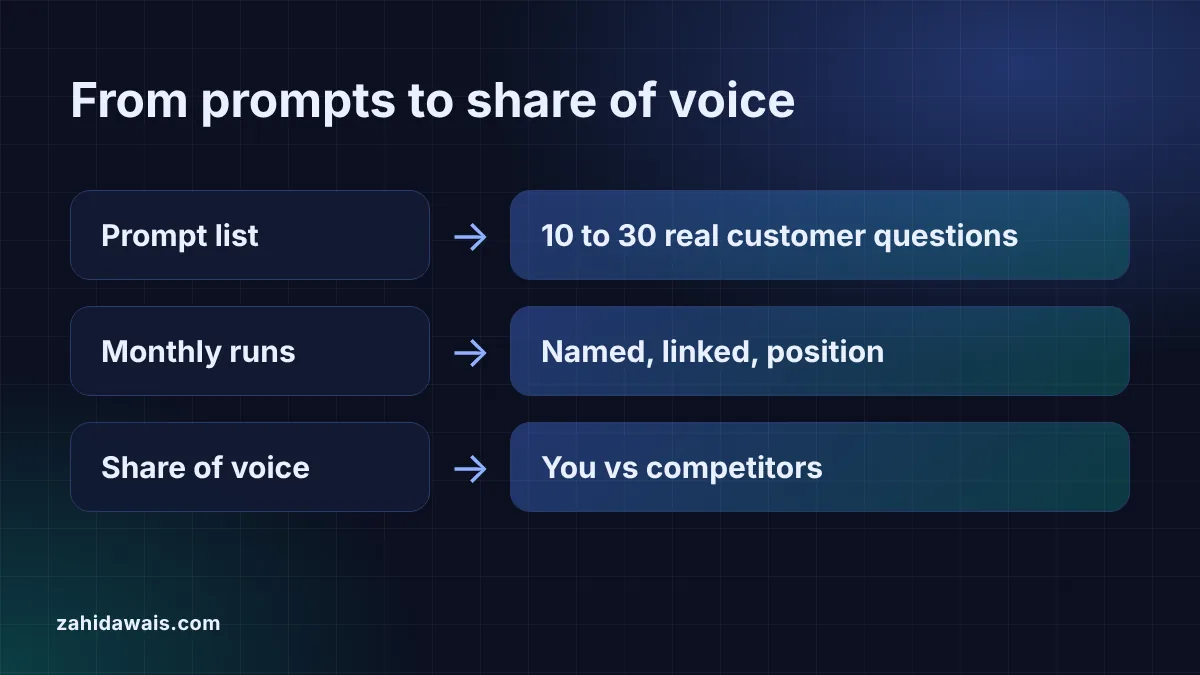
To track brand mentions in AI answers, write 10 to 30 prompts your customers ask, run them every month in each AI tool, and log whether your brand is named, linked and in what position. Add Search Console’s generative AI report and Bing’s AI Performance report, then compare your share of voice with competitors.
Partly. Google and Microsoft now report some AI visibility for their own products, but no single report covers every AI assistant, so you still need your own checks. Search Console’s generative AI performance report shows impressions for AI Overviews and AI Mode, and Google says that “as of August 31, 2026” it has rolled these insights out to all websites. Bing Webmaster Tools has an AI Performance report for Copilot and Bing’s AI summaries.
For ChatGPT and Perplexity, none of the OpenAI or Perplexity help pages cited in this guide describe a report for site owners. Those answers are checked by hand: you ask the question, read the answer and write down what you see. The table shows what each tool gives you.
| AI tool | How it shows sources | Report for site owners | What to log by hand |
|---|---|---|---|
| Google AI Overviews and AI Mode | Links inside the AI answer | Search Console generative AI report (impressions) | Named, linked, position |
| Microsoft Copilot and Bing AI summaries | Cited sources | Bing Webmaster Tools AI Performance (citations) | Named, linked, competitors named |
| ChatGPT | Inline citations and a Sources button | None described in the OpenAI pages cited here | Named, linked, position |
| Perplexity | Numbered citations | None described in the Perplexity pages cited here | Named, linked, position |
| Gemini, Claude and others | Varies by tool and mode | Not covered in this guide | Named, linked, position |
A mention is your brand named in the answer text; a citation is a link to your site shown as a source. The two often come apart. An answer can recommend your business without linking you, or link your guide while recommending a competitor. The tools show sources in their own ways: OpenAI says ChatGPT “responses that use search will contain inline citations”, with a Sources button at the end, and Perplexity says “each answer includes numbered citations linking to the original sources”.
Track both. Mentions tell you whether the AI tools know your brand and connect it with the topic. Citations tell you whether they use your pages as evidence, which is also where referral clicks come from. A brand with many mentions and few citations usually needs better pages to cite; a brand with citations but few mentions usually needs a clearer brand and entity signal, which my guide to building an entity home page covers.
Choose 10 to 30 prompts that real customers would type when they are close to choosing a supplier. Good sources are the questions people ask on sales calls, the queries in Search Console that bring you leads, and the questions in your own FAQ. Write them the way a person talks to an assistant, not as short keywords.
Freeze the list. Changing the wording each month makes the numbers impossible to compare.
Run every prompt in every engine once a month, in a new chat, and log one row per answer: the date, the engine, the prompt, whether your brand was named, whether your site was linked, and your position among the brands named. The AI citation tracker is built for exactly this. It works out your mention rate and citation rate per engine and per month, and exports the log as a CSV file. It does not query any AI tool itself; you run the prompts and it does the counting.
Expect noise. In Google’s guide to AI features and your website, Google says “AI Mode and AI Overviews may use different models and techniques, so the set of responses and links they show will vary.” Other assistants vary too. Keep the setup fixed, for example always logged out in a private window, write the setup in the notes column, and judge rates over many runs rather than single answers.
Share of voice is your count divided by the total count for you and the competitors you track. While you log each answer, also note which competitors were named and linked. At the end of the month, add up mentions and citations per brand and enter them in the share of voice calculator, which shows each brand’s share with the formula behind it.
Bing Webmaster Tools reports a similar number for its own AI answers. Its Citation Share is, in Bing’s words, “the percentage of citations attributed to your site out of all citations shown”, but Bing describes it as observational and it does not reveal competitor domains. Your own log adds the missing part: who else the AI tools recommend, and for which prompts.
Check three things each month next to your manual log. First, Search Console: AI Overviews and AI Mode are “included in the overall search traffic” and reported in the Performance report under the Web search type, and the generative AI report shows impressions for them separately. Google adds that if two results from the same site appear in one AI feature, they count as a single impression. Second, Bing Webmaster Tools’ AI Performance report, which shows total citations, cited pages and sampled grounding queries for Copilot and Bing’s AI summaries.
Third, your analytics. Clicks from AI assistants often show up as referrals, which you can separate with the steps in how to track ChatGPT traffic in GA4 and the AI referral regex generator.
Start with the basics that let AI search tools reach and quote your pages. Google says there are “no additional requirements to appear in AI Overviews or AI Mode”, so normal SEO and helpful content apply. For ChatGPT, OpenAI says “sites that are opted out of OAI-SearchBot will not be shown in ChatGPT search answers”, so check that your robots.txt allows it.
Then work on the gaps your log shows. Prompts where you are never named need clear pages that answer them and consistent facts about your brand across the web. Prompts where you are named but not linked need a page worth citing. My guide on how to get cited by ChatGPT covers the page side, and your monthly log tells you whether it is working.
Example: Example Ltd, a made-up agency in Manchester, tracks two prompts in ChatGPT, Perplexity, Gemini, Google AI Mode and Copilot in September and October 2026, 12 runs in total. The AI citation tracker shows the brand named in 8 of 12 runs, a 66.7% mention rate, and linked in 5, a 41.7% citation rate. The mention rate went from 50% in September to 83.3% in October, and Copilot named it in neither month, so Copilot becomes the next focus. In a separate count over its full prompt list, it records 60 brand mentions and 20 citations across itself and two rivals. The share of voice calculator shows Example Ltd with 18 of 60 mentions, 30%, and 7 of 20 citations, 35%, while Rival One leads mentions with 50%.
Yes. Run a fixed list of prompts in ChatGPT each month and log whether your brand is named and linked, using a spreadsheet or a free tracker. It takes time, but it costs nothing and shows exactly what users see.
Monthly suits most businesses. Run the same prompts in the same week each month, in new chats, with the same setup. Add an extra check after a big launch, a site migration or a press campaign to see whether anything changed.
It shows impressions, which count when a link to your site appears in AI Overviews or AI Mode. It does not show brand mentions without a link, and it does not cover other AI assistants, so a manual log is still needed.
AI answers vary between runs because the systems can choose different sources and wording. Google says this about its own AI Overviews and AI Mode. Judge your visibility as a rate over many runs and months, not from one answer.
Yes. Note which competitors each answer names and links, because share of voice needs the total for all brands. It also shows which pages and sources the AI tools prefer, which is useful when you plan content and outreach.
Do not trust anyone who promises guaranteed AI mentions. You can earn them with helpful pages, accurate brand facts and real coverage on trusted sites. Any paid placement on another site must be disclosed and its links marked rel=”sponsored”.
This guide is part of my AI search optimization guide.
Checked 23 Oct 2026. Facts checked against these official pages. Read how I check facts in my editorial policy.
Want AI assistants to name and cite your brand more often? See my GEO service.
Control how AI search uses your content: robots.txt tokens for GPTBot, ClaudeBot and Google-Extended, nosnippet and max-snippet for AI Overviews, and llms.txt.
Read article
GEO for SaaS companies explained from Google and OpenAI docs: crawler access, buyer question pages, structured data and mentions that help AI…
Read article
What an entity home page is, which page to use for a brand or person, what to put on it, which schema…
Read articleSend your website and I will reply with a free audit.