UTM Builder
A UTM builder is a tool that appends tracking parameters to a landing page URL. It takes the base URL, keeps…
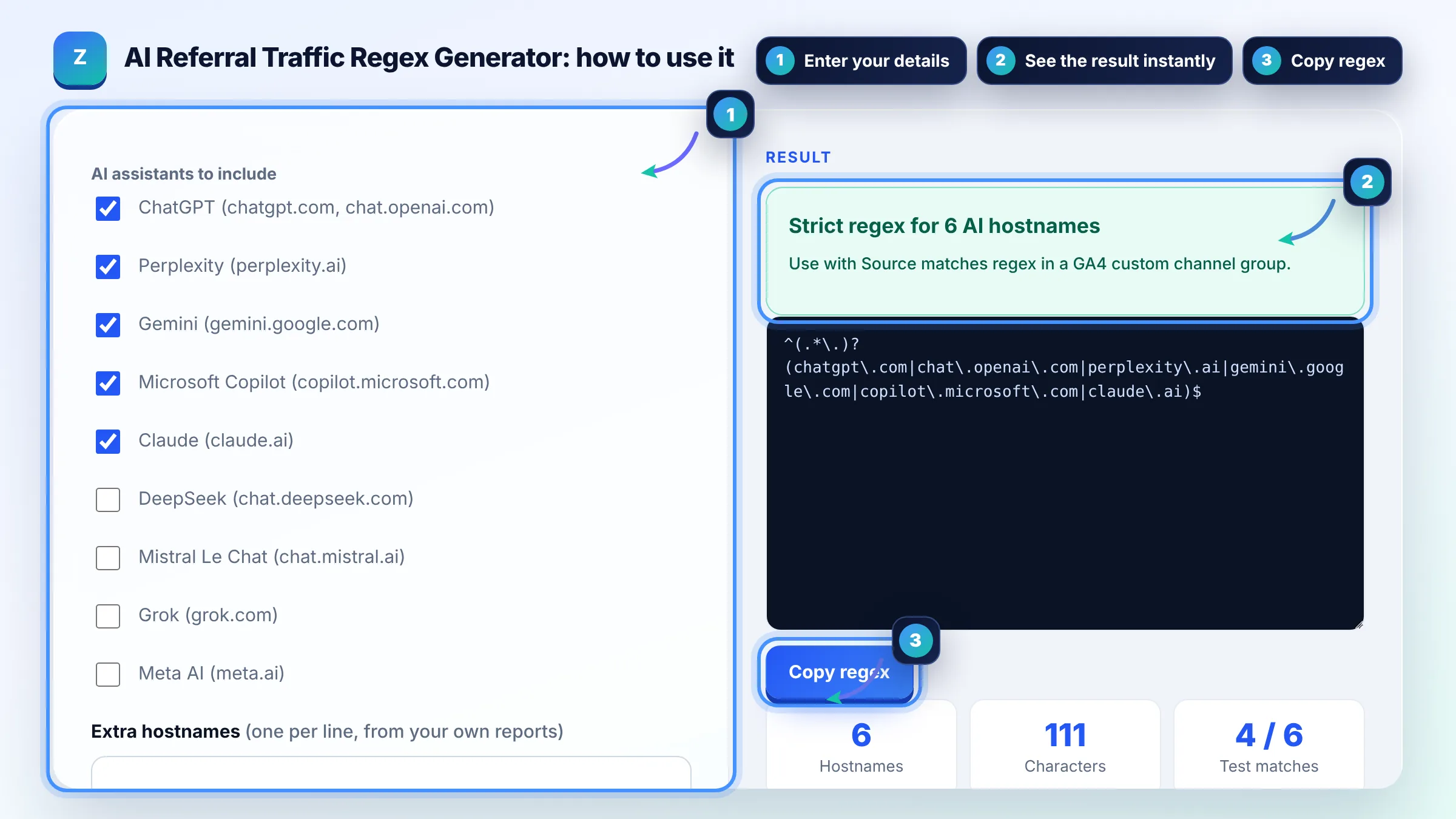
Tick the AI assistants you care about and copy one GA4 regex for a custom AI channel.
AI assistants to include
GA4 setup: Admin, Data display, Channel groups, Create new channel group, Add new channel, condition Source matches regex, paste the pattern, then reorder the channel above Referral.
The free chatgpt traffic regex ga4 runs in your browser, needs no sign-up and never sends what you type anywhere.
To track ChatGPT traffic in GA4, create a custom channel group with a channel such as AI assistants where Source matches a regex like ^(.*\.)?(chatgpt\.com|perplexity\.ai|gemini\.google\.com|copilot\.microsoft\.com|claude\.ai)$. Place it above Referral, because GA4 assigns each visit to the first channel whose rules it matches.
An AI referral regex generator is a tool that writes one regular expression matching the referral hostnames of AI assistants such as ChatGPT, Perplexity, Gemini, Copilot and Claude. GA4 regex is a full match by default, so the pattern lists each domain, escapes the dots and allows an optional subdomain such as www.
Open Reports, Acquisition, Traffic acquisition, switch the primary dimension to Session source and search for chatgpt.com. OpenAI says ChatGPT adds utm_source=chatgpt.com to referral URLs, so these visits usually show chatgpt.com as the source. For an ongoing view, add a custom channel group using the regex from this tool.
GA4 puts each visit in the first channel whose definition it matches, in the order of the list. If Referral sits above your AI channel, visits from chatgpt.com or perplexity.ai match Referral first and never reach the AI channel. Google explains this in its custom channel groups help page.
Yes, GA4 uses full match for regex by default, so chatgpt alone will not match chatgpt.com. Use .* or a full domain list with anchors, as this generator does. Channel definitions are not case sensitive, but report filters can be, so keep hostnames in lowercase.
| AI assistant | Typical GA4 source | Pattern part |
|---|---|---|
| ChatGPT | chatgpt.com (older: chat.openai.com) | chatgpt\.com|chat\.openai\.com |
| Perplexity | perplexity.ai | perplexity\.ai |
| Google Gemini | gemini.google.com | gemini\.google\.com |
| Microsoft Copilot | copilot.microsoft.com | copilot\.microsoft\.com |
| Claude | claude.ai | claude\.ai |
| DeepSeek | chat.deepseek.com | chat\.deepseek\.com |
Example: with ChatGPT, Perplexity, Gemini, Copilot and Claude ticked, the strict regex is ^(.*\.)?(chatgpt\.com|chat\.openai\.com|perplexity\.ai|gemini\.google\.com|copilot\.microsoft\.com|claude\.ai)$. Tested against 6 sample sources, it matches chatgpt.com, www.perplexity.ai, gemini.google.com and claude.ai, and correctly ignores google and facebook.com.
Yes, by default. GA4's default channel group has no AI channel, so visits from chatgpt.com or perplexity.ai land in Referral. A custom channel group with the regex from this tool moves them into their own AI channel in your reports.
No. Clicks from AI Overviews and AI Mode come from Google Search, so GA4 reports them as google / organic, mixed with normal search clicks. Search Console includes them in the Performance report, but it does not separate them from other web results.
Yes. Google says custom channel groups can be applied to your reports retroactively, so you can see past AI visits once the group is saved. Audiences only use the new definition going forward.
Some apps and browsers do not pass a referrer when a user taps a link, for example in certain mobile apps or when copying a link. Those visits arrive as direct / none and no regex can recover them. The real AI share is often a little higher than reported.
A standard GA4 property can have 2 custom channel groups and a GA4 360 property can have 5, in addition to the default group. Each group can hold up to 50 channels, so one AI channel fits easily.
No. The generator and tester run entirely in your browser. Nothing is sent to Google Analytics or any server. You copy the regex and paste it into GA4 yourself.
Facts checked against these official pages. Read how I check facts in my editorial policy.
A UTM builder is a tool that appends tracking parameters to a landing page URL. It takes the base URL, keeps…
A regex tester is a tool that compiles a regular expression and applies it to sample strings so you can see…
An AI crawler robots.txt generator is a tool that turns your allow or block choice for each AI user agent…
Send your website and I will check it for you, free.
One short email when something new goes live: articles, free SEO tools, package updates, discounts and price alerts. No spam, unsubscribe in one click.