Htaccess Redirect Generator
An htaccess redirect generator is a tool that converts old and new URLs into Apache directives such as…
Test a regular expression against URLs line by line and preview redirect replacements.
| Line | Match | Groups | Result |
|---|
The free regex tester runs in your browser, needs no sign-up and never sends what you type anywhere.
This regex tester runs your pattern against each line of sample text, usually URLs, and shows which lines match, the highlighted match, every capture group and the result of a replacement such as /articles/$2. Rule of thumb: anchor redirect patterns with ^ and $, escape dots and question marks, and test URLs that should not match too.
A regex tester is a tool that compiles a regular expression and applies it to sample strings so you can see matches before using the pattern live. It uses the browser's JavaScript RegExp engine, which is close to the syntax in Apache, Nginx, Google Analytics and Search Console, with some differences.
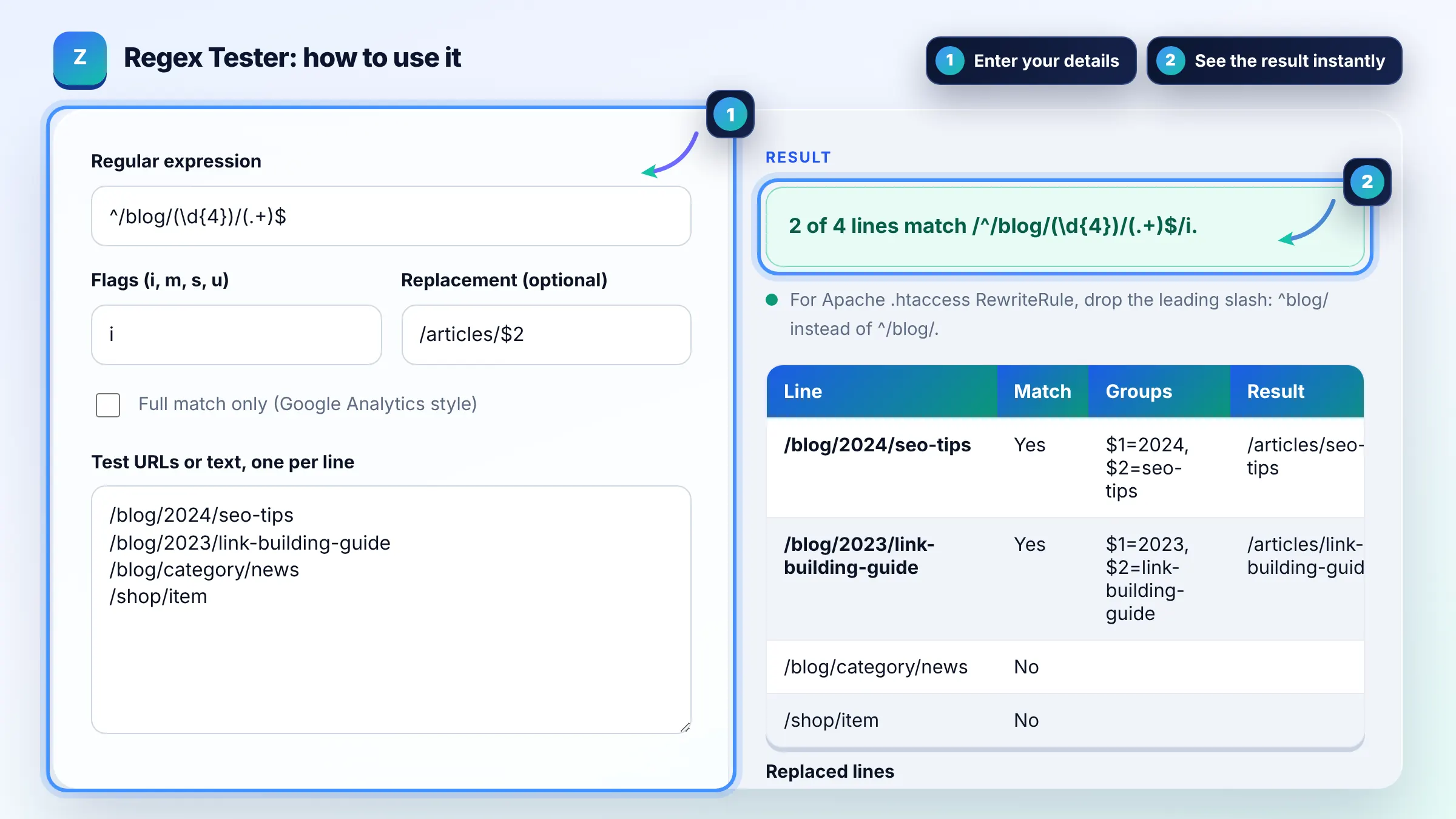
Paste the old URLs one per line, write a pattern with ^ and $ anchors and capture groups, and add the target with $1 or $2 to preview each new URL. Include URLs that must not redirect, because an over broad pattern is the most common redirect mistake. Test the final rule on a staging server too.
Google Analytics 4 uses RE2 regular expressions, which are case sensitive and match the full value by default, so add .* for partial matches. RE2 does not support lookaheads or backreferences. See Google's guide to regular expressions in Analytics.
In the Performance report, add a Query or Page filter and choose Custom (regex), then enter a pattern such as ^(what|how|why) to find question queries. Search Console uses RE2 syntax, so lookaheads are not available. Use the negative option in the filter to exclude matches instead.
| Pattern | Matches | SEO use |
|---|---|---|
| ^/blog/(.+)$ | /blog/any-post | Redirect a folder, keep the slug |
| \.(jpg|png|webp)$ | URLs ending in an image extension | Filter image URLs in a crawl |
| ^(what|how|why|when)\b | Question style queries | Search Console query filter |
| [?&]utm_ | URLs with UTM parameters | Find tracking URLs to canonicalize |
| ^https?://(www\.)?example\.com | HTTP, HTTPS, www and non www | Normalize hostnames |
Example: the pattern ^/blog/(\d{4})/(.+)$ with replacement /articles/$2 is tested on 4 URLs. /blog/2024/seo-tips becomes /articles/seo-tips and /blog/2023/link-building-guide becomes /articles/link-building-guide, while /blog/category/news and /shop/item do not match, which is exactly what the redirect needs.
Usually because it is missing anchors or uses a greedy .* in the middle. Add ^ at the start and $ at the end, and replace .* with a narrower class such as [^/]+ when you only want one path segment. Always test URLs that should not match.
Escape the dot as \. when you mean a literal dot, because an unescaped dot matches any character. Forward slashes do not need escaping in this tool or in most server configs, though JavaScript regex literals written between slashes do need them escaped.
They insert the text captured by the first and second pair of parentheses in the pattern. In Apache RewriteRule and Nginx rewrite you use the same $1 style, so the preview here maps directly to most redirect rules.
Basic syntax such as anchors, groups, classes and quantifiers works the same. Apache RewriteRule matches the path without the leading slash in .htaccess, so ^blog/ rather than ^/blog/. Lookbehind and named groups may differ, so test on staging before going live.
RE2 is the regex engine used by Google Analytics, Search Console and Looker Studio. It does not support lookaheads, lookbehinds or backreferences. If your pattern uses them, it works in this tester but will be rejected or behave differently in those Google tools.
No. Patterns run in your browser with the JavaScript RegExp engine, and nothing is uploaded or stored. Very complex patterns on long text can be slow, so the tool limits output to the first 500 lines.
Facts checked against these official pages. Read how I check facts in my editorial policy.
An htaccess redirect generator is a tool that converts old and new URLs into Apache directives such as…
A redirect map generator is a tool that builds the old URL to new URL table you need before a site migration.…
An Nginx redirect generator is a tool that turns old and new URLs into Nginx configuration such as location =…
Send your website and I will check it for you, free.
One short email when something new goes live: articles, free SEO tools, package updates, discounts and price alerts. No spam, unsubscribe in one click.