Website design and WordPress SEO
SVG vs PNG vs WebP: Which Image Format to Use on a Website
SVG vs PNG vs WebP for websites: which format to use for logos, icons, photos and screenshots, what Google Images supports, and…
Read article
This guide is for site owners, designers and developers who want the small images around a website, the favicon, the social share image and the home screen icon, to look right everywhere. You get the favicon, Open Graph and app icon sizes taken from Google, Facebook, X and web.dev documentation checked today, the tags that go with each file, and free tools to make them.
Use a square favicon larger than 48 by 48 pixels, since Google requires at least 8 by 8. Make the Open Graph image 1200 by 630 pixels, which Facebook recommends, and X accepts at 2:1. For a web app manifest, add 192 by 192 and 512 by 512 icons plus a separate 512 by 512 maskable icon.
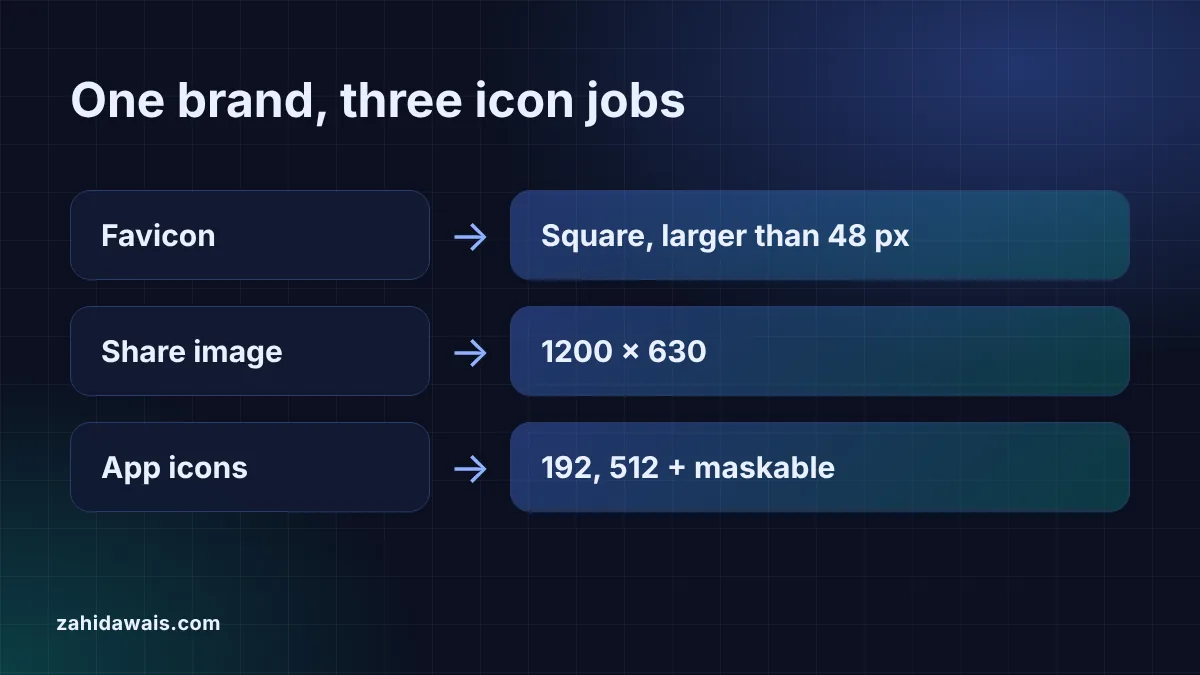
Google needs a square favicon of at least 8 by 8 pixels, and recommends one larger than 48 by 48. Google’s favicon guidelines say: “Your favicon must be a square (1:1 aspect ratio) that’s at least 8x8px”, and “we recommend using a favicon that’s larger than 48x48px so that it looks good on various surfaces.”
The same page lists the supported formats as “BMP, GIF, ICO, PNG, JPEG, PPM, and TIFF”, and adds rules that matter as much as size. “Googlebot-Image must be able to crawl the favicon file and Googlebot must be able to crawl the home page.” The URL “must be stable”, so do not rename the file every redesign. Google supports one favicon per hostname, which means www.example.com and shop.example.com can differ, but example.com/blog cannot have its own. Declare it with <link rel="icon" href="/favicon.ico"> or a PNG equivalent; Google also reads apple-touch-icon. The favicon generator makes the files in common sizes.
| Image | Size from the docs | Formats and limits | Source |
|---|---|---|---|
| Favicon in Google Search | Square, at least 8 × 8 px; larger than 48 × 48 px recommended | BMP, GIF, ICO, PNG, JPEG, PPM, TIFF | Google Search Central |
| Open Graph image (Facebook) | At least 1200 × 630 px, close to 1.91:1; minimum 200 × 200 px | Up to 8 MB | Meta for Developers |
| X summary_large_image | 2:1, from 300 × 157 to 4096 × 4096 px | Under 5 MB; JPG, PNG, WEBP, GIF; no SVG | X Developer docs |
| Manifest icons | 192 × 192 and 512 × 512 px | PNG; SVG with a raster fallback | web.dev |
| Maskable icon | At least 512 × 512 px, logo inside a 40% radius circle | Separate icon entry | web.dev |
Make the Open Graph image 1200 by 630 pixels. Facebook’s guide to images in link shares says to “use images that are at least 1200 x 630 pixels” for high resolution devices, to keep them “as close to 1.91:1 aspect ratio as possible”, that “the minimum allowed image dimension is 200 x 200 pixels”, and that the file “must not exceed 8 MB”.
X documents its large image card separately. Its summary card with large image page says images “support an aspect ratio of 2:1 with minimum dimensions of 300×157 or maximum of 4096×4096 pixels”, must be “less than 5MB”, and that “SVG is not supported”. Because 1.91:1 and 2:1 are close, one 1200 by 630 image with the text kept away from the edges works on both. The OG image generator draws that image from your title and brand colours and writes the tags for you.
Add og:image with the full image URL, plus og:image:width, og:image:height and alt text. Facebook says “using these tags will specify the image dimensions to the crawler”, which lets it render the image on the first share instead of processing it first. For X, add twitter:card with the value summary_large_image and twitter:image; its alt text tag allows a “maximum 420 characters”.
<meta property="og:image" content="https://www.example.com/og/page.png">
<meta property="og:image:width" content="1200">
<meta property="og:image:height" content="630">
<meta name="twitter:card" content="summary_large_image">
After publishing, check what the platforms will read with the Open Graph checker, and see the card as people will see it in the Open Graph preview.
A web app manifest needs at least a 192 by 192 and a 512 by 512 icon, plus a separate maskable icon. web.dev’s guide to adding a manifest says Chromium needs these two sizes and scales them for other uses, and its manifest lesson says “if you need to pick only one icon size, it should be 512 by 512 pixels”. Maskable icons “should be at least 512 by 512”.
A maskable icon has extra padding so the system can crop it to a circle or rounded square. web.dev’s maskable icon guide says the logo must fit inside “a circular area in the center of the icon with a radius equal to 40% of the icon width”, and advises against listing one icon as both any and maskable. The web app manifest generator builds the icon list, checks those rules and gives you the <link rel="manifest"> and theme-color tags.
For the file format of each image, see SVG vs PNG vs WebP.
Example: setting up the images for a new site, example.com. The favicon is a 96 by 96 PNG, square and larger than 48 by 48, linked with rel="icon" at a fixed URL. The share image is a 1200 by 630 PNG from the OG image generator: with a #0F172A background, white title and the default layout, the title “How to fix crawled, currently not indexed” fits on 2 lines at 76px with a contrast of 17.85:1, and the tool outputs og:image:width 1200 and og:image:height 630. The manifest from the web app manifest generator lists 3 icons, 192 by 192, 512 by 512 and a 512 by 512 maskable icon, and reports 0 errors and 0 warnings.
Google requires a square favicon of at least 8 by 8 pixels and recommends one larger than 48 by 48. A 96 by 96 or 192 by 192 PNG is a practical choice, with an ICO file for older browsers if you want one.
Google’s favicon page lists BMP, GIF, ICO, PNG, JPEG, PPM and TIFF as the supported formats. SVG is not on that list, so add a PNG or ICO favicon as well if you use an SVG icon for browsers.
I only state sizes the platforms document themselves, and I checked Facebook and X. A 1200 by 630 image at about 1.91:1 is widely used across link previews, but test your pages with each platform’s own tools.
Check that Googlebot can crawl the home page and Googlebot-Image can crawl the icon file, that it is square and at least 8 by 8 pixels, and that the URL is stable. Google says recrawling can take several days to several weeks.
No, it is optional. A manifest still helps when visitors add your site to a phone home screen, because it sets the name, icon and colours used there. It takes a few minutes with a generator.
Use the same logo, but not always the same file. A favicon has to read at tiny sizes, while a maskable app icon needs padding around the logo. Keep the colours and shape consistent so people recognise the brand.
This guide is part of my website design and SEO guides.
Checked 23 Oct 2026. Facts checked against these official pages. Read how I check facts in my editorial policy.
Want a site where every icon, share image and tag is set up properly? See my website design service.
SVG vs PNG vs WebP for websites: which format to use for logos, icons, photos and screenshots, what Google Images supports, and…
Read article
Responsive images and SEO: how srcset and sizes work, what Google says about src fallbacks, and how width, height and fetchpriority help…
Read article
Responsive CSS without media queries: fluid type and spacing with clamp(), grids that wrap with auto-fit and minmax(), and the zoom check…
Read articleSend your website and I will reply with a free audit.