Website design and WordPress SEO
Favicon, OG Image and App Icon Sizes: What the Docs Say
Favicon, Open Graph and app icon sizes from Google, Facebook, X and web.dev: the exact numbers, formats and tags, with free tools…
Read article
This guide is for site owners, designers and WordPress users who want each image on their site in the right format, without guessing. You will learn the real difference in SVG vs PNG vs WebP, which one suits logos, icons, photos and screenshots, what Google Search supports, and how to change formats without breaking anything.
Use SVG for logos, icons and diagrams, because it is vector code that stays sharp at any size. Use WebP for photos and screenshots, because it is usually smaller than PNG or JPEG. Keep PNG for lossless copies, transparency fallbacks and apps that do not accept WebP. Google Search supports all three formats.
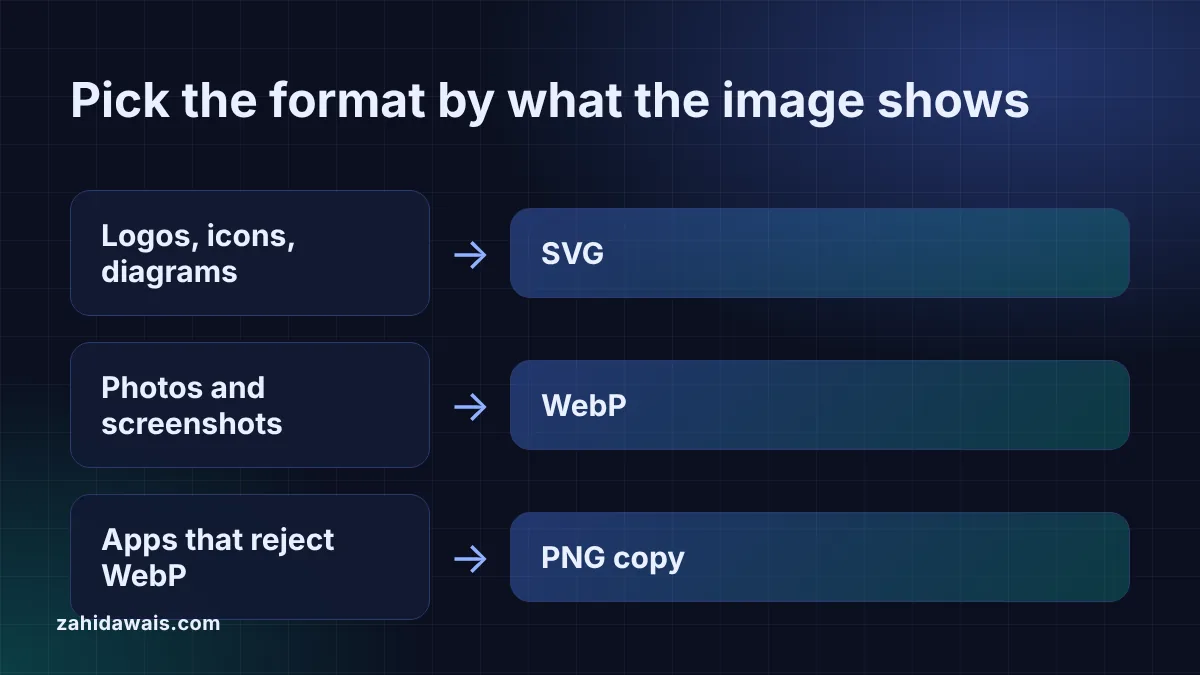
Choose by what the image contains: SVG for shapes drawn with lines and flat colours, WebP for anything made of pixels, and PNG only when you need a lossless copy that every app can open. MDN’s image file type guide says that for diagrams and charts that must be drawn accurately at different sizes you should “use SVG”, and that for raster images you should “prefer WebP or AVIF, which generally provide better compression than PNG, JPEG, and GIF”.
The three formats are not rivals for the same job. SVG is vector code, while PNG and WebP store pixels. A photo saved as SVG would only wrap a bitmap inside it, and a logo saved as PNG blurs when it is scaled up. Most sites need all three, each in its own place.
| Format | Type | Transparency | Supported by Google Search | Best for |
|---|---|---|---|---|
| SVG | Vector (text code) | Yes | Yes | Logos, icons, diagrams, charts |
| PNG | Raster, lossless | Yes | Yes | Lossless copies, apps that need PNG |
| WebP | Raster, lossy or lossless | Yes | Yes | Photos and screenshots on your site |
| JPEG | Raster, lossy | No | Yes | Photo fallback for older software |
SVG is the best choice for logos, icons, arrows, simple illustrations and charts, because it describes shapes as text and scales to any screen without losing sharpness. A simple icon is often a few hundred bytes, smaller than any pixel version at retina sizes, and you can change its colour with CSS.
Tiny decorative icons can go straight into your CSS as data URIs, which saves a request. The SVG to data URI converter optimises the code, encodes only the characters that need it and shows the URL-encoded and base64 sizes side by side. SVG is code, so treat files from unknown sources with care: the converter removes script elements and event attributes, and browsers do not run scripts in an SVG shown as an image.
Use PNG when a person or an app needs a lossless file that opens everywhere, such as a logo for a print shop, a screenshot for a support ticket, or an upload form that rejects WebP. On your own pages, WebP usually does the same job in less space. Google’s WebP documentation says “WebP lossless images are 26% smaller in size compared to PNGs” and that WebP is natively supported in Chrome, Safari, Firefox, Edge and Opera.
Both formats keep transparency, so you do not need PNG for a transparent logo on the web. When someone sends you a WebP and a tool insists on PNG, the WebP to PNG converter makes the PNG in your browser. Keep the WebP on the site and use the PNG only where it is required.
Format choice affects SEO mainly through page speed and indexing: WebP files are usually smaller, so pages load faster, and both formats can appear in Google Images. Google’s image SEO best practices say Google Search supports images in the img src attribute in “BMP, GIF, JPEG, PNG, WebP, SVG, and AVIF”. The same page says “Google doesn’t index CSS images”, so an SVG used as a CSS background will not show in image search.
What helps image SEO more than the format is the markup around it: an img element with a fallback src, descriptive alt text and a clear file name. Read how to name image files for SEO and responsive images and srcset to get those parts right.
Switch one template or section at a time, keep the original files, and check each page after the change. Convert photos and screenshots with the JPG to WebP converter, leave logos and icons as SVG, and keep the same width and height attributes so the layout does not shift.
If you must support very old browsers, MDN suggests a picture element with a PNG or JPEG fallback. On WordPress, an image plugin can create WebP copies and serve them automatically; my guide to WordPress image optimization covers the settings. Do not change the image URLs Google already knows unless you redirect or update every link to them.
Example: a small business home page with four images. The logo and the arrow icons are SVG. One arrow icon, pasted into the SVG to data URI converter, is 298 bytes as exported and 203 bytes after optimising, and its data URI is 240 characters URL-encoded against 298 in base64, so it goes into the CSS as the shorter URL-encoded version. The hero photo and a screenshot of the client dashboard are WebP, with width and height set. The print shop needs the logo badge as PNG, so the 242 byte sample.webp badge goes through the WebP to PNG converter and the PNG is sent to the printer only, never uploaded to the site.
Yes. Google’s image documentation lists SVG among the formats Google Search supports in the img src attribute. Use an img element with alt text for SVGs that matter, because Google says it does not index images set with CSS.
Yes. Google says lossless WebP supports transparency at a cost of just 22% additional bytes, and lossy WebP supports it too. So a transparent logo or product cut-out does not need PNG on a website.
Both are modern raster formats, and MDN recommends WebP or AVIF over PNG, JPEG and GIF because they generally compress better. Test both on your own images, and provide a fallback with the picture element if you must support older browsers.
An SVG is code and can contain scripts. Browsers disable scripts when an SVG is shown as an image, but a script can run if someone opens the file directly. Use SVGs from trusted sources, or strip scripts first.
Convert photos and screenshots where the WebP is clearly smaller and looks the same. Logos and icons are better as SVG. Keep the original PNG files as a backup, and check every page after the change.
All current major browsers do. Google says WebP is natively supported in Chrome, Safari, Firefox, Edge and Opera. Only very old browsers lack it, and a picture element with a PNG or JPEG fallback covers them.
This guide is part of my website design and SEO guides.
Checked 23 Oct 2026. Facts checked against these official pages. Read how I check facts in my editorial policy.
Want a fast website with every image in the right format? See my website design service.
Favicon, Open Graph and app icon sizes from Google, Facebook, X and web.dev: the exact numbers, formats and tags, with free tools…
Read article
Responsive images and SEO: how srcset and sizes work, what Google says about src fallbacks, and how width, height and fetchpriority help…
Read article
Responsive CSS without media queries: fluid type and spacing with clamp(), grids that wrap with auto-fit and minmax(), and the zoom check…
Read articleSend your website and I will reply with a free audit.