JPG to WebP Converter
A JPG to WebP converter is a tool that re-encodes JPG or PNG images as WebP, a format made by Google that…
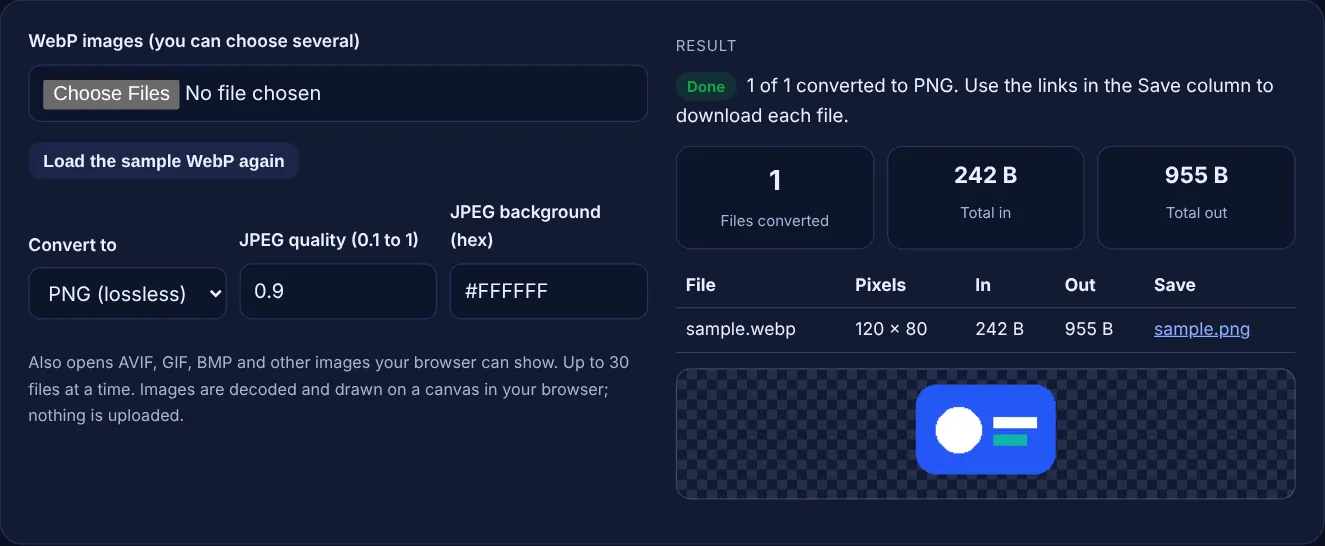
Choose one or more WebP images and convert them to PNG, or to JPEG with a quality setting, right in your browser. Files never leave your device.
Also opens AVIF, GIF, BMP and other images your browser can show. Up to 30 files at a time. Images are decoded and drawn on a canvas in your browser; nothing is uploaded.
| File | Pixels | In | Out | Save |
|---|
The free WebP to PNG converter turns WebP images into PNG files, or into JPEG with a quality setting, inside your browser. Choose several files at once, see the pixel size and file size before and after, and save each result. No image is uploaded to a server.
To convert WebP to PNG, open the WebP in a tool that can decode it, draw it at full size and save it as PNG. PNG is lossless and keeps transparency, so nothing more is lost, but the file is usually larger than the WebP. Convert only when an app or upload form does not accept WebP.
A WebP to PNG converter decodes a WebP image into pixels and saves those pixels in the PNG format. WebP is a modern format from Google that can be lossy or lossless, and Google's WebP page says "WebP lossless images are 26% smaller in size compared to PNGs". That is why many sites serve WebP and why images saved from the web often arrive as .webp files.
Some older apps, print services and upload forms still accept only PNG or JPEG. This tool draws each image on an HTML canvas and exports it with the canvas toBlob method. MDN's toBlob reference says "Browsers are required to support image/png" and that the quality setting applies to lossy formats such as JPEG. The PNG keeps every pixel and any transparency exactly as decoded.
Convert to PNG when the image has transparency, sharp edges or text, such as logos, icons and screenshots, and to JPEG when it is a photo and file size matters. MDN's image format guide says PNG is "the fallback for any image needing transparency, as JPEG has no alpha channel". If a transparent image goes to JPEG, the tool fills the transparent areas with the background colour you choose and tells you.
Do not convert your own website images away from WebP just to be safe. Every current major browser shows WebP, and Google lists WebP among the formats Google Search supports. Keep WebP on the site and convert only copies for apps that need PNG or JPEG.
The PNG is larger because PNG compression is less efficient than WebP, and because a lossy WebP becomes a lossless PNG that stores every decoded pixel. Converting cannot bring back detail that lossy WebP compression removed, so the PNG looks the same as the WebP, only in a bigger file.
If you need a smaller file, choose JPEG with a quality of 0.8 to 0.9 for photos, or run the PNG through the image compressor. To go the other way and make WebP files for your site, use the JPG to WebP converter.
Yes, and it is more private than an upload based converter, because the files never leave your device. The tool reads each file with an object URL, decodes it with the browser's own image decoder, draws it on a canvas and creates the PNG or JPEG locally. There is no server, account or limit on how often you use it.
One trade off: the canvas export does not copy metadata such as camera details or location. For photos you post online that is often a benefit, but keep the original if you need that data.
| Format | Compression | Transparency | Best use |
|---|---|---|---|
| WebP | Lossy or lossless | Yes | Images on your website |
| PNG | Lossless | Yes | Logos, icons, screenshots, apps that need PNG |
| JPEG | Lossy | No | Photos for apps, email and print |
| SVG | Vector, not pixels | Yes | Icons and logos that must scale |
Example: the built-in sample is sample.webp, a 242 byte lossless WebP of 120 by 80 pixels with transparent corners. As soon as the page loads, the tool converts it to sample.png and shows 1 of 1 converted to PNG, with the PNG size next to the WebP size. Now switch to JPEG and choose two files: logo-transparent.png (40 by 30 pixels, 208 bytes) and photo.webp (300 by 200 pixels, 198 bytes). The table lists logo-transparent.jpg and photo.jpg, the total in is 406 B, and a note says the logo has transparent pixels that were filled with #FFFFFF.
No. The images are decoded and converted by your own browser with JavaScript and a canvas. Nothing is sent over the network, so it is safe for client files, private screenshots and photos you have not published yet.
Yes. Choose up to 30 files in the file box at once. Each one gets its own row with sizes and a download link. Very large images take longer and use more memory, so split big batches on a phone.
No further quality is lost, because PNG is lossless and stores the decoded pixels exactly. Detail removed earlier by lossy WebP compression cannot be restored, though, so the PNG looks the same as the WebP you started with.
Only the first frame is converted, because a canvas draws one still image. PNG output here is a still image. For animations, use a desktop tool that can export animated PNG or GIF.
Any format your browser can display, which usually includes AVIF, GIF, BMP, JPEG and PNG. If your browser cannot show a format, the tool says the file could not be decoded.
JPEG cannot store transparency, so transparent pixels need a colour. The tool uses white by default. Change the background field to any hex colour, such as your page background, or choose PNG to keep the transparency.
Checked 23 Oct 2026. Facts checked against these official pages. Read how I check facts in my editorial policy.
A JPG to WebP converter is a tool that re-encodes JPG or PNG images as WebP, a format made by Google that…
An image compressor is a tool that reduces an image's file size by resizing it and re-encoding it with lossy…
An image resizer is a tool that redraws an image at a new pixel size. With the aspect ratio locked it scales…
Turns SVG code into a short URL-encoded or base64 data URI with CSS and img snippets.
Send your website and I will check it for you, free.
One short email when something new goes live: articles, free SEO tools, package updates, discounts and price alerts. No spam, unsubscribe in one click.