
E-commerce SEO
How to Show Shipping and Returns in Google Search
Show shipping costs, delivery times and return policies in Google Search with ShippingService and MerchantReturnPolicy markup, or Merchant Center settings.
Read article
This guide is for shop owners, subscription businesses and marketers who report on customers and want to use the right number in the right place. You will learn the difference in churn rate vs retention rate, the formula for each, why they sometimes do not add up to 100%, and how to compare months with years without overstating losses.
Churn rate is the share of customers at the start of a period who left during it; retention rate is the share who stayed. Measured on the same group, they add up to 100%: 54 lost of 1,200 is 4.50% churn and 95.50% retention. Churn highlights losses, retention highlights loyalty, and both ignore new customers.
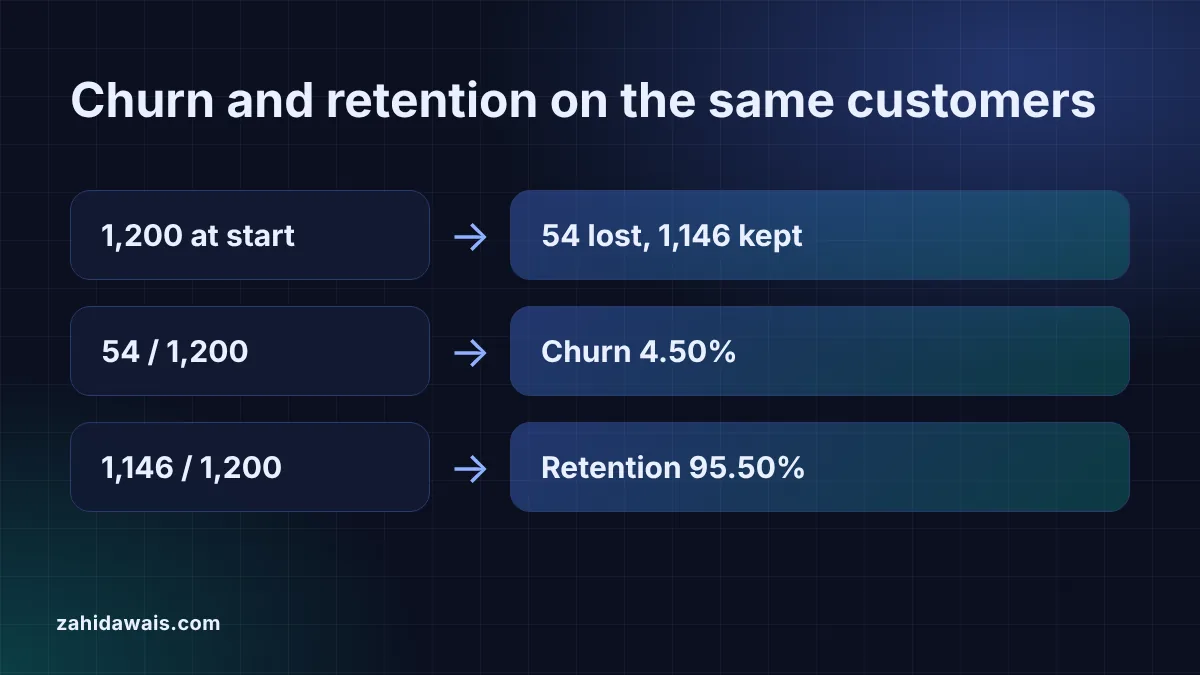
Churn rate is the percentage of the customers you had at the start of a period who stopped being customers during it. The usual formula is churn rate = customers lost / customers at start x 100. What counts as lost depends on the business: a cancelled subscription, a contract that was not renewed, or for some shops a buyer who has not ordered again within a set time.
Billing tools write their own definitions, so check them before you compare figures. Stripe’s Billing analytics documentation says that when all of a subscriber’s subscriptions are cancelled or marked unpaid, “the subscriber is considered to have churned”. Its subscriber churn rate divides churned subscribers in the past 30 days by active subscribers 30 days ago plus new subscribers in those 30 days, a slightly different base from the usual formula.
Customer retention rate (CRR) is the percentage of customers at the start of a period who are still customers at the end of it. Because the count at the end includes people who joined during the period, you subtract them first: CRR = (E - N) / S x 100, where E is customers at the end, N is new customers and S is customers at the start. Salesforce gives the same customer retention rate formula: “(Customers you end with – new customers)/customers you started with”.
The customer retention rate calculator applies this formula and also builds a table for several months, so you can see the trend rather than one figure.
Churn rate counts the customers who left and retention rate counts the ones who stayed, so for the same group in the same period they always add up to 100%. The difference is mostly in the inputs you need and the story each number tells. Churn needs a count of lost customers, which billing systems record as cancellations. Retention needs start and end counts plus new customers, which is easier when you only have customer lists from two dates.
| Churn rate | Retention rate | |
|---|---|---|
| Measures | Share of starting customers who left | Share of starting customers who stayed |
| Formula | Lost / S x 100 | (E – N) / S x 100 |
| Inputs you need | Customers at start, customers lost | Customers at start, at end, new |
| Sample result | 54 / 1,200 = 4.50% | (1,296 – 150) / 1,200 = 95.50% |
| Better when it is | Lower | Higher |
| Often reported by | Subscription and SaaS businesses | Shops, service firms, agencies |
Pick one as your main number and show the other beside it. Subscription businesses tend to report churn, because a small monthly loss is easy to watch. Shops and service firms often report retention, because it shows how much of the customer base keeps buying.
They stop adding up to 100% when the two numbers are not calculated on the same base, period or unit. The three common causes are:
Use compounding, not multiplication: annual churn = 1 - (1 - monthly churn)^12. Each month you lose a share of the customers who are left, not of the original group. At 4.50% monthly churn, 95.50% stay each month, 0.955^12 leaves 57.55% after a year, so annual churn is 42.45%. Multiplying by 12 would give 54%, which overstates the loss.
Stripe shows the same effect for retention by cohort: with 10% monthly churn, it lists 90%, 81%, 73%, 66% and 59% retention for months 1 to 5. The churn rate calculator does this conversion for monthly, quarterly and yearly rates and shows the simple multiplied figure next to it, so you can see the gap.
Revenue churn measures the recurring revenue you lost, while customer churn counts the people. Gross revenue churn is MRR lost to cancellations and downgrades divided by MRR at the start. Stripe calls that loss churned revenue, “the sum of churned MRR plus total contraction MRR”. Net revenue churn subtracts expansion MRR from upgrades, and net revenue retention is 100% minus net revenue churn.
The two views can disagree. A company can lose 4.50% of its customers but only 2.50% of its revenue, net, because the customers who stayed bought more. Report both when your plans have different prices.
They tell you how long new customers stay, and so how much you can afford to spend winning them. A common estimate of average customer lifetime is 1 divided by churn rate, and the customer lifetime value calculator turns that into revenue per customer. Compare it with your customer acquisition cost before raising ad or SEO budgets. For a shop, a higher average order value from kept customers adds to the same sum, and the guide on the value of an SEO lead shows how to put that value against organic enquiries.
Do not confuse customer retention with the retention data in Google Analytics. Its retention overview report says “User retention shows the percentage of users who return each day in their first 42 days”. That is returning visitors, not paying customers, so take CRR and churn from your CRM, shop or billing system.
Example: a subscription box shop starts the month with 1,200 customers and $36,000 MRR. During the month 54 customers cancel and 150 new ones sign up, so it ends with 1,296. Churn is 54 / 1,200 = 4.50% and retention is (1,296 – 150) / 1,200 = 95.50%, together 100%. Compounded, 4.50% a month is 42.45% a year. Cancellations and downgrades cost $1,800 of MRR and upgrades add $900, so gross revenue churn is 5.00% and net revenue churn 2.50%. These are the default inputs of both calculators.
Yes, when both are measured on the same starting customers over the same period. If your churn rate uses a different base, such as start plus new customers, or a different period, the two will not add up to exactly 100%.
Track both, but pick one as your headline number. Churn suits subscriptions, where cancellations are recorded as they happen. Retention suits shops and services where you compare customer lists from two dates. Keep the same definition every period.
There is no universal benchmark, because rates depend on your industry, prices, contracts and how often people buy. Compare your figures with your own past periods of the same length, and check that customer value covers what you spend to acquire customers.
No. Retention looks only at the customers you had at the start, so new customers are subtracted from the end count. Otherwise a month with strong sales would hide the customers you lost.
Yes. Customer retention cannot exceed 100%, but net revenue retention can, because customers who stay may upgrade or buy more. A business can lose customers and still grow revenue from the ones who remain.
Because churn compounds. Each month you lose a share of the customers who are left, which is a smaller group every time. 4.50% monthly churn is 42.45% a year, not 54%.
This guide is part of my SEO guides.
Checked 23 Oct 2026. Facts checked against these official pages. Read how I check facts in my editorial policy.
Want steady new customers to replace the ones who leave? See my SEO services.
Show shipping costs, delivery times and return policies in Google Search with ShippingService and MerchantReturnPolicy markup, or Merchant Center settings.
Read article
How to calculate break-even ROAS: find your contribution margin, divide 1 by it, then set target ROAS, ACoS and CPA for profit.…
Read article
Every store retires products. The status code you choose decides whether that page's value is kept, moved or lost.
Read articleSend your website and I will reply with a free audit.