Churn Rate Calculator
Customer churn, gross and net revenue churn, and compounded monthly to annual rates.
Enter customers at the start, at the end and the new ones you won to get your retention rate, churn and a table for several periods.
E is everyone who is a customer at the end of the period, including the new ones. Nothing leaves your browser.
| Metric | Value |
|---|
| Period | Kept | Retention | Churn |
|---|
The free customer retention rate calculator applies the standard formula (E - N) / S x 100 to your customers at the start, customers at the end and new customers won, shows the matching churn rate, and builds a period by period table so you can see whether retention is rising or falling.
Customer retention rate (CRR) is the share of customers you had at the start of a period who are still customers at the end. The formula is (E - N) / S x 100, where E is customers at the end, N is new customers and S is customers at the start. (1,296 - 150) / 1,200 is 95.50%.
A customer retention rate calculator is a tool that tells you what share of your existing customers stayed with you over a period, using three counts from your CRM, shop or billing system. Salesforce describes the inputs as "Customers at the start of a given period", "Customers at the end of that period" and "New customers acquired during that period", and gives the formula as (customers you end with - new customers) / customers you started with.
New customers are taken out because they were not there at the start, so they cannot have been retained. Retention and churn are two sides of the same number: if 95.50% stayed, 4.50% left. The optional table repeats the sum for several months or quarters, the same idea as a cohort view.
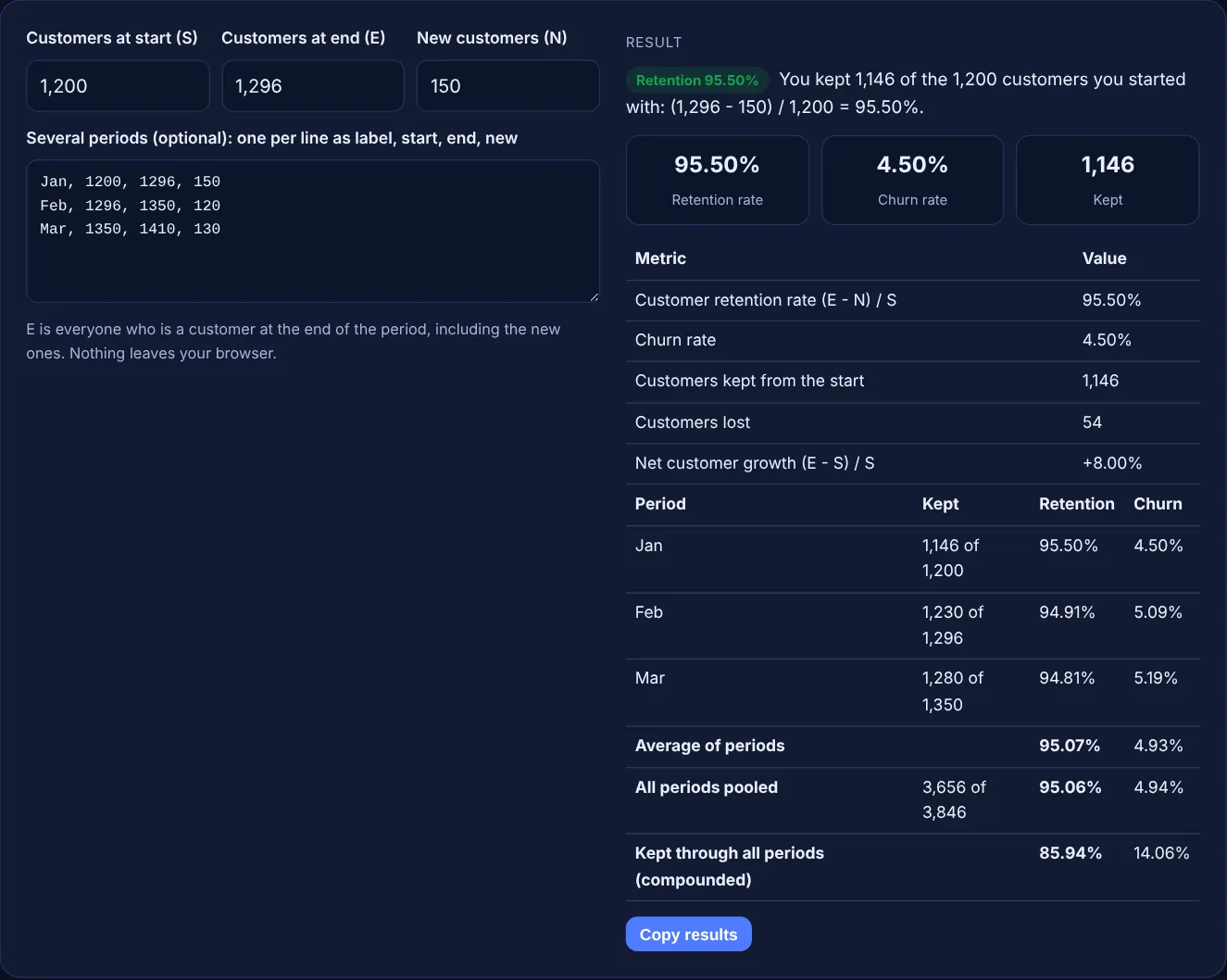
Subtract new customers from customers at the end of the period, divide by customers at the start, and multiply by 100: CRR = (E - N) / S x 100. A business that starts the month with 1,200 customers, wins 150 and ends with 1,296 kept 1,146 of its original customers, so its retention rate is 1,146 / 1,200 = 95.50%. Use the same counting rules, such as what makes someone an active customer, every period.
Retention rate is the share of starting customers who stayed, and churn rate is the share who left, so together they add up to 100%. A 95.50% retention rate means 4.50% churn. Use the churn rate calculator when you know how many customers left rather than the end count, and when you also want revenue churn from MRR or an annual rate from a monthly one.
Calculate retention for each period separately, then compare them side by side, as the table in this tool does. It also shows three summaries: the simple average of the periods, a pooled rate from all kept and starting customers, and compounded retention, which multiplies the rates to estimate how many of the first group remain after every period. Google Analytics uses a similar idea in its cohort exploration, where a cohort is "a group of users who share a common characteristic".
| Metric | Formula | Sample result |
|---|---|---|
| Customer retention rate | (E - N) / S x 100 | (1,296 - 150) / 1,200 = 95.50% |
| Churn rate | 100% - retention rate | 100% - 95.50% = 4.50% |
| Customers kept | E - N | 1,296 - 150 = 1,146 |
| Net customer growth | (E - S) / S x 100 | 96 / 1,200 = +8.00% |
| Pooled retention | Sum of kept / sum of start | 3,656 / 3,846 = 95.06% |
| Compounded retention | Rate 1 x rate 2 x rate 3 | 95.50% x 94.91% x 94.81% = 85.94% |
Example: an online shop with a subscription box starts January with 1,200 customers, wins 150 and ends with 1,296. Retention is (1,296 - 150) / 1,200 = 95.50% and churn is 4.50%, even though the customer count grew 8.00%. February (1,296 to 1,350 with 120 new) gives 94.91% and March (1,350 to 1,410 with 130 new) gives 94.81%. Pooled over the quarter retention is 95.06%, and compounded only 85.94% of a group kept through all three months would remain.
There is no single good figure, because retention depends on your industry, prices and how often people need to buy. Compare your rate with your own earlier periods of the same length, and check that what you earn from kept customers covers what you spend winning new ones.
Customer retention rate cannot go above 100%, because you cannot keep more customers than you started with. If the sum gives more, new customers are missing from N. Revenue retention can pass 100% when existing customers upgrade, which is a different metric.
The customer count grows when new customers outnumber the ones who leave. Retention only looks at the starting group, so a shop can grow 8% in a month while still losing 4.50% of its existing customers. Growth can hide a retention problem.
Use a period that matches how often customers buy or pay. Monthly suits subscriptions billed monthly, while a quarter or a year suits slower purchase cycles. Keep the same length every time, because rates from different period lengths cannot be compared directly.
Google Analytics shows user retention, not customer retention. Its retention overview report shows the share of users who return each day in their first 42 days. That measures returning visitors, not paying customers, so use your CRM or billing data for CRR.
No. The calculator runs entirely in your browser with JavaScript. Customer counts are never uploaded or stored, so you can use real figures from your CRM or shop safely.
Checked 23 Oct 2026. Facts checked against these official pages. Read how I check facts in my editorial policy.
Customer churn, gross and net revenue churn, and compounded monthly to annual rates.
A customer lifetime value calculator is a tool that estimates the total value one customer brings during the…
A customer acquisition cost calculator is a tool that adds every cost of winning customers (ad spend, SEO and…
AOV from revenue and orders, period change, revenue per visitor and a what-if uplift.
Send your website and I will check it for you, free.
One short email when something new goes live: articles, free SEO tools, package updates, discounts and price alerts. No spam, unsubscribe in one click.