
Technical SEO
HTML Sitemap vs XML Sitemap: Which One Does Your Site Need?
HTML sitemap vs XML sitemap: what each one does, what Google says about sitemaps and links, when a site needs one or…
Read article
This guide is for site owners, developers and SEOs who want their photos and videos found in Google and are unsure whether a media sitemap is worth the effort. You will learn when an image sitemap or a video sitemap actually helps, which tags Google still supports in 2026, the limits that apply, and how to build both files in a few minutes with free tools.
You need an image sitemap when Google might miss your images, for example images loaded with JavaScript or hosted on a CDN. You need a video sitemap when videos sit on your own watch pages and you want Google to find and understand them. Plain img tags and small, well linked sites often need neither.
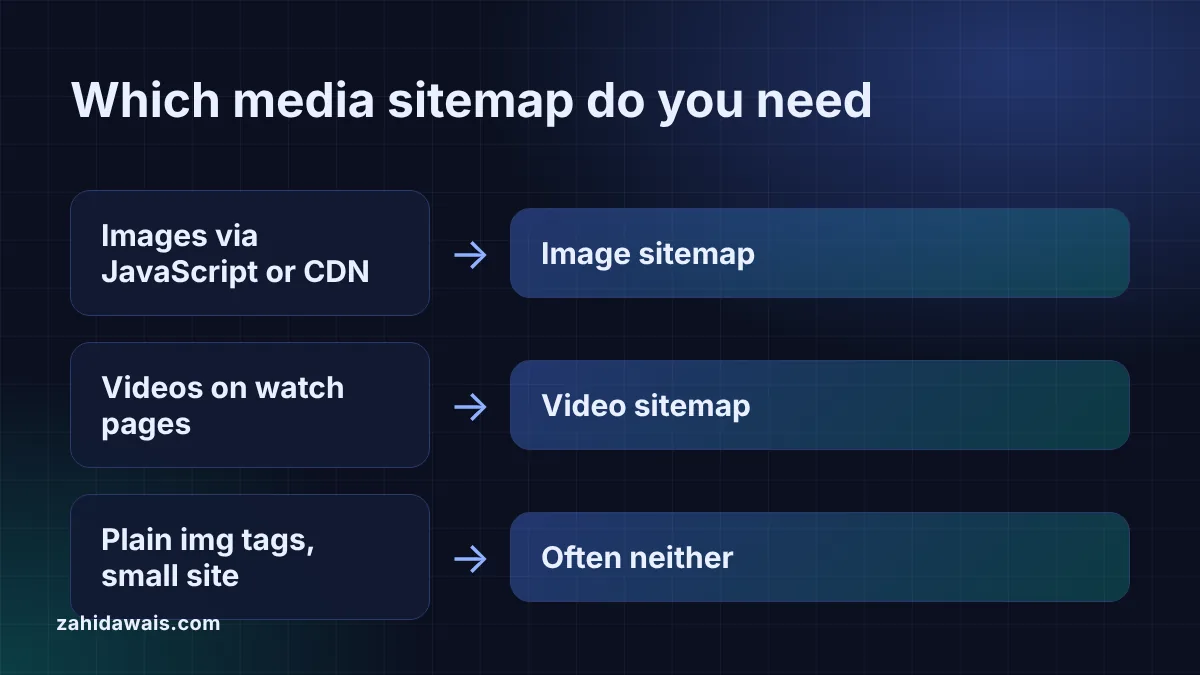
Image and video sitemaps add media details to an ordinary XML sitemap, so Google learns which images and videos belong to which page. Google’s sitemap overview says “a sitemap image entry can include the location of the images included in a page” and “a sitemap video entry can specify the video running time, rating, and age-appropriateness rating.”
Both are extensions of the normal format, each with its own namespace: http://www.google.com/schemas/sitemap-image/1.1 for images and http://www.google.com/schemas/sitemap-video/1.1 for videos. You can put the media tags in your existing sitemap or in a separate file. Google says of image sitemaps that “either approach is equally fine for Google”, and the video documentation offers the same choice. The table compares the two.
| Question | Image sitemap | Video sitemap |
|---|---|---|
| Namespace | sitemap-image/1.1 | sitemap-video/1.1 |
| Required tags | image:image, image:loc | thumbnail_loc, title, description, content_loc or player_loc |
| Main limit | Up to 1,000 images per url entry | Description up to 2,048 characters, duration 1 to 28,800 seconds |
| Removed tags | caption, title, geo_location, license | category, gallery_loc, price, tvshow |
| Best for | Images loaded with JavaScript or hosted on a CDN | Videos on your own watch pages |
| Alternative | Plain img elements on crawlable pages | VideoObject structured data, mRSS |
You need an image sitemap when Google may not find your images by crawling your pages. Google’s image sitemap documentation describes them as a way to tell Google about images “that we might not otherwise find (such as images your site reaches with JavaScript code)”. Typical cases are product galleries and sliders built with JavaScript, lazy loading scripts that hide the real image URL, and photo heavy sites where images matter for traffic.
If your images are ordinary <img> elements in the HTML, Google can usually find them without help. Its image SEO guidance says “Google can find images in src attribute of <img> element” and also that “Google doesn’t index CSS images”, so background images set in CSS are not a reason to build a sitemap. If you sell products, my guide to product image SEO covers the on-page side, which matters more than the sitemap.
You need a video sitemap when you host or embed videos on your own pages and want Google to find them and read their details. Google’s video sitemap documentation says creating one “is a good way to help Google find and understand the video content on your site”. It adds: “Google recommends using video sitemaps, however we also support mRSS feeds.”
A sitemap alone does not get a video indexed. Google’s video best practices say “the video must be embedded on a watch page” and “the watch page must be indexed”. If Search Console reports a problem here, my guide to Video isn’t on a watch page explains the fix. Structured data is the other main way to describe a video, and the video schema generator builds VideoObject markup for the same page.
For images, only two tags: image:image and image:loc, both required. Google says it “removed the following tags and attributes from our documentation”: image:caption, image:geo_location, image:title and image:license.
For videos, the required tags are video:thumbnail_loc, video:title, video:description, and either video:content_loc or video:player_loc. Optional tags include duration, expiration_date, rating, view_count, publication_date, family_friendly, restriction, platform, requires_subscription, uploader, live and tag. Google removed video:category, video:gallery_loc, video:price, video:tvshow, and the autoplay and allow_embed attributes of player_loc from its documentation. Old plugins may still write them, so check your output.
Collect the media URLs per page, generate the XML, check it and submit it. Step by step:
content_loc and player_loc must not equal the page URL in loc, and HTML or Flash files are not supported video formats.Example: a small shop on www.example.com loads its product gallery with JavaScript and hosts the photos on cdn.example.net. It pastes 4 lines into the image sitemap generator. The tool returns 6 images on 3 pages, skips 1 duplicate photo, merges a repeated product line and flags the 3 images on cdn.example.net, so the shop verifies that domain in Search Console. The same shop has 3 how-to videos on 2 watch pages. The video sitemap generator writes all 3 with 0 errors, converts a 6:05 duration to 365 seconds and drops an old category line with 1 warning.
No. An image sitemap helps Google discover images and connect them to pages, but it does not raise rankings by itself. How images rank depends on the page, the text around the image, alt text and image quality.
Often not, if your SEO plugin’s sitemap already lists images. Open it and look for image:loc tags. Also check for removed tags such as image:caption or image:title, and only build your own file if images are missing.
Yes. Google’s guide to combining sitemap extensions says to add the tags from each extension you use, with one namespace per extension on the urlset element. Separate files are easier to regenerate on their own, though.
Only for YouTube videos embedded on your own pages, and only if you want those pages to show as video results. List your watch page as the loc and the YouTube embed URL in player_loc.
Up to 1,000 image:image tags in one url entry, according to Google’s image sitemap documentation. The whole file must still stay within 50,000 URLs and 50MB uncompressed, like any other sitemap.
Upload it to your site, then add it in the Sitemaps report of Search Console, or list it in your sitemap index. You can also add a Sitemap line to robots.txt so other search engines find it.
This guide is part of my technical SEO guides.
Checked 23 Oct 2026. Facts checked against these official pages. Read how I check facts in my editorial policy.
Want your images and videos checked for indexing by hand? See my technical SEO service.
HTML sitemap vs XML sitemap: what each one does, what Google says about sitemaps and links, when a site needs one or…
Read article
Which rich results Google still shows in 2026: the 25 features in Google's search gallery, the ones retired since 2023 with exact…
Read article
XML sitemap size limit explained: 50,000 URLs or 50MB uncompressed per file, what happens above it, and how to split a big…
Read articleSend your website and I will reply with a free audit.