Video Schema Generator
A video schema generator is a tool that writes schema.org VideoObject structured data. It turns the video…
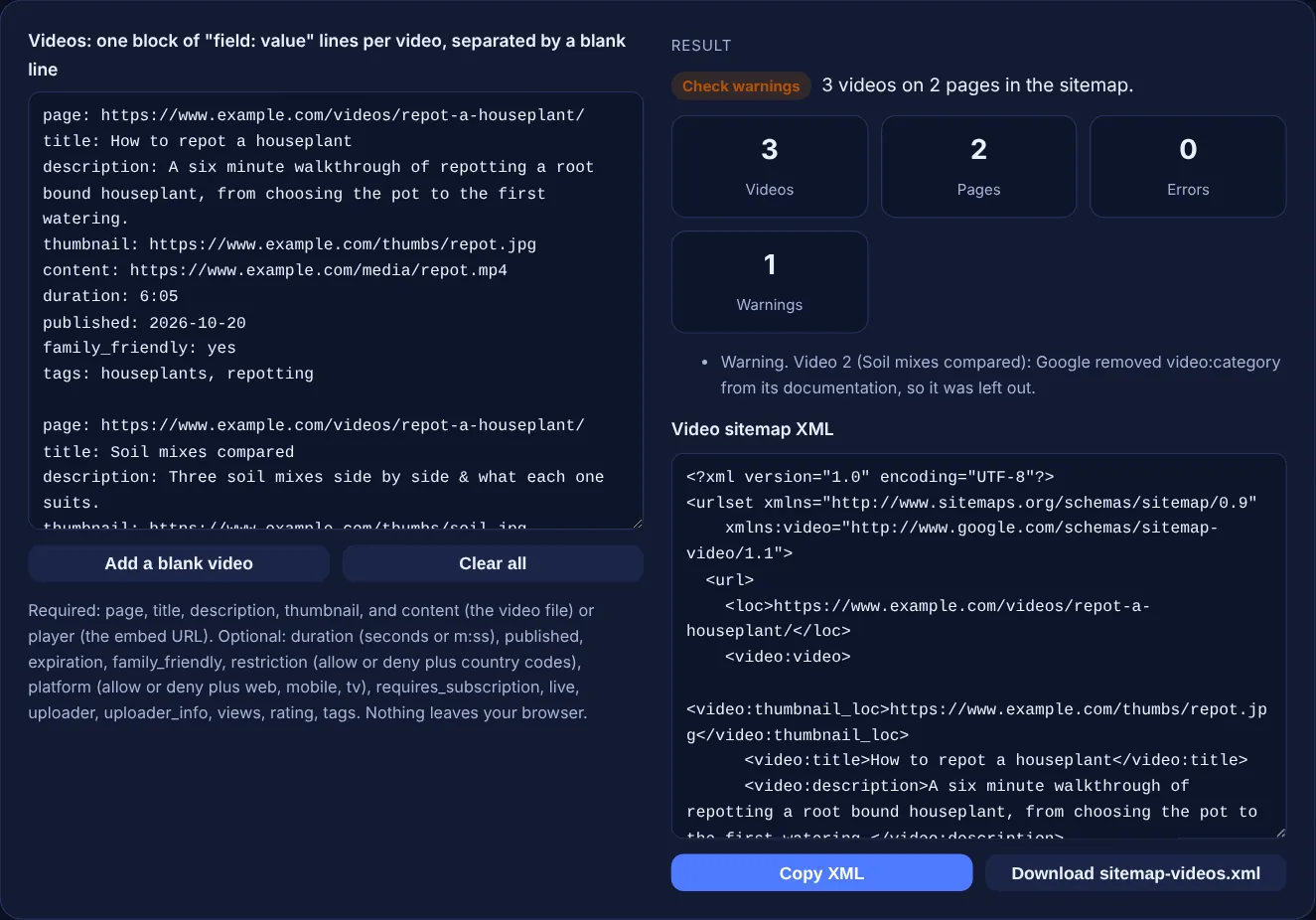
Describe each video in a few labelled lines and get a video sitemap with the tags Google documents today, checked against Google's limits.
Required: page, title, description, thumbnail, and content (the video file) or player (the embed URL). Optional: duration (seconds or m:ss), published, expiration, family_friendly, restriction (allow or deny plus country codes), platform (allow or deny plus web, mobile, tv), requires_subscription, live, uploader, uploader_info, views, rating, tags. Nothing leaves your browser.
The free video sitemap generator turns a short description of each video into an XML video sitemap with the tags Google documents today. It checks the required fields, the limits Google states for description, duration and tags, and leaves out tags Google has removed.
A video sitemap is an XML sitemap that describes the videos on your pages with Google's video namespace. Each video needs a thumbnail, title, description and either a content_loc file URL or a player_loc embed URL. Optional tags such as duration, publication date and restrictions add detail, within limits Google sets.
A video sitemap is a sitemap with extra video:video blocks that describe the videos on each page. Google's video sitemap documentation says it "is a good way to help Google find and understand the video content on your site". The loc of each url entry is the watch page, and each video on that page gets its own video:video block. The namespace is http://www.google.com/schemas/sitemap-video/1.1.
Google lists the required tags as thumbnail_loc, title, description, and content_loc or player_loc. It also removed several tags from its documentation: video:category, video:gallery_loc, video:price, video:tvshow, and the autoplay and allow_embed attributes of player_loc. This tool warns you and leaves those out. For on-page markup of the same video, use the video schema generator.
Every video needs video:thumbnail_loc, video:title, video:description, and either video:content_loc or video:player_loc. Google recommends that the title match the one on the page and says the description has a "Maximum 2048 characters". The content and player URLs must not be the same as the page URL in loc, and Google says "HTML and Flash aren't supported formats" for content_loc. Use player_loc for embeds from YouTube, Vimeo and similar platforms.
Duration "must be from 1 to 28800 (8 hours)" in seconds. Rating is a number from 0.0 to 5.0. Uploader can be "a maximum of 255 characters", and its info URL must be on the same domain as the page. "A maximum of 32 tags is permitted per video." Restriction takes ISO 3166 country codes and platform takes web, mobile and tv, each with a required relationship of allow or deny. Dates use the W3C format. The tool checks each of these.
Not strictly, but they work well together. Google's video SEO best practices say Google supports "structured data, video sitemaps, and the Open Graph protocol" as video metadata. A sitemap helps Google find videos, especially new ones, while structured data on the page describes each video where it is shown. Either way, the video must sit on an indexed watch page whose main purpose is that video.
| Tag | Required? | Google's rule |
|---|---|---|
| thumbnail_loc | Yes | Follow the video thumbnail requirements |
| title | Yes | Should match the title on the page; escape HTML entities |
| description | Yes | Maximum 2,048 characters |
| content_loc or player_loc | One of them | Not the same URL as loc; no HTML or Flash files |
| duration | No | 1 to 28,800 seconds |
| rating | No | 0.0 to 5.0 |
| restriction, platform | No | relationship allow or deny is required |
| uploader | No | Up to 255 characters; info on the same domain |
| tag | No | Up to 32 per video |
| category, gallery_loc, price, tvshow | Removed | Removed from Google's docs |
Example: the default input describes 3 videos. Two are on the houseplant watch page and one is on the pruning page, so the sitemap has 2 url entries holding 3 videos. The duration 6:05 is written as 365 seconds. The soil mix video uses a player URL and its description is escaped to &. Its category: Gardening line is left out with 1 warning, because Google removed video:category from its documentation. The pruning video gets <video:restriction relationship="allow">GB US</video:restriction>. Result: 0 errors.
Yes, if they are embedded on your own watch page. Use the page on your site as page, and the embed URL as player. Do not list videos that are unrelated to the page content, which Google asks you to avoid.
Yes. Google allows several video:video entries inside one url entry. Give each video its own block with the same page URL, and the tool groups them under one url entry in the order you listed them.
It is left out of the XML and the error explains why, such as a missing thumbnail or a content URL that equals the page URL. Invalid optional values only cause a warning and that single tag is dropped.
You can. Google says you can create a separate video sitemap or add video tags to an existing sitemap. A separate sitemap-videos.xml is easier to update when you publish new videos, and you can list it in a sitemap index.
Yes. Google recommends video sitemaps but also supports mRSS feeds, which can be tested, submitted and updated like sitemaps. This tool writes the sitemap format, which is the one Google recommends.
No. The generator runs entirely in your browser with JavaScript, and the file is created on your device. You can safely use it for videos that are not published yet or for a client site.
Checked 23 Oct 2026. Facts checked against these official pages. Read how I check facts in my editorial policy.
A video schema generator is a tool that writes schema.org VideoObject structured data. It turns the video…
Turns page and image URL rows into a Google image sitemap with checked image:loc tags.
A sitemap validator is a tool that parses sitemap XML and checks it against the sitemap protocol and Google's…
A sitemap index generator is a tool that wraps each sitemap URL in a sitemap element with a loc and optional…
Send your website and I will check it for you, free.
One short email when something new goes live: articles, free SEO tools, package updates, discounts and price alerts. No spam, unsubscribe in one click.