Sitemap XML Validator
A sitemap validator is a tool that parses sitemap XML and checks it against the sitemap protocol and Google's…
Paste each page URL followed by its image URLs and get a valid image sitemap in the format Google documents today.
A CSV with one page and one image per row also works: rows for the same page are merged and a header row is ignored. Google removed image:caption, image:title, image:geo_location and image:license from its documentation, so only image:image and image:loc are written. Everything runs in your browser.
The free image sitemap generator turns a list of page URLs and the image URLs on each page into an XML image sitemap in the exact format Google documents today. It merges repeated pages, removes duplicate images, escapes special characters and checks Google's 1,000 images per page limit.
An image sitemap is an XML sitemap that lists, for each page, the images it uses with image:image and image:loc tags in Google's image namespace. It helps Google find images it might miss, such as images loaded with JavaScript. Google allows up to 1,000 images per URL and no longer documents caption, title, geo_location or license tags.
An image sitemap is a sitemap that tells Google which images appear on which pages. Google's image sitemap documentation calls it "a way of telling Google about other images on your site, especially those that we might not otherwise find (such as images your site reaches with JavaScript code)". Each page is a normal url entry with a loc, and each image is an image:image block with one image:loc inside. The image prefix must be declared with the namespace http://www.google.com/schemas/sitemap-image/1.1.
Only those two tags are required, and they are the only image tags Google still documents. Google says it "removed the following tags and attributes from our documentation": image:caption, image:geo_location, image:title and image:license. This tool writes only the supported tags, so you do not ship markup Google no longer documents. To check the finished file, paste it into the sitemap XML validator.
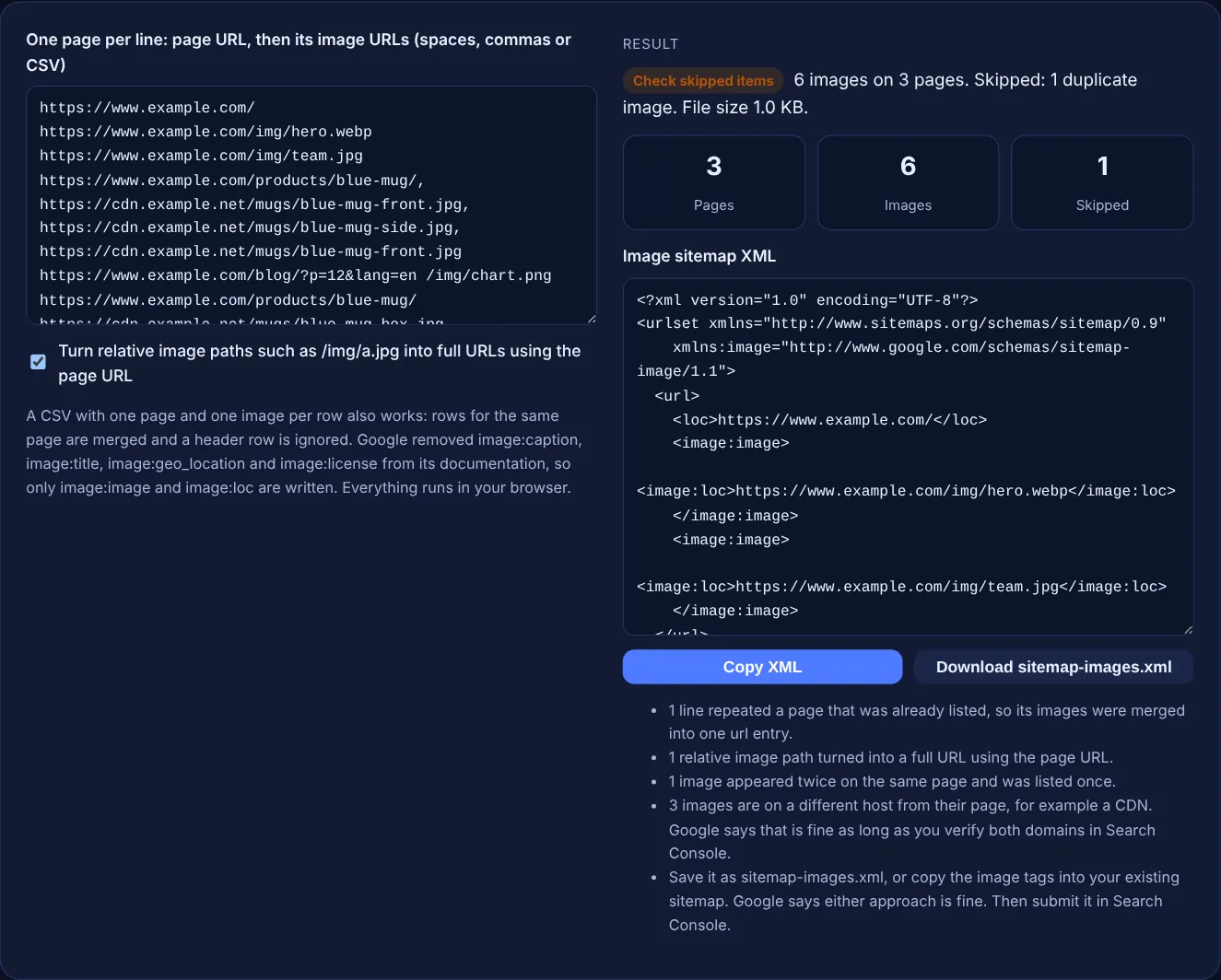
Google supports two tags: image:image, which "encloses all information about a single image", and image:loc, "the URL of the image". Both are required. The older image:caption, image:title, image:geo_location and image:license tags were removed from Google's documentation, and Google links a deprecation announcement on the same page. A sitemap that only lists image locations is all Google needs from you; describe the image on the page itself with alt text and nearby text.
Up to 1,000. Google states: "Each <url> tag can contain up to 1,000 <image:image> tags." The general sitemap limits still apply to the whole file: 50,000 URLs or 50MB uncompressed. If a page lists more than 1,000 images, this tool keeps the first 1,000 and tells you how many it left out. A file that grows past the size limit can be split with the XML sitemap splitter.
Yes. Google says that when "the image URL may not be on the same domain as your main site", this "is fine, as long as you verify both domains in Search Console". Google's image SEO best practices also say you can include URLs from other domains in image:loc, which lets you host images on a CDN. The tool counts images whose host differs from the page so you know which domains to verify.
| Item | Status or limit | Source |
|---|---|---|
| image:image | Required, one per image | Google image sitemap docs |
| image:loc | Required, the image URL | Google image sitemap docs |
| image:caption, image:title | Removed from Google's docs | Google image sitemap docs |
| image:geo_location, image:license | Removed from Google's docs | Google image sitemap docs |
| Images per url entry | Up to 1,000 | Google image sitemap docs |
| URLs per sitemap file | 50,000 or 50MB uncompressed | Google sitemap docs |
| Namespace | http://www.google.com/schemas/sitemap-image/1.1 | Google image sitemap docs |
Example: the default input has 4 lines for www.example.com. The blue mug page appears twice, and its front photo is listed twice. The generator outputs 6 images on 3 pages: 2 on the home page, 3 on the mug page and 1 on the blog page. It skips 1 duplicate image and merges the second mug line into the first. The relative path /img/chart.png becomes https://www.example.com/img/chart.png, and the blog URL with &lang=en is written as &lang=en. The notes flag 3 images on cdn.example.net, a host to verify in Search Console.
No. Google says you can create a separate image sitemap or add image tags to your existing sitemap, and either approach is equally fine. A separate file is easier to regenerate, while one file keeps everything in one place.
Not in the sitemap. Google removed image:caption and image:title from its documentation. Put descriptive alt text, a clear file name and helpful text near the image on the page instead, because Google reads those from the page itself.
Yes. Use one page URL and one image URL per row, or a page followed by several images. Rows for the same page are merged, and a first row without URLs is treated as a header and ignored.
The tool skips values that are not full http or https URLs, the same image listed twice on one page, and images beyond 1,000 on a page. The notes list each reason and how many items it affected.
It helps Google discover them, but it is not a guarantee. Google still needs to crawl the image files, so make sure robots.txt does not block them. Image quality, page context and alt text matter for how they rank.
No. The generator runs entirely in your browser with JavaScript, and the download is created on your device. You can safely use it for a staging site or a client project that is not live yet.
Checked 23 Oct 2026. Facts checked against these official pages. Read how I check facts in my editorial policy.
A sitemap validator is a tool that parses sitemap XML and checks it against the sitemap protocol and Google's…
Builds a Google video sitemap from labelled video details and checks required tags and limits.
A sitemap index generator is a tool that wraps each sitemap URL in a sitemap element with a loc and optional…
Splits a URL list or sitemap into files under 50,000 URLs and 50MB, plus a sitemap index.
Send your website and I will check it for you, free.
One short email when something new goes live: articles, free SEO tools, package updates, discounts and price alerts. No spam, unsubscribe in one click.