Htaccess Redirect Generator
An htaccess redirect generator is a tool that converts old and new URLs into Apache directives such as…
Paste a list of URLs, with status codes if you have them, to find mixed trailing slash use and get redirect rules that enforce one pattern.
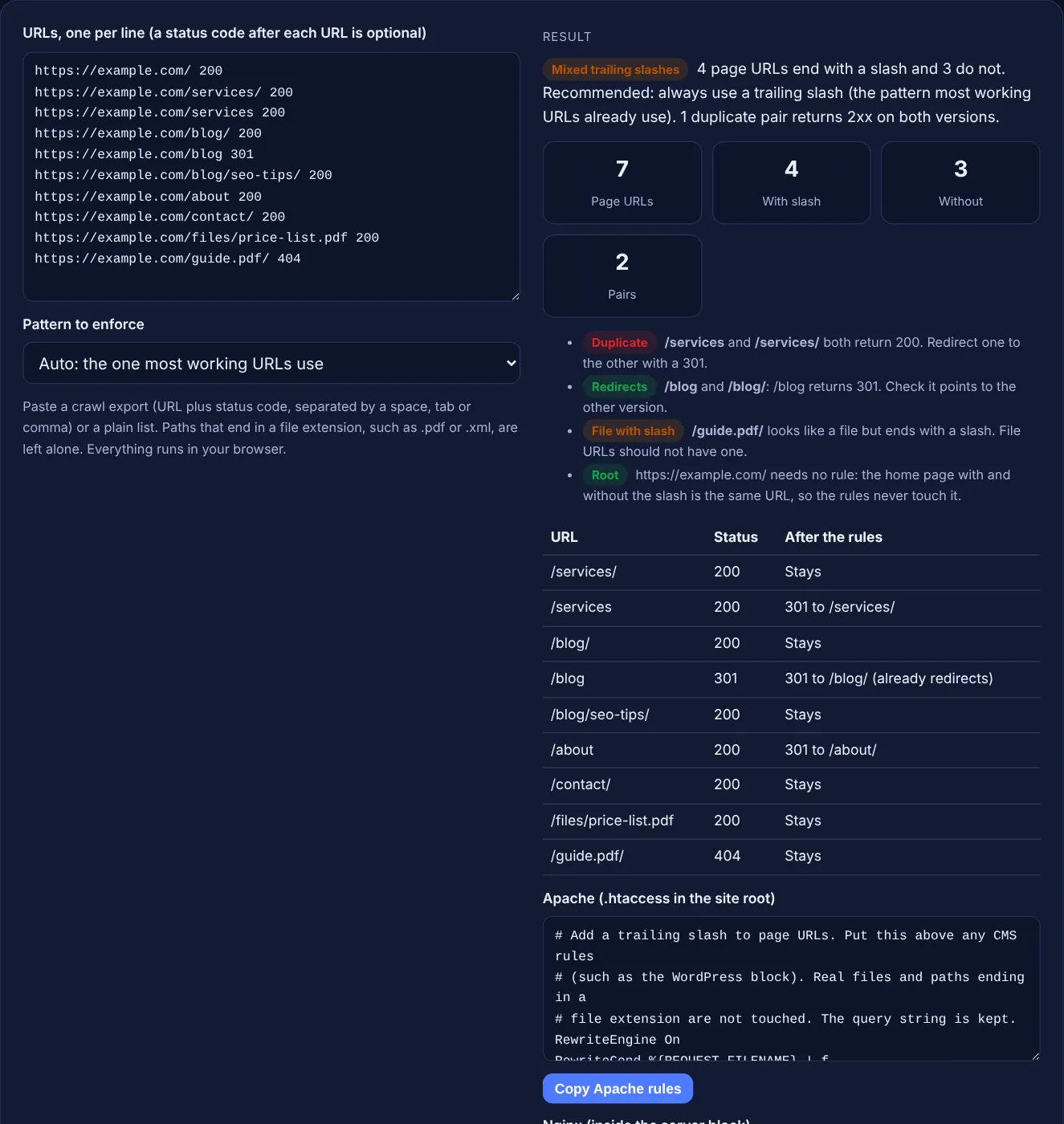
Paste a crawl export (URL plus status code, separated by a space, tab or comma) or a plain list. Paths that end in a file extension, such as .pdf or .xml, are left alone. Everything runs in your browser.
| URL | Status | After the rules |
|---|
The free trailing slash checker reads a list of URLs, finds pages that appear both with and without a slash at the end, flags file URLs with a stray slash, and writes 301 redirect rules for Apache and Nginx that enforce the one pattern you choose. It runs in your browser.
A trailing slash checker compares the URLs on a site and finds paths that end with a slash next to paths that do not, especially pairs like /services and /services/. Google treats those as separate URLs, so pick one pattern, use it in internal links and 301 redirect the other version to it.
A trailing slash checker is a tool that groups your URLs by path and shows whether they end in a slash or not. When both /blog and /blog/ load a page, search engines see two URLs with the same content. Google's post To slash or not to slash says Google "treats each URL above separately (and equally) regardless of whether it's a file or a directory", and suggests a 301 redirect from the duplicate to the preferred version.
This checker does more than count. If you paste status codes from a crawl, it tells you which pairs are real duplicates (both 200) and which already redirect. It then previews exactly what the generated rules would do to each URL, using the same regular expressions that go into the Apache and Nginx code.
Either choice is fine for SEO as long as you use one consistently. Google's post says it is "more conventional to use a trailing slash with your directory URLs", but adds that "you're free to choose whichever you like". What matters is that each page has one URL, that internal links, the sitemap and canonical tags all use it, and that the other version redirects to it. Changing a whole site from one pattern to the other creates many redirects, so keep the pattern most of your indexed URLs already use.
No. The root URL is a special case: Google says http://example.com "is equivalent to" http://example.com/, because a browser always requests / for the home page. The generated rules never touch the root, and the checker only shows a note when it finds the home page in your list. Folders below the root, such as /blog and /blog/, are different URLs and do need a decision.
Both use the same regular expression, so they behave the same way. In Apache, the rule sits in .htaccess, where the leading slash is stripped from the path before matching, as the Apache per-directory rewrite docs explain. The [R=301] flag sends a permanent redirect and the query string is kept. In Nginx, the rewrite directive with the permanent flag "returns a permanent redirect with the 301 code" and keeps the original arguments. Paths ending in a file extension are skipped in both.
| Case | Example | What to do |
|---|---|---|
| Root URL | example.com and example.com/ | Nothing, they are the same URL |
| Folder style page, both load | /services and /services/ | 301 the duplicate to your chosen pattern |
| One version already redirects | /blog returns 301 to /blog/ | Keep it, check the target is right |
| File URL | /files/price-list.pdf | No trailing slash |
| File URL with a slash | /guide.pdf/ | Remove the slash or fix the link |
| URL with a query string | /shop/?page=2 | Redirect the path, keep the query |
Example: the default list has 10 URLs from example.com with status codes. The root and 2 PDF paths are set aside, leaving 7 page URLs: 4 end with a slash and 3 do not, so the result says mixed trailing slashes. The checker finds 2 pairs. /services and /services/ both return 200, so that is 1 duplicate. /blog returns 301, so that pair already redirects. Counting only working URLs, 4 use the slash and 2 do not, so Auto recommends always using a trailing slash. The preview shows /services and /about getting a 301 to the slash version, /blog marked as already redirecting, and /guide.pdf/ flagged as a file URL with a stray slash.
Only when both versions load. Then you have two URLs with the same content, which splits signals and wastes crawling. Pick one version, link to it everywhere and 301 redirect the other. The slash itself is not a ranking factor.
Yes, when a redirect is not possible. Google's post calls rel="canonical" a strong option in that case. A 301 is better because visitors and every crawler land on the same URL, and links point to one address.
When a URL matches a real folder on disk, Apache's directory handling redirects to the version with a slash. That is why the remove slash rule skips real folders. Most CMS pages are not real folders, so they are not affected.
Put them above the WordPress block in .htaccess and test on a staging copy first. If WordPress already redirects one version through its permalink settings, you may not need extra rules at all, so check with a crawler before adding them.
They are kept. Apache keeps the original query string when the target has none, and Nginx appends the original arguments by default. The preview table shows the full target, for example /shop?page=2 after a slash is removed.
Run a crawler such as Screaming Frog, or check the page indexing report in Search Console. Export the URL and status code columns and paste them here. Without codes, the tool still finds pairs but cannot say which one redirects.
Checked 23 Oct 2026. Facts checked against these official pages. Read how I check facts in my editorial policy.
An htaccess redirect generator is a tool that converts old and new URLs into Apache directives such as…
An Nginx redirect generator is a tool that turns old and new URLs into Nginx configuration such as location =…
Normalises, dedupes and strips tracking parameters from a list of URLs, with a change log.
A redirect chain finder is a tool that reads a list of redirect rules and follows each old URL through the…
Send your website and I will check it for you, free.
One short email when something new goes live: articles, free SEO tools, package updates, discounts and price alerts. No spam, unsubscribe in one click.