Technical SEO
Mixed Content Warning: How to Fix It on HTTPS Sites
Find every insecure image, script and stylesheet on your HTTPS pages and replace it for good.
Read articleFind every chain and loop on your site, cut each path to a single hop and keep it that way.

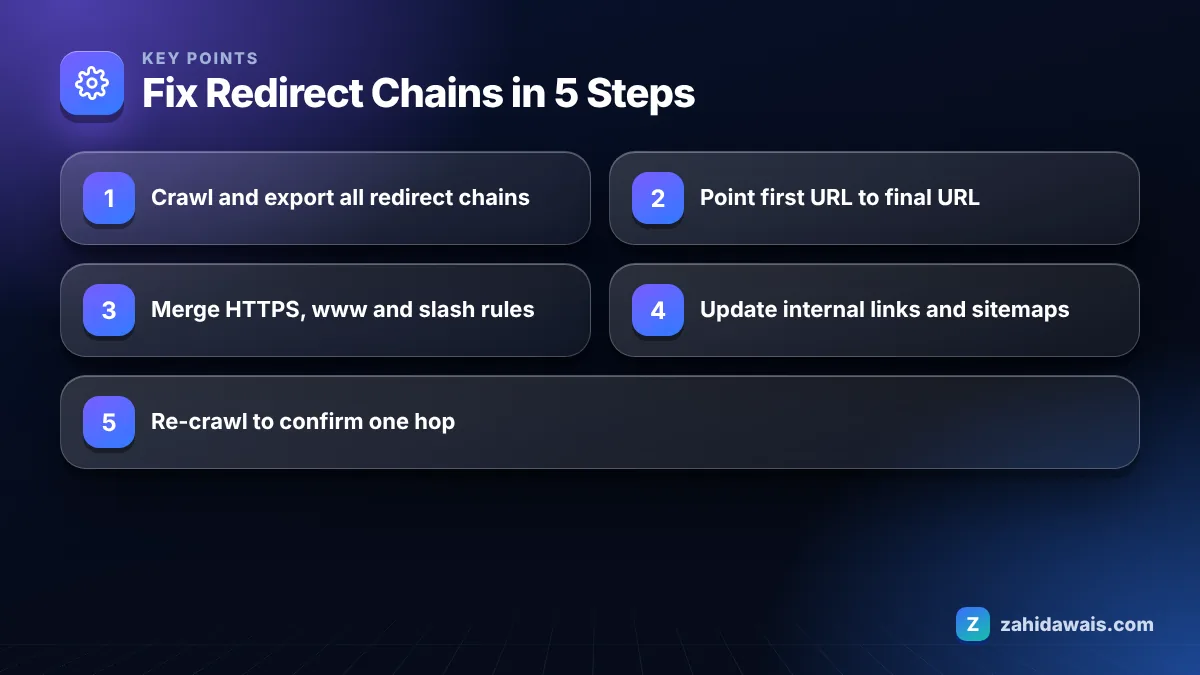
This guide shows you how to find every redirect chain and loop on your site and collapse each one into a single hop. If you are searching for how to fix redirect chains, the short version is simple: point every old URL straight at its final destination and update the links that still use old URLs.
To learn how to fix redirect chains, crawl your site, export every URL that redirects more than once, and change each first redirect so it points directly to the final 200 URL. Then update internal links, canonicals and sitemaps to the final URL. For loops, remove the rule that sends the target back to the source.
A redirect chain is any path where a URL redirects to another URL that also redirects, so the browser or crawler needs two or more hops to reach a page that returns 200. A typical example is http://site.com/page to https://site.com/page to https://www.site.com/page to https://www.site.com/page/.
A redirect loop is a chain with no end. URL A points to URL B and URL B points back to A, so the page never loads and the browser shows an error such as “too many redirects”. A chain wastes time; a loop breaks the page completely.
Chains usually build up over years. A site moves to HTTPS, then switches to www, then changes its permalink structure, and each change adds a rule on top of the old ones instead of rewriting them.
Any chain longer than one hop is worth fixing, and Google’s own guidance is to redirect to the final destination directly. In its documentation on site moves with URL changes, Google says Googlebot can follow up to 10 redirect hops, but if you cannot avoid a chain, keep it short: ideally no more than 3 hops and fewer than 5.
Those numbers are a ceiling, not a target. Every extra hop adds a round trip for real visitors, and on a slow mobile connection that delay is easy to feel. In my audits I treat one hop as normal, two hops as a task for the next sprint and three or more as urgent.
| Hops to reach a 200 page | Status | What I do |
|---|---|---|
| 0 (direct 200) | Ideal | Nothing, this is the goal for internal links |
| 1 | Normal | Fine for old URLs; update internal links to skip it |
| 2 | Chain | Rewrite the first rule to point at the final URL |
| 3 to 4 | Long chain | Fix this week; check for stacked HTTPS, www and slash rules |
| 5 or more | Risky | Fix now; Google advises fewer than 5 hops |
| Loop | Broken | Fix immediately; the page cannot load at all |
Redirect chains can hurt SEO indirectly because they slow pages down, waste crawl requests and make your canonical signals messier, even though a short chain will not get a page removed from Google. Google still follows them, so the damage is gradual rather than sudden.
The bigger risks are practical:
Google explains in its guide to redirects and Google Search that permanent redirects (301 and 308) signal that the target should be canonical, while temporary ones (302, 303 and 307) do not. A chain that mixes the two is a common reason the wrong URL keeps showing in results. If Search Console lists many URLs under “Page with redirect”, my guide to the Page with redirect status explains when that report needs action and when it is expected.
You find redirect chains by crawling your site with a tool that follows redirects and reports the full path, then checking your server rules and backlinks for old URLs. One method is rarely enough, so I combine three.
A quick command line check also works for single URLs: curl -I -L shows each status code and Location header in order, so you can count the hops yourself.
You fix a chain by editing the first redirect so it goes straight to the final URL, and you fix a loop by deleting or correcting the rule that points the target back to the source. After that, you remove the reasons the old URLs are still being requested.
Google recommends keeping redirects from a move for as long as possible, generally at least one year, so do not delete old rules just because the chain is gone. On WordPress, a redirect plugin and a server rule fighting each other is the most common loop I find. If you are planning a bigger rebuild, my website redesign service includes a full redirect map so chains never form in the first place.
Imagine a small UK services site that moved to HTTPS in 2019, added www in 2021 and switched to trailing slash URLs in 2023. An old blog URL with backlinks now goes through four hops: http://site.co.uk/blog/post to https://site.co.uk/blog/post to https://www.site.co.uk/blog/post to https://www.site.co.uk/blog/post/ and finally to a renamed slug. The fix is one combined server rule that sends every protocol and host variant to https://www with the slash in a single step, plus a direct 301 from each retired slug to its new URL. The 4 hop path becomes 1 hop. Then the 38 internal links that still use old slugs are updated in the CMS so they return 200 directly. This is the most common pattern I find on sites that are five or more years old.
You stop chains from returning by keeping one central redirect map and checking it every time a URL changes. Most chains are created during routine edits, not migrations.
If you would rather hand this off, my technical SEO service covers redirect audits, chain fixes and the follow-up crawl to prove every path is clean.
Google’s site move documentation says Googlebot can follow up to 10 redirect hops. It still recommends redirecting to the final destination directly, and if a chain is unavoidable, keeping it to ideally no more than 3 hops and fewer than 5.
Google’s documentation does not describe a fixed loss per hop. The practical risks are slower pages, wasted crawling and mixed canonical signals if a temporary redirect sits in the chain. Pointing old URLs straight to the final page removes all of those risks at once.
A loop happens when two or more rules send a URL back to itself, for example an HTTPS rule and an HTTP rule at the CDN that undo each other, or a plugin redirect that conflicts with a server rule. The browser stops and shows a too many redirects error.
No. Point them at the final URL instead of deleting them. Google advises keeping redirects from a URL change for as long as possible, generally at least one year, because old links, bookmarks and backlinks still use those URLs.
Yes. A plugin that redirects an old slug to a URL your server then redirects again for HTTPS, www or a trailing slash creates a two hop chain. Set the plugin targets to the exact final URL, including protocol, host and slash.
Check monthly on active sites and after every migration, theme change or permalink change. A scheduled crawl that exports redirect chains takes minutes and catches new chains before they grow into loops.
Facts checked against these official pages. Read how I check facts in my editorial policy.
Find every insecure image, script and stylesheet on your HTTPS pages and replace it for good.
Read article
Fix return tag, code and canonical problems so Google shows the right language version to each visitor.
Read article
A technical SEO audit finds what stops Google from crawling, indexing and understanding your pages. This is the 6-step, 30-check process I use before any other SEO work.
Read articleSend your website and I will reply with a free audit.