rel Attribute Generator
A rel attribute generator is a tool that writes an HTML link with the correct rel value for its situation.…
Build the HTML for a paid, user generated or unvouched link with the right rel values, a new tab option and a disclosure line, ready to paste.
The free sponsored link code generator writes the HTML for a link with the right rel sponsored, ugc or nofollow value, plus optional noopener, noreferrer, target and title attributes and a plain disclosure line. Each value is explained with the wording from Google's own documentation.
Use rel="sponsored" for links that are paid, advertising or sponsorship, rel="ugc" for comments and forum posts, and rel="nofollow" when neither applies and you do not want to vouch for the page. Google still accepts nofollow on paid links but prefers sponsored. noopener and noreferrer are browser values, not search values.
A sponsored link code generator is a tool that writes a ready to paste HTML anchor element with the rel values a paid or user generated link needs. You choose what kind of link it is, and the tool sets the matching values, escapes special characters in the URL and text, and can add a disclosure line for readers.
The values come from Google's guide to qualifying outbound links, which describes sponsored, ugc and nofollow. Paid links matter most: Google's spam policies say such links are not a violation "as long as they are qualified with a rel="nofollow" or rel="sponsored" attribute value".
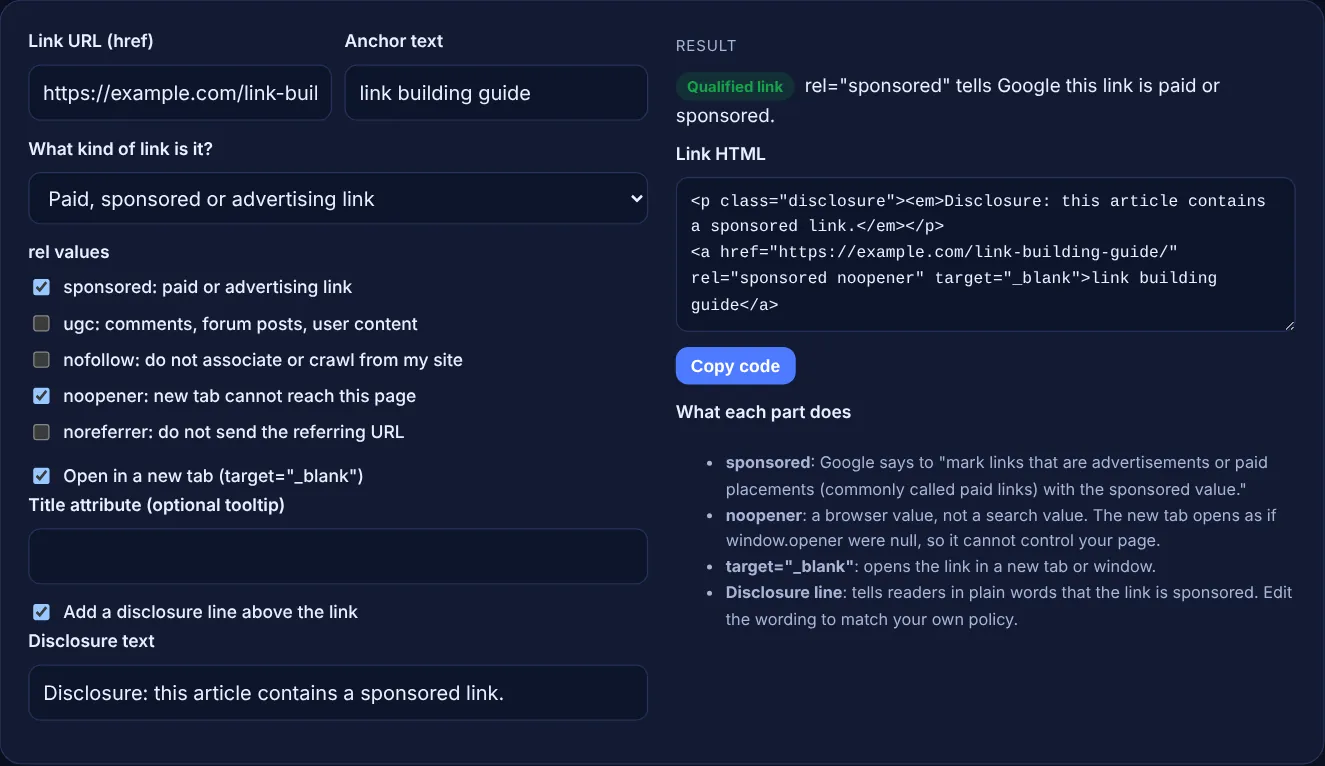
sponsored marks paid or advertising links, ugc marks links inside user generated content such as comments and forum posts, and nofollow is for links where neither applies and you do not want Google to associate your site with the page. Google says links marked with these values "will generally not be followed", but it adds that the linked pages "may still be crawled" if Google finds them through sitemaps or other sites.
Yes. Google says "You may specify multiple rel values as a space- or comma-separated list", and gives rel="ugc nofollow" as an example. This tool uses spaces, which is the usual HTML style. A common combination is ugc nofollow for a forum post you do not vouch for, and sponsored noopener for a paid link that opens in a new tab.
No source from Google says they do. Google's guide on qualifying outbound links lists sponsored, ugc and nofollow and does not mention noopener or noreferrer. They are browser values described on MDN: noopener stops the new page from reaching yours through window.opener, and noreferrer also hides the referring page, which removes you as the source in the other site's analytics.
| Value | Use it for | Read by |
|---|---|---|
| sponsored | Advertising, paid placements, sponsorships | Search engines |
| ugc | Comments, forum posts, user content | Search engines |
| nofollow | Links you do not want to vouch for when others do not fit | Search engines (also as a robots meta rule) |
| noopener | Links that open a new tab | Browsers |
| noreferrer | Links where you do not want to send your URL | Browsers |
| none | Normal editorial links nobody paid for | Not applicable |
Example: a publisher places a paid link to https://example.com/link-building-guide/ with the anchor "link building guide", opening in a new tab. With the default settings the tool writes a disclosure paragraph, then <a href="https://example.com/link-building-guide/" rel="sponsored noopener" target="_blank">link building guide</a>. Switching to "User content you do not vouch for" and unticking the new tab option changes it to rel="ugc nofollow" with no target, and quotes or ampersands in the URL are escaped as " and &.
No. Both tell Google not to treat the link as an endorsement, but sponsored says why: the link was paid for or is advertising. Google prefers sponsored for paid links and still accepts nofollow, which was the older recommendation for them.
Only when the link was paid for in money, goods or services. Google's spam policies list paid articles with optimized anchor text in guest posts as link spam. An unpaid editorial guest post that links naturally does not need it.
Yes. Google allows several rel values on one link, separated by spaces or commas. rel="sponsored nofollow" is valid, and Google names both values as acceptable ways to flag a paid link, with sponsored preferred.
That is a user experience choice, not a search rule. If you open them in a new tab, add noopener so the new page cannot control yours. Many sites keep links in the same tab so the back button works as expected.
Say plainly that the article or link is sponsored or paid, and put it where readers see it before the link. The default text is a starting point. Check your local advertising rules, which can set their own wording.
No. It only writes HTML code in your browser for you to copy. Nothing is sent anywhere. To check links that are already live, use the nofollow link checker or view the page source.
Checked 23 Oct 2026. Facts checked against these official pages. Read how I check facts in my editorial policy.
A rel attribute generator is a tool that writes an HTML link with the correct rel value for its situation.…
A nofollow link checker is a tool that lists the links on a page and reads each rel attribute. A link with…
A dofollow nofollow ratio calculator divides each link type count by the total links to get its percentage,…
Labels each anchor as exact, partial, branded, URL, generic, compound or image, with shares.
Send your website and I will check it for you, free.
One short email when something new goes live: articles, free SEO tools, package updates, discounts and price alerts. No spam, unsubscribe in one click.