Anchor Text Generator
An anchor text generator is a tool that builds anchor variations from your inputs and assigns each type a…
Choose the right rel value for any link and copy HTML that follows Google's guidelines.
The free rel sponsored ugc nofollow runs in your browser, needs no sign-up and never sends what you type anywhere.
Use rel="sponsored" for paid, affiliate or gifted links, rel="ugc" for comments and forum posts, and rel="nofollow" when you do not want to vouch for a link and nothing else fits. Editorial links you chose freely need no rel value. Values can be combined, such as rel="ugc sponsored".
A rel attribute generator is a tool that writes an HTML link with the correct rel value for its situation. The logic follows Google's guidance: money or gifts involved means sponsored, user written content means ugc, no endorsement means nofollow, and a freely chosen editorial link stays plain.
Use rel="sponsored" whenever a link is paid for, an advert, an affiliate link or given in exchange for a gift. Google's guide to qualifying outbound links says sponsored is preferred for paid links, while nofollow is still an acceptable way to flag them. Use plain nofollow for other links you do not want to endorse.
Yes, if you paid for the placement or the post was published in exchange for anything of value, the links should carry rel="sponsored" or nofollow. Google's link spam policy names paid links that pass ranking credit as a violation. A genuinely editorial guest article where nobody paid can use normal links.
Yes, you can list several values separated by spaces, such as rel="ugc sponsored" or rel="sponsored nofollow". Google accepts space or comma separated values. noopener and noreferrer can sit in the same attribute because they control browser behaviour, not SEO.
| Situation | rel value | Why |
|---|---|---|
| Paid guest post, sponsored article or advert | sponsored | Paid placement |
| Affiliate link | sponsored | You earn a commission |
| Link given for a free product | sponsored | Compensated with a gift |
| Blog comment or forum post | ugc | Written by users, not you |
| Link you cite but do not trust | nofollow | No endorsement intended |
| Editorial link you chose freely | none | A normal recommendation |
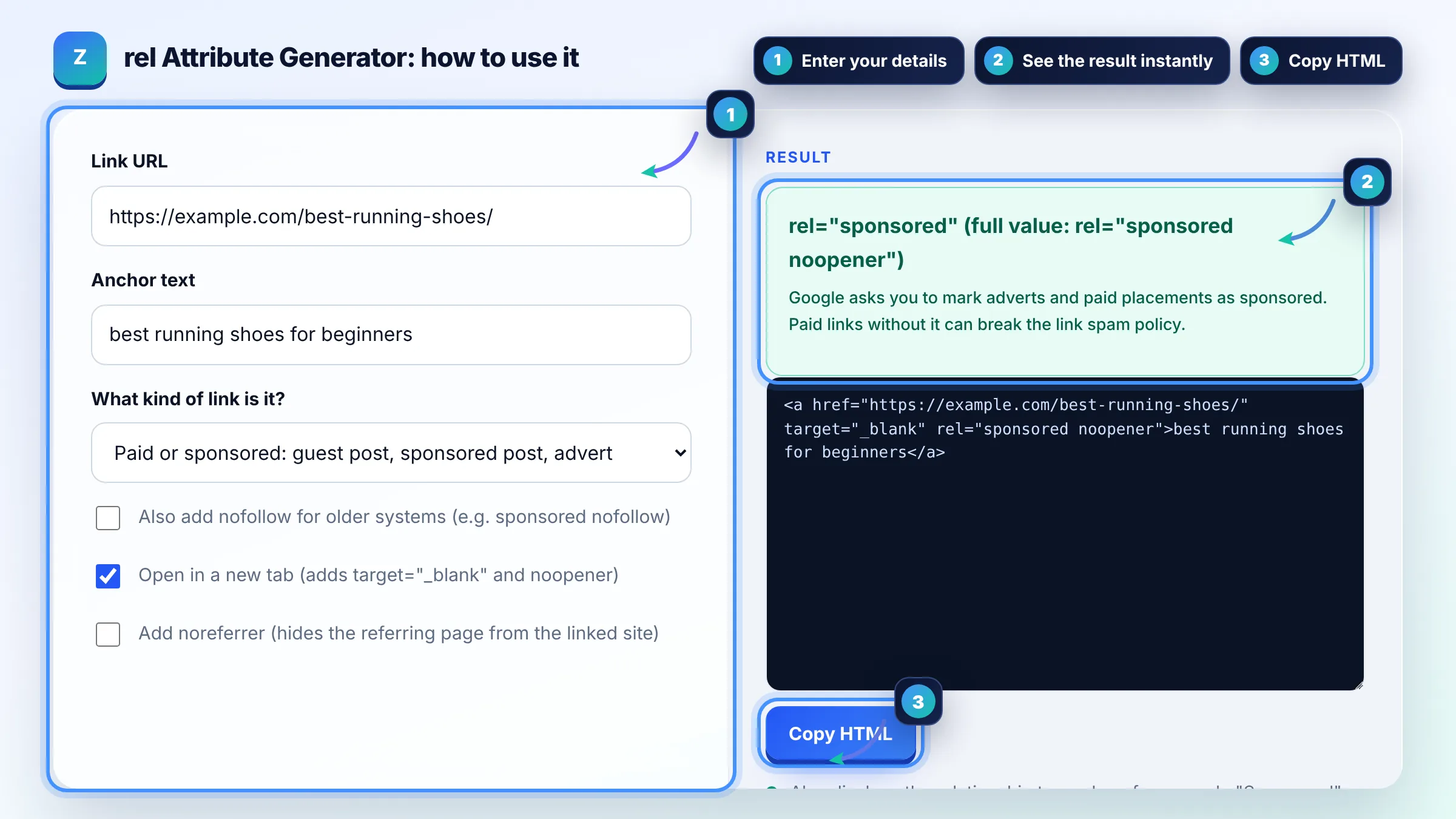
Example: you publish a paid guest post that links to a running shoe guide and want it to open in a new tab. Choose "Paid or sponsored" and tick new tab; the tool outputs best running shoes for beginners. Add a visible "Sponsored" label near the article as well.
rel="ugc" stands for user generated content. Google recommends it for links inside comments, forum posts and similar content written by users. You can remove it for trusted members who have consistently contributed high quality content.
Yes. Since 2019 Google has treated nofollow, sponsored and ugc as hints rather than strict directives. Links with these values are generally not followed, but linked pages may still be crawled if Google finds them through other links or sitemaps.
No, correctly marked sponsored links do not hurt your site. The risk comes from paid links that are not marked. Using rel="sponsored" tells Google the relationship honestly, which is exactly what its spam policies ask for.
No. Internal links help Google discover and understand your pages, so leave them followed. To keep a section from being crawled use robots.txt, and to keep a page out of search results use a noindex tag.
noopener is a browser security setting for links that open in a new tab, so the new page cannot control yours. nofollow is a hint to search engines about endorsement. They solve different problems and can be used together.
In the block editor, select the link and use the link settings toggle to mark it sponsored or nofollow if your version or SEO plugin offers it. Otherwise switch the block to Edit as HTML and paste the code from this tool.
Facts checked against these official pages. Read how I check facts in my editorial policy.
An anchor text generator is a tool that builds anchor variations from your inputs and assigns each type a…
A nofollow link checker is a tool that lists the links on a page and reads each rel attribute. A link with…
A dofollow nofollow ratio calculator divides each link type count by the total links to get its percentage,…
Send your website and I will check it for you, free.
One short email when something new goes live: articles, free SEO tools, package updates, discounts and price alerts. No spam, unsubscribe in one click.