Anchor Text Ratio Calculator
An anchor text ratio calculator is a tool that classifies each backlink anchor and divides the count in each…
Paste your anchor texts, add your brand, domain and keywords, and see every anchor labelled by type with the share of each type.
The warning limit is your own choice. Google publishes no safe anchor text percentage. Anchors exported from Search Console or a backlink tool work, including tab separated rows with counts. Nothing leaves your browser.
| Anchor type | Links | Share |
|---|
| Anchor | Links | Type |
|---|
The free anchor text classifier sorts every anchor pointing to your site into the main anchor text types: exact match, partial match, branded, compound, naked URL, generic, image or empty, and other. It counts each type, shows its share and flags when keyword anchors pass a limit you choose.
An anchor text classifier labels each link text by type. Exact match equals a target keyword, partial match contains part of one, branded uses your brand, compound mixes brand and keyword, naked URL is a web address, and generic is text like "click here". Google publishes no ideal mix, so treat the shares as a review aid.
An anchor text classifier is a tool that takes the clickable text of your backlinks and puts each one into a type, so you can see the mix at a glance. A raw anchor list from a backlink export can have hundreds of lines. Grouped by type and weighted by the number of links, it shows whether your profile looks like people linking naturally with your name and URL, or like a set of placed links all using the same money phrase.
Google describes good anchor text in its link best practices as "descriptive, reasonably concise, and relevant to the page that it's on and to the page it links to." The same page warns that keyword stuffing is a violation of its spam policies. This classifier does not judge any single link. It shows the pattern, and you decide what to review.
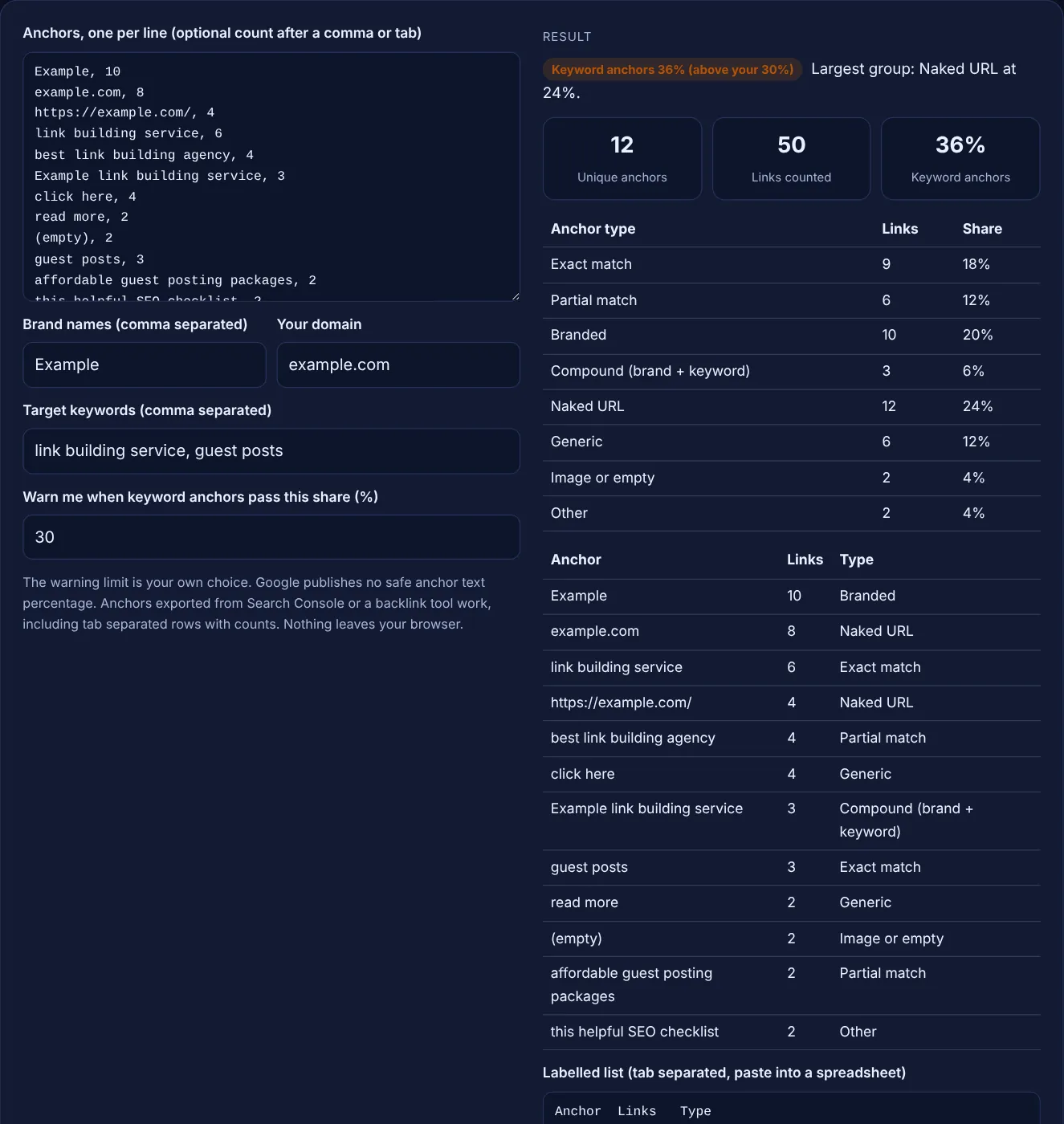
The main types are exact match, partial match, branded, compound, naked URL, generic and image or empty. Exact match is the target keyword itself, such as "link building service". Partial match contains a word from it, such as "best link building agency". Branded uses your name, compound adds a keyword to it, a naked URL is the address itself, and generic is text like "click here" or "read more". Anything else is labelled other.
No, Google publishes no safe percentage for any anchor type. Its spam policies list paid articles that include "links with optimized anchor text in articles, guest posts, or press releases distributed on other sites" as link spam, and its link guidance asks for natural text. Ratios you see in SEO blogs and plugins are opinions. The limit in this tool is yours to set.
They are counted as image or empty. The Search Console Links report shows links with no text, such as image links, as "(empty)", and this tool reads that label, blank anchor cells and words like [image]. For image links, Google says it "uses the alt attribute of the img element as anchor text", so check that your linked images carry descriptive alt text.
| Type | Example for Example Ltd, keyword link building service | How the tool detects it |
|---|---|---|
| Exact match | link building service | Equals a target keyword (plural s ignored) |
| Partial match | best link building agency | Contains a word from a target keyword |
| Branded | Example, Example Ltd | Contains a brand name or the domain name |
| Compound | Example link building service | Brand plus a keyword word |
| Naked URL | example.com, https://example.com/ | The whole anchor is a web address |
| Generic | click here, read more | Only common filler words |
| Image or empty | (empty), [image] | Blank text or an image label |
| Other | this helpful SEO checklist | None of the above |
Example: the default list has 12 anchors with 50 links for a brand called Example on example.com, targeting "link building service" and "guest posts". The classifier finds Naked URL 12 links (24%), Branded 10 (20%), Exact match 9 (18%), Partial match 6 (12%), Generic 6 (12%), Compound 3 (6%), Image or empty 2 (4%) and Other 2 (4%). Keyword anchors, meaning exact, partial and compound together, make up 18 links or 36%, above the 30% limit set in the box, so the result shows a warning to review those anchors.
Exact match anchor text is the target keyword and nothing else, such as "guest posts". Partial match uses a variation or adds other words, such as "affordable guest posting packages". Both describe the target page, but many exact match anchors in placed links can look optimized.
Any anchor that contains your brand name or the name part of your domain, such as Example or Visit Example. If the anchor also contains a target keyword word, the tool labels it compound instead, because it mixes brand and keyword.
Either works, as long as you are consistent. The tool adds up whatever number you paste after each anchor. Counting referring domains stops one site with hundreds of sitewide links from dominating the shares.
Keyword anchors are not banned. Google's spam policies target links made to manipulate rankings, and they name optimized anchor text in paid articles and guest posts as an example. Descriptive anchors that read naturally in the sentence are what Google's link guidance asks for.
Other means the anchor has no brand, no target keyword word, is not a URL and is not generic filler. Natural descriptive anchors often land here. Add more keywords or brand spellings in the boxes if you expected a different label.
No. The classifier runs entirely in your browser with JavaScript. Your anchors, brand and keywords are never sent to a server or stored, so client data stays on your device.
Checked 23 Oct 2026. Facts checked against these official pages. Read how I check facts in my editorial policy.
An anchor text ratio calculator is a tool that classifies each backlink anchor and divides the count in each…
An anchor text generator is a tool that builds anchor variations from your inputs and assigns each type a…
Summarises a backlink CSV: referring domains, anchor shares, rel split and top pages.
Builds link HTML with rel sponsored, ugc or nofollow, new tab options and a disclosure line.
Send your website and I will check it for you, free.
One short email when something new goes live: articles, free SEO tools, package updates, discounts and price alerts. No spam, unsubscribe in one click.