Disavow File Generator
A disavow file generator is a tool that cleans a pasted list of links into the plain text format Google…
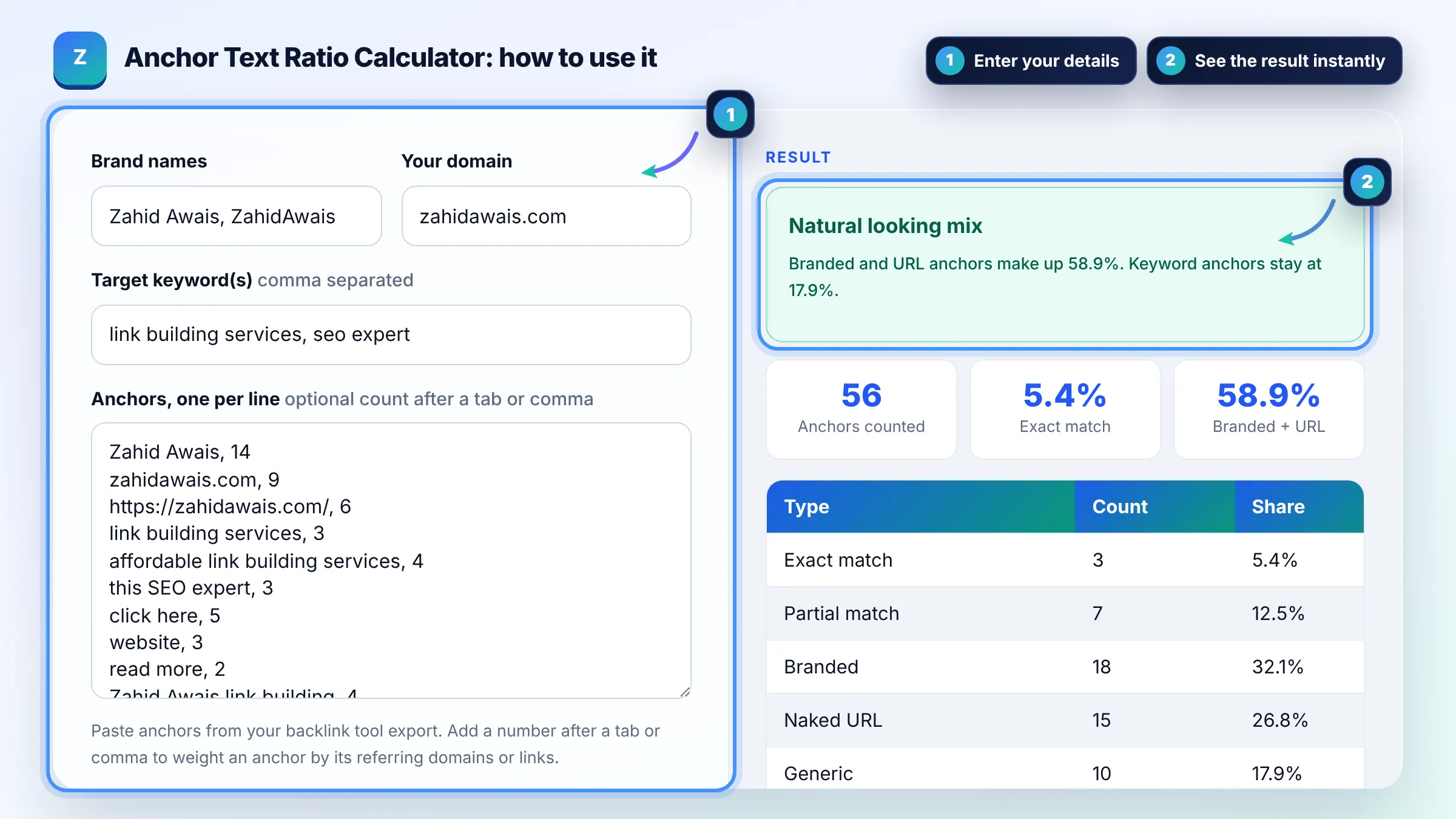
Paste your backlink anchors and see your exact, partial, branded, URL and generic split instantly.
Paste anchors from your backlink tool export. Add a number after a tab or comma to weight an anchor by its referring domains or links.
| Type | Count | Share |
|---|
Benchmarks are common industry rules of thumb, not numbers published by Google.
The free anchor text ratio calculator runs in your browser, needs no sign-up and never sends what you type anywhere.
An anchor text ratio calculator sorts your backlink anchors into exact match, partial match, branded, naked URL and generic, then shows each share in percent. A common rule of thumb: keep exact match keyword anchors at or below 5 to 10% and let branded and URL anchors make up the largest share of the profile.
An anchor text ratio calculator is a tool that classifies each backlink anchor and divides the count in each type by the total anchors to give a percentage split. This one matches your brand, domain and target keywords, so an anchor that equals a keyword is exact, one that shares most of its words is partial, and so on.
A safe working ratio is roughly 5% or less exact match, 10 to 20% partial match, and 40% or more branded plus naked URL anchors. Google does not publish any ratio, so treat these as industry benchmarks. Compare yourself with competitors that rank, because the natural mix differs by niche.
Yes, a profile where many anchors repeat your money keyword is a classic sign of manipulated links. Google lists links with optimized anchor text in articles, guest posts or press releases as an example of link spam in its spam policies. Diversify toward branded anchors and earn links naturally.
A branded anchor is any anchor that contains your brand or company name, such as "Zahid Awais" or "Zahid Awais link building". Branded anchors are the most common type in natural profiles because people usually link by naming the source. Naked URLs like zahidawais.com are a close second.
| Anchor type | Example | Typical share in a natural profile |
|---|---|---|
| Branded | Zahid Awais | 30 to 50% |
| Naked URL | zahidawais.com | 15 to 30% |
| Generic | click here, this site | 10 to 25% |
| Partial match | guide to link building services | 10 to 20% |
| Exact match | link building services | 1 to 5% |
| Other / topical | safe backlink tips | remainder |
Example: a site has 56 referring domains. 18 use the brand name, 15 use the URL, 10 are generic, 7 are partial match and 6 are exact match. Exact match is 6 / 56 = 10.7%, which is above the 10% warning line, while branded plus URL is 33 / 56 = 58.9%. The fix is to make the next links branded or descriptive.
No. Google has never published a target ratio. Its guidance asks for descriptive, concise anchor text and lists keyword optimized anchors in guest posts and press releases as link spam. The percentages in this tool are industry rules of thumb based on how natural profiles usually look.
Google Search Console shows top linking text under Links. Third party tools such as Ahrefs, Semrush and Majestic export anchors with referring domain counts. Paste the anchor and count columns here, one anchor per line, and the tool weights each anchor by its count.
Referring domains give a fairer picture. One sitewide footer link can create thousands of links with the same anchor and distort the ratio. Counting each domain once shows how many separate sites chose each anchor, which is closer to how a natural profile is judged.
Exact match means the anchor is the same as your target keyword, for example "link building services". Partial match includes the keyword or most of its words with extra text, like "affordable link building services for startups". Both signal keyword targeting, so watch their combined share.
Stop requesting keyword anchors, ask publishers you control to change paid or exchanged links to branded anchors, and earn new branded links. If you have many spammy links that caused or may cause a manual action, Google suggests removing them first and disavowing only what remains.
No. The calculator runs fully in your browser with plain JavaScript. Your anchors, brand and keywords never leave the page, nothing is stored, and there is no tracking. Refreshing the page clears everything you typed.
Facts checked against these official pages. Read how I check facts in my editorial policy.
A disavow file generator is a tool that cleans a pasted list of links into the plain text format Google…
An anchor text generator is a tool that builds anchor variations from your inputs and assigns each type a…
Coming 12 OctA dofollow nofollow ratio calculator divides each link type count by the total links to get its percentage,…
Coming 17 OctSend your website and I will check it for you, free.