Anchor Text Ratio Calculator
An anchor text ratio calculator is a tool that classifies each backlink anchor and divides the count in each…
Paste spammy URLs or domains and download a clean, deduplicated disavow.txt in Google format.
Google says most sites never need a disavow file. Use it only for spammy or artificial links that caused, or will likely cause, a manual action, after you try to remove them.
The free disavow file generator runs in your browser, needs no sign-up and never sends what you type anywhere.
A disavow file generator turns a messy list of spammy URLs and domains into a clean .txt file that follows Google format: one entry per line, domain: prefixes for whole sites and # for comments. Rule of thumb: most sites never need one. Disavow only spammy links that caused, or will likely cause, a manual action.
A disavow file generator is a tool that cleans a pasted list of links into the plain text format Google accepts in its disavow links tool. It extracts each hostname, adds the domain: prefix, removes duplicates, protects your own domain and checks the 100,000 line and 2 MB limits.
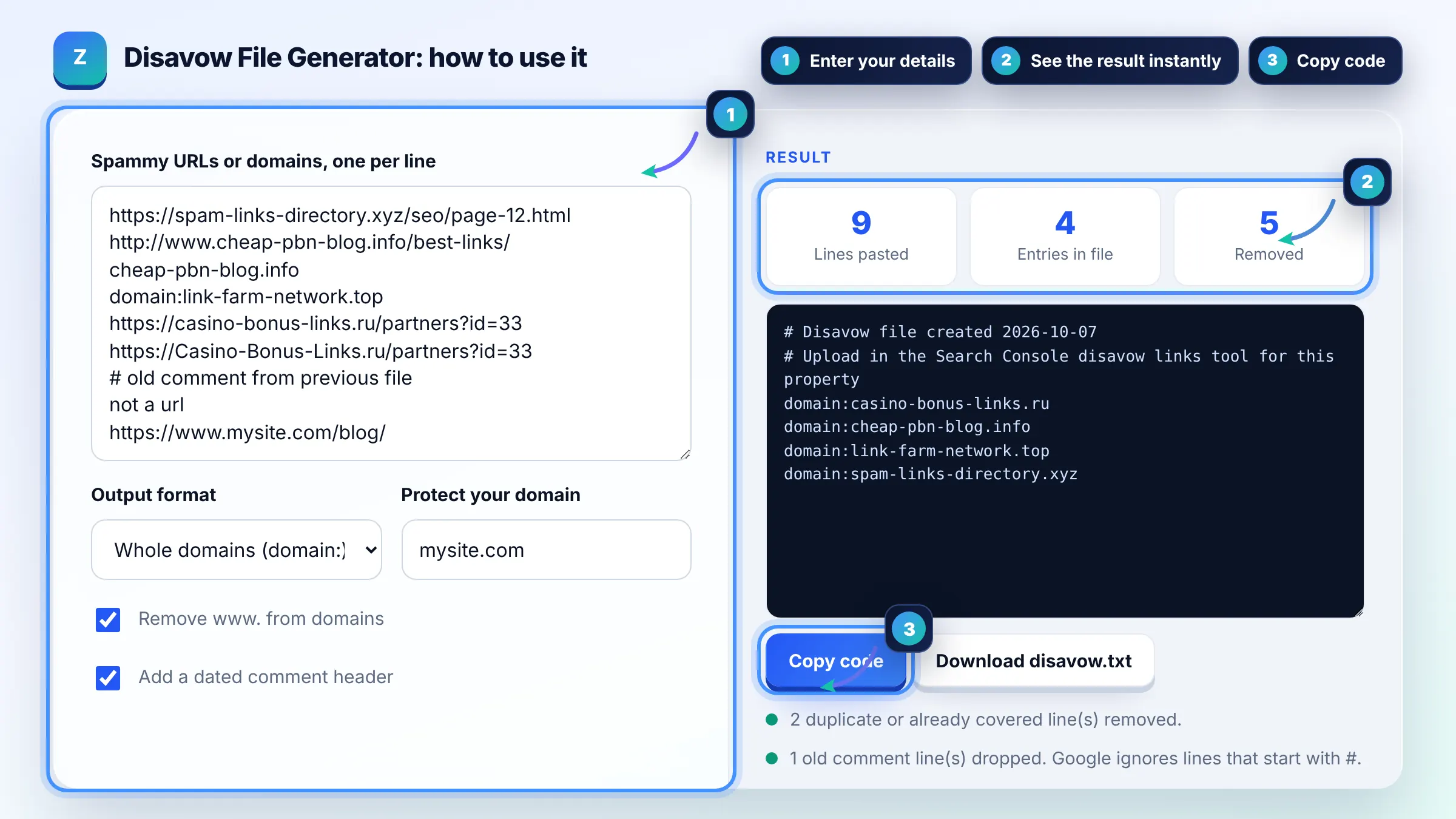
Most sites do not need a disavow file, because Google can usually judge which links to trust on its own. Google says to use it only if you have many spammy, artificial or low-quality links that have caused, or will likely cause, a manual action. See Google disavow links guidance.
Use a UTF-8 or 7-bit ASCII .txt file with one URL or domain per line. Prefix whole domains with domain:, for example domain:example.com, and start comment lines with #. The file can have up to 100,000 lines and 2 MB, and each URL can be up to 2,048 characters.
It can take a few weeks after a successful upload. Google applies the list as it recrawls and reprocesses the pages that link to you, so nothing changes the same day. If the file has errors, Search Console shows them immediately and keeps your previous list in place.
| Line in your list | Line in disavow.txt (domain mode) | Why |
|---|---|---|
| https://www.spam-blog.info/post-1/ | domain:spam-blog.info | Covers every page on that site |
| spam-blog.info | removed | Duplicate of the line above |
| domain:link-farm.top | domain:link-farm.top | Already in Google format |
| # old note | removed | Old comments dropped, new header added |
| https://www.mysite.com/blog/ | removed | Your own domain is protected |
| not a url | removed | Not a valid URL or domain |
Example: you paste 40 lines from a link audit. 12 are different pages on 3 spam domains, 6 are duplicates in mixed case, 2 are notes and 1 is your own blog URL. In domain mode the tool outputs a 2 line header plus 22 domain: entries, removes 18 lines, and the file is about 0.7 KB.
Whole domains are usually safer for clearly spammy sites, because spam networks often link from many pages and new ones appear later. Use individual URLs only when a site is otherwise good and a single page carries an unwanted link, such as one paid post.
No. A new upload replaces the previous disavow list for that property. Download your current file from Search Console first, paste its entries together with the new ones, and let this tool merge and deduplicate them before you upload.
Yes, if you disavow good links. Disavowed links stop helping your site, so removing natural editorial links from real sites can lower rankings. Only include links you are confident are spammy or artificial, and never disavow just because a tool labels a link toxic.
Not for domain entries. A domain: line disavows links from that host whatever the protocol, so one line replaces many URL lines. URL lines are matched as written, so if you disavow single URLs, list each version that appears in your link report.
No. It only formats a list you choose. Deciding which links are spammy needs human review of each linking page. Third party toxic scores are guesses and Google does not use them. Look for paid links without rel sponsored, link farms, hacked pages and automated spam.
No. Everything runs in your browser with plain JavaScript. Your URLs are never sent to a server, nothing is stored, and the download is created locally on your device. Closing the tab clears the list.
Facts checked against these official pages. Read how I check facts in my editorial policy.
An anchor text ratio calculator is a tool that classifies each backlink anchor and divides the count in each…
A backlink tracker template is a structured log of your links. This builder adds a row per link, extracts the…
Coming 14 OctA dofollow nofollow ratio calculator divides each link type count by the total links to get its percentage,…
Coming 17 OctSend your website and I will check it for you, free.