Anchor Text Ratio Calculator
An anchor text ratio calculator is a tool that classifies each backlink anchor and divides the count in each…
Paste or open a backlink export and get referring domains, anchor text shares, the dofollow and nofollow split and your most linked pages in seconds.
The file is read by your browser and never uploaded. Columns are found from the header names, so exports from different backlink tools work if they list one link per row.
| Link type | Links | Share |
|---|
| Top referring domains | Links |
|---|
| Top anchors | Links | Share |
|---|
| Top target pages | Links |
|---|
The free backlink analyzer reads a backlink export from Ahrefs, Semrush, Google Search Console or any other tool and summarises it: referring domains, the most used anchors with their share, the dofollow, nofollow, sponsored and UGC split, and the pages that get the most links. The file stays in your browser.
A backlink analyzer turns a raw export of links into a summary you can act on. Paste or open a CSV with one link per row, and this tool counts referring domains, ranks anchors by share, splits dofollow from nofollow, sponsored and UGC links, and lists your most linked pages. Columns are detected from their names.
A backlink analyzer is a tool that reads a list of links pointing to your site and groups them so patterns are easy to see. A raw export can have thousands of rows. Grouped by root domain, anchor text and link attribute, it shows in a few lines whether your links come from many sites or a few, whether one commercial anchor dominates, and how many links are qualified as paid or user generated.
Google gives you a free starting point in the Search Console Links report, which shows top linking sites, top linked pages and top linking text, and lets you export "Latest links" or "More sample links" of up to 100,000 rows. Paid tools export more columns. This analyzer reads whichever export you have, and if a column is missing, it says so instead of guessing.
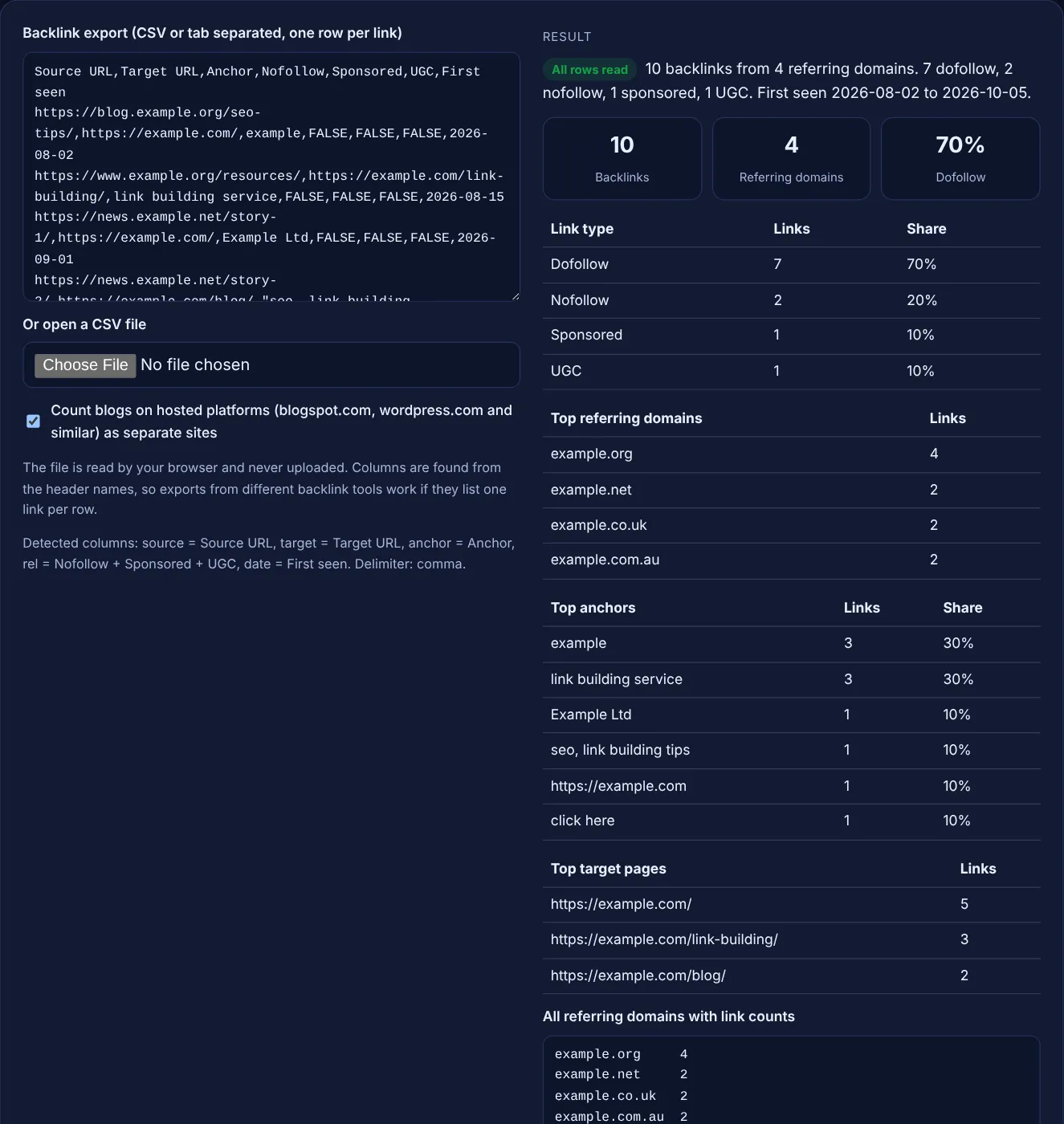
It needs one column with the URL of the linking page; everything else is optional. Headers containing words like source, referring or linking plus URL or page are used for the linking page, target or destination for your page, anchor or link text for the anchor, and nofollow, sponsored, UGC, rel or link type for attributes. If no header matches, the first column full of URLs is used. Rows are read the way RFC 4180 describes CSV, so a field in double quotes can contain commas, and a double quote inside it is written as two.
Because the export has no column that says whether a link is nofollow, sponsored or UGC. Search Console exports are an example: Google's Links report help says "The report doesn't specify if a link is marked as nofollow." The tool will not guess. Use an export from a backlink tool that includes link attributes, or check single pages with a nofollow checker.
They are rel values that tell Google how a link should be treated. Google's guide to qualifying outbound links says to use sponsored to "mark links that are advertisements or paid placements", ugc for comments and forum posts, and nofollow "when other values don't apply". A link can carry more than one value, so the tool counts each flag and calls a link dofollow only when it has none. Paid links without sponsored or nofollow are listed as link spam in Google's spam policies.
| Summary | What it shows | What to look for |
|---|---|---|
| Referring domains | Unique root domains that link to you | Many links from very few domains |
| Top anchors | Most used link texts and their share | One exact match commercial phrase taking a large share |
| Link types | Dofollow, nofollow, sponsored and UGC counts | Paid placements that are not marked sponsored or nofollow |
| Top target pages | Your pages with the most links | Important pages with no links at all |
| First seen dates | When the links were found | Sudden bursts you cannot explain |
Example: the default export has 10 rows with source, target, anchor, three rel flag columns and a first seen date. The analyzer finds 10 backlinks from 4 referring domains: example.org 4, example.net 2, example.co.uk 2 and example.com.au 2. Seven links have no flag, so dofollow is 70%; 2 are nofollow, 1 is sponsored and 1 is UGC (the forum link is both nofollow and UGC). The top anchors are "example" and "link building service" at 30% each. https://example.com/ gets 5 links, and the links were first seen from 2026-08-02 to 2026-10-05.
It is built to. Instead of relying on fixed column names, it looks for words such as source, referring, target, anchor and nofollow in the header row, and shows the columns it chose. If a column is picked wrongly, rename that header and paste again.
No. The file is read with your browser's FileReader and analysed with JavaScript on your device. Nothing is sent to a server or stored, so client exports stay private.
The tool groups links by root domain, so www.example.org and blog.example.org count as example.org. Google's Links report also groups linking sites by root domain. Untick the platforms option only if you want all blogspot.com blogs merged into one.
Exports of tens of thousands of rows work in most modern browsers. Very large files may take a few seconds. If the page slows down, split the file or remove columns you do not need before pasting.
A link with no nofollow, sponsored or UGC flag in the export. Dofollow is not an HTML value; it simply means none of those rel values was found. If the export has no rel columns, the share shows n/a.
No. It summarises the data and highlights patterns, but deciding whether a link is spam needs a look at the linking page. Google says most sites never need to disavow, so review links by hand before you act.
Checked 23 Oct 2026. Facts checked against these official pages. Read how I check facts in my editorial policy.
An anchor text ratio calculator is a tool that classifies each backlink anchor and divides the count in each…
A dofollow nofollow ratio calculator divides each link type count by the total links to get its percentage,…
A disavow file generator is a tool that cleans a pasted list of links into the plain text format Google…
Turns a list of URLs into unique root domains with counts, as a list or domain: lines.
Send your website and I will check it for you, free.
One short email when something new goes live: articles, free SEO tools, package updates, discounts and price alerts. No spam, unsubscribe in one click.