Backlink CSV Analyzer
Summarises a backlink CSV: referring domains, anchor shares, rel split and top pages.
Paste a list of backlink URLs and get the unique root domains with counts, ready to copy or download as a plain list or a domain: disavow list.
Root domains use a built in list of common two part suffixes such as co.uk and com.au, not the full Public Suffix List. Everything runs in your browser.
| Domain | URLs |
|---|
This free tool lets you extract domain from URL lists in one step: paste backlink URLs, get every unique root domain with the number of URLs it appears in, and copy or download the result as a plain list, a CSV or a disavow style list of domain: lines.
To extract the domain from a URL, take the host name, remove the scheme, port, path and www, then keep the part a person can register: example.com, or example.co.uk where the suffix has two parts. This tool does that for a whole list, counts URLs per domain and removes duplicates.
A referring domain extractor turns a list of linking URLs into the list of websites behind them. Ten links from one blog are one referring domain, so counting domains instead of URLs gives a truer picture of how many sites link to you. Backlink tools and Google's Search Console Links report work the same way: Google says linking sites are "grouped by root domain", with protocol and subdomains removed.
The hard part is knowing where the registrable name starts. MDN explains that a registrable domain sits directly under an effective top level domain such as .com or .ac.uk, and that "it's impossible to tell algorithmically" which suffixes are public. The Public Suffix List records them. This tool uses a compact built in list of the most common two part suffixes, not that full list.
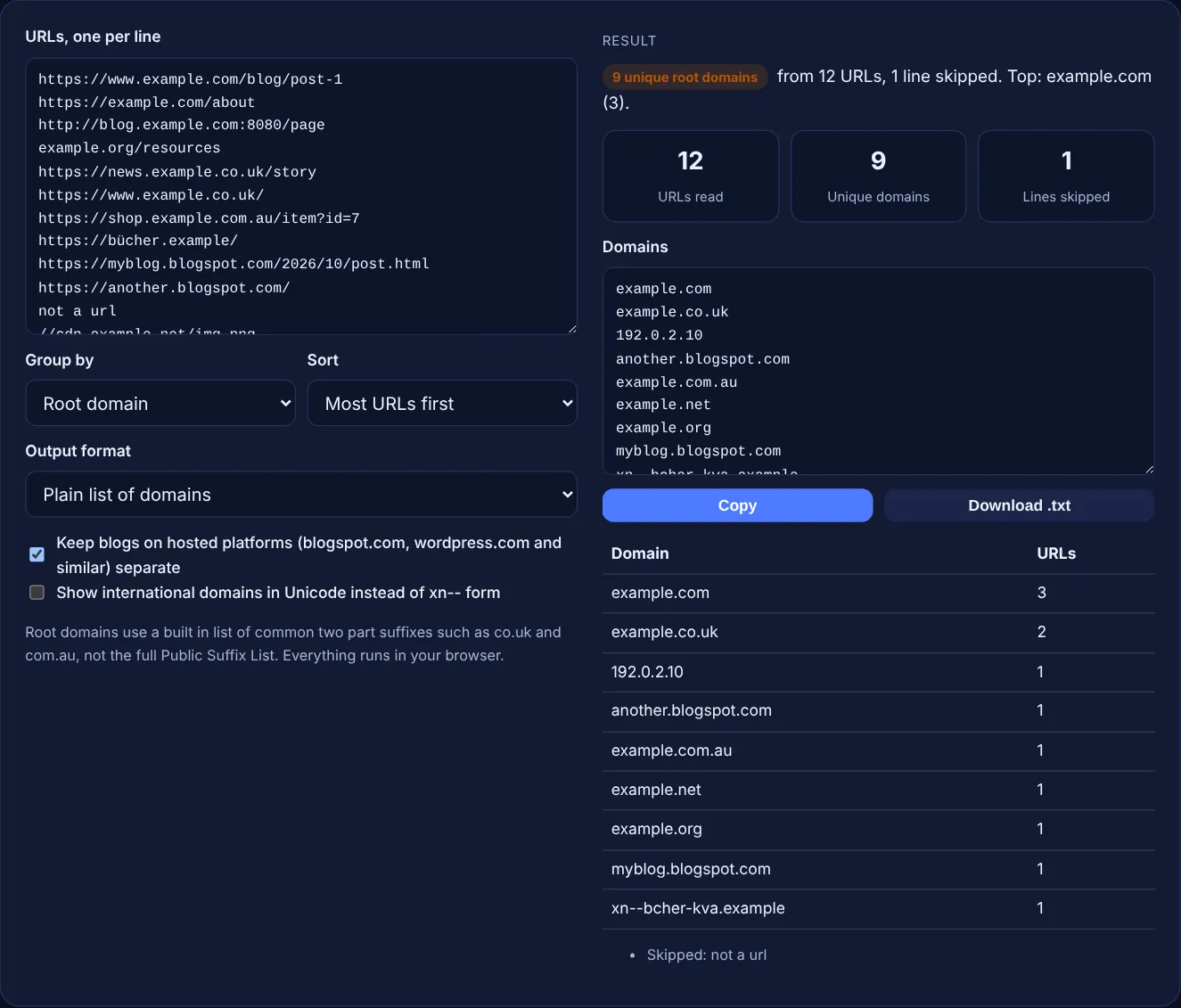
It drops the scheme, any user name, the port and the path, removes a trailing dot and lowercases the host, then cuts it back to the root domain. So https://www.example.com/a, http://blog.example.com:8080/b and //cdn.example.com/c all become example.com. Lines without a scheme, such as example.org/page, are read as web addresses. IP addresses are kept as they are, because they have no root domain.
A built in list of 76 common two part suffixes, such as co.uk, org.uk, ac.uk, com.au, co.nz, co.in, com.br and com.pk, keeps one more label, so news.example.co.uk becomes example.co.uk. The Public Suffix List gives "com, co.uk and pvt.k12.ma.us" as examples of public suffixes and contains thousands of entries, so rare or three part suffixes are not covered here. Use Full host mode if a result looks too short.
You can use it as a starting point. Google's disavow help page asks for one URL or domain per line, a "domain:" prefix for domains, a .txt file "encoded in UTF-8 or 7-bit ASCII", and says lines that begin with # are ignored. It also warns the tool "can potentially harm your site's performance" if used wrongly, and says to disavow only when there are many spammy links that caused, or likely will cause, a manual action. Remove every domain you want to keep.
| Input | Root domain | Full host |
|---|---|---|
| https://www.example.com/page | example.com | example.com |
| http://blog.example.com:8080/a | example.com | blog.example.com |
| https://news.example.co.uk/ | example.co.uk | news.example.co.uk |
| https://myblog.blogspot.com/ | myblog.blogspot.com | myblog.blogspot.com |
| https://bücher.example/ | xn--bcher-kva.example | xn--bcher-kva.example |
| 192.0.2.10/page | 192.0.2.10 | 192.0.2.10 |
Example: the default list has 13 lines. 12 are read as URLs and 1 line, "not a url", is skipped. They reduce to 9 unique root domains. example.com appears 3 times (www, bare and a blog subdomain on port 8080) and example.co.uk twice. The other 7 appear once each: 192.0.2.10, another.blogspot.com, example.com.au, example.net (from the protocol relative //cdn.example.net), example.org, myblog.blogspot.com and xn--bcher-kva.example, which is bücher.example in Unicode. The two blogspot.com blogs stay separate because the platforms option is on.
A URL is the full address of one page, such as https://blog.example.com/post?id=1. The domain is the name of the site, here example.com. Many URLs on one site share the same domain, which is why domain counts are smaller.
Each blog on a hosted platform usually has a different owner, so treating myblog.blogspot.com as its own site is more useful in a link audit. Untick the platforms option if you prefer to merge them into blogspot.com.
It is the ASCII form, called Punycode, of an international domain name with letters outside A to Z. bücher.example becomes xn--bcher-kva.example. Tick the Unicode option to show the readable form instead.
No. It is a compact list of 76 common two part suffixes. Rare suffixes, private suffixes not in the platforms list and three part suffixes are not covered, so a few domains may come out one label too short or too long.
No. Everything runs in your browser with JavaScript, and the download is created on your device. Nothing is uploaded or stored, so you can paste client backlink lists safely.
Tens of thousands of lines work in a modern browser. The table shows the first 100 domains and the output box always holds all of them, so copy or download from the box for large lists.
Checked 23 Oct 2026. Facts checked against these official pages. Read how I check facts in my editorial policy.
Summarises a backlink CSV: referring domains, anchor shares, rel split and top pages.
A disavow file generator is a tool that cleans a pasted list of links into the plain text format Google…
A backlink tracker template is a structured log of your links. This builder adds a row per link, extracts the…
A nofollow link checker is a tool that lists the links on a page and reads each rel attribute. A link with…
Send your website and I will check it for you, free.
One short email when something new goes live: articles, free SEO tools, package updates, discounts and price alerts. No spam, unsubscribe in one click.