
Technical SEO
How to Find AI Bots in Your Server Logs (and Verify Them)
Find AI bots in your server logs: the user agents for GPTBot, ClaudeBot and PerplexityBot, how to verify their IPs and how…
Read article
This guide is for owners and marketers of service businesses, such as agencies, clinics, law firms and trades, who want their site to describe the business and its services clearly to search engines. You will learn which service business schema to add to each page, which parts Google actually uses, and how to build the code in a few minutes with free tools.
Service business schema is structured data that describes the business and what it sells. Use LocalBusiness, or its most specific subtype, on the home or contact page with name, address and opening hours, and Service markup on each service page. Google shows a local business feature but no rich result for Service.
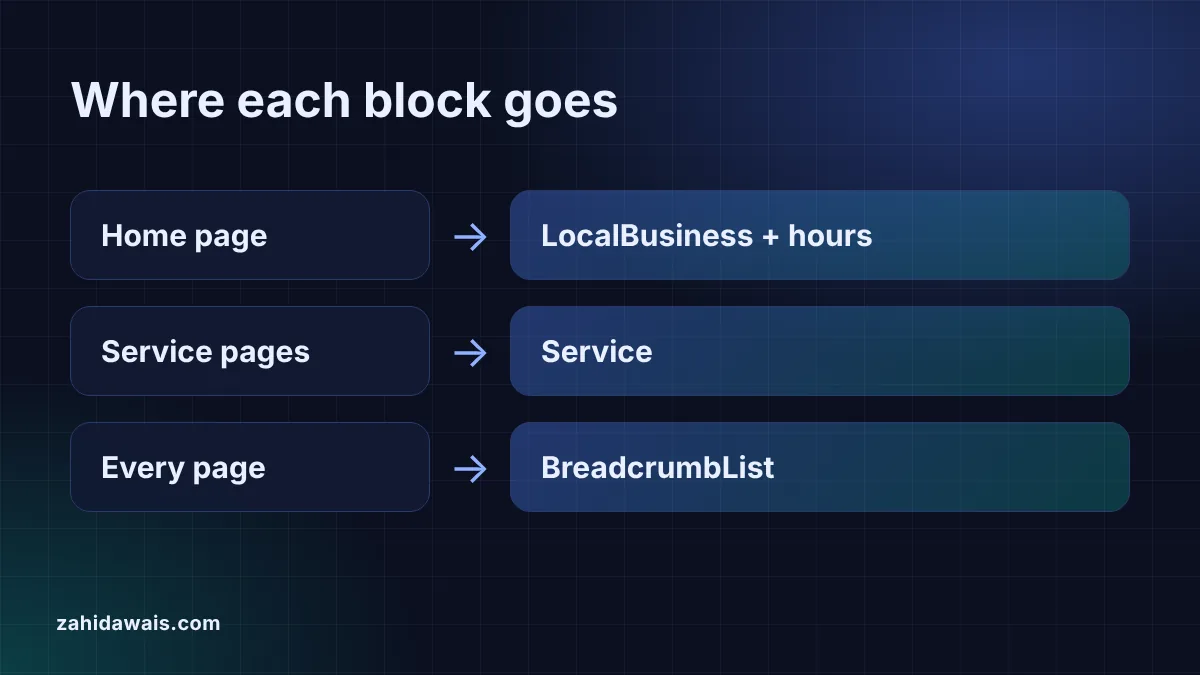
Most service businesses need three blocks of structured data, each on the page it describes. The business itself gets LocalBusiness markup, or Organization markup if it has no public location. Each service page gets Service markup. Every page can carry BreadcrumbList markup that matches its breadcrumb trail.
Keep each block on the page whose content it describes. Google’s general structured data guidelines say markup must be “a true representation of the page content” and warn: “Don’t mark up content that is not visible to readers of the page.” That rules out copying the same full business block, with every service and price, onto every URL.
| Page | Schema type | Key properties |
|---|---|---|
| Home or contact page | LocalBusiness subtype, or Organization | name, address, telephone, url, openingHoursSpecification |
| Each service page | Service | name, serviceType, provider, areaServed, offers if priced |
| Every page | BreadcrumbList | One item per breadcrumb level |
| About or team page | Person (for named experts) | name, jobTitle, sameAs |
Google’s search gallery lists the structured data features Google supports. Local business is on the list, and Google says the markup can help it show a knowledge panel with details such as opening hours. Service is not on the list, so Service markup produces no special search feature.
That does not make Service markup useless. It states, in a format machines read without guessing, what you sell, who provides it and where. That clarity can help search engines and AI assistants connect a page to the right questions. Just do not expect stars, prices or extra links in the results because of it, and remember Google’s own warning: “Google does not guarantee that your structured data will show up in search results”.
Start with the business block, because the service markup refers back to it. Choose the most specific type that is true. Google’s local business documentation says to “use the most specific LocalBusiness sub-type possible”, so a dentist uses Dentist, a law firm LegalService and an agency ProfessionalService. The only required properties are name and address; telephone, url, geo and opening hours are recommended.
The fastest route is the Local Business Schema Generator for the main block, then the opening hours schema generator for the timetable. Paste the hours output inside the business block, after the address.
Give every service its own page and its own Service block. Use the service name from the page heading as name, a short category as serviceType, the business as provider and the places you serve as areaServed. Add an offers price only when the same price is printed on the page.
The service schema generator builds this block from a short form and warns you about invalid URLs or prices. Use the same business name and type inside provider as in your LocalBusiness block, so both describe the same entity. That consistency, the same name, address and phone everywhere, matters more than adding every optional property.
Use the openingHoursSpecification property with one entry per group of days that share the same hours. Google documents three special cases that trip people up: open 24 hours is 00:00 to 23:59, closed all day is 00:00 to 00:00, and hours past midnight go in one entry, such as 18:00 to 03:00. Holiday hours use validFrom and validThrough dates, and Google says leaving those dates out means the hours apply all year.
Your Google Business Profile, not your schema, controls the hours shown on Google Maps. Change the hours in all three places, the page, the schema and the profile, on the same day so no source contradicts another.
Example: a small SEO agency in London with three service pages. The home page carries one ProfessionalService block with name, address, phone, website and weekday hours of 09:00 to 17:30, plus a Christmas closure with validFrom 2026-12-24 and validThrough 2026-12-26. Each service page carries one Service block. The technical SEO audit page, for instance, has name “Technical SEO audit”, serviceType “Search engine optimization”, the agency as provider, London and Manchester as areaServed, and an offer of 450 GBP because that price is on the page. Both blocks use exactly the same business name.
Only if the home page is about one service. Most home pages describe the whole business, so LocalBusiness or Organization fits there. Put Service markup on each dedicated service page, where the content matches it.
Not as a direct ranking boost. Structured data helps Google understand a page and qualifies it for some search features. For local businesses, the bigger levers are a complete Google Business Profile, reviews, relevant content and links.
Use a LocalBusiness subtype when customers can visit you or you serve a local area from a real address. Use Organization for an online only business without a public location. Pick one and keep it consistent across the site.
There is no fixed limit, but list only the places you really serve and mention on the page. Google’s guidelines say markup must truly represent the page content, so long hidden lists of towns are a bad idea.
No. Free generators create the JSON-LD, and you paste it into the page using your theme’s custom code area or a header and footer plugin. Test it in the Schema Markup Validator after you publish.
Yes. Update the price in the markup at the same time as the price on the page. If you stop showing prices on the page, remove the offers property from the Service block as well.
This guide is part of my schema markup guide.
Checked 22 Oct 2026. Facts checked against these official pages. Read how I check facts in my editorial policy.
Need help with local search? See my local SEO service.
Find AI bots in your server logs: the user agents for GPTBot, ClaudeBot and PerplexityBot, how to verify their IPs and how…
Read article
Pick one URL format, redirect the other and keep links consistent so Google never sees two versions of a page.
Read article
Measure your slowest interactions, find the scripts behind them and bring INP under 200 milliseconds.
Read articleSend your website and I will reply with a free audit.