Review Request Message Generator
Writes email, SMS and WhatsApp review requests with your link, SMS part counts and policy checks.
Enter your current rating and review count, or your star breakdown, to see how many 5-star reviews lift you to a target average.
A one decimal rating such as 4.2 can be any average from 4.15 to just under 4.25. For an exact answer, switch to the star breakdown. Nothing leaves your browser.
| Metric | Value |
|---|
The free how many 5-star reviews calculator takes your current rating and review count, or the number of reviews at each star level, and works out how many 5-star reviews in a row you need to reach a target average, both exactly and as a rating rounded to one decimal. It also shows what a single 1-star review does.
To find how many 5-star reviews you need, use k = (target x reviews - total stars) / (5 - target) and round up. At 4.2 stars from 87 reviews, reaching an exact 4.5 takes 53 more 5-star reviews, and a one decimal display shows 4.5 after about 40. An exact 5.0 is impossible once you have any lower review.
A review rating calculator is a tool that does the averaging maths behind star ratings in reverse. Instead of asking what your average is, it asks how many new reviews of a given rating it takes to move the average to a target. Google's help page on review scores for local places says ratings use "a scale from 1 to 5 stars" and that "the review score is the average of all ratings published on Google for that place or business". That average is what this tool models.
The tool gives two answers because the rating people see is rounded. The exact answer is the number of reviews that lifts the true average to the target. The display answer is the number that makes a one decimal rating show the target, assuming normal rounding. Google does not document how it rounds, so plan around the exact figure.
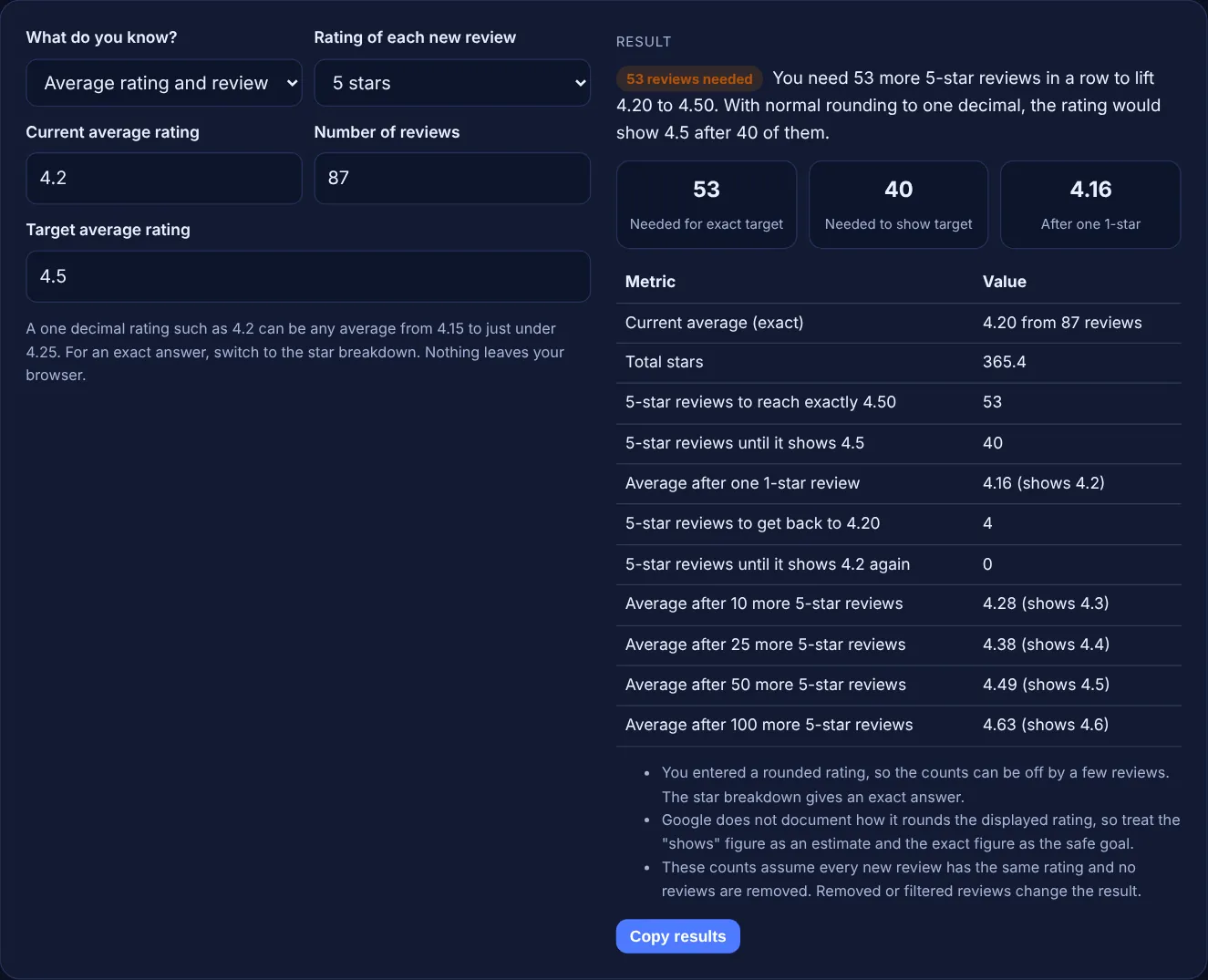
Multiply your target by your review count, subtract your total stars, divide by 5 minus the target, and round up. Total stars is your average times your review count. At 4.2 from 87 reviews, total stars are 365.4, the target needs 4.5 x 87 = 391.5, the gap is 26.1, and each 5-star review closes 0.5 of it, so you need 26.1 / 0.5 = 52.2, rounded up to 53. Check: (365.4 + 265) / 140 = 4.50.
Because an average of 5.0 needs every rating to be 5, so one lower review rules it out for good. Each new 5-star review moves the average closer to 5 without reaching it. A rounded rating can still show 5.0: with normal rounding to one decimal that happens once the true average reaches 4.95. Google does not publish its rounding rule, so treat that point as an estimate, and never remove or hide genuine low reviews to get there.
It lowers your average by (average - 1) / (reviews + 1). At 4.2 from 87 reviews, one 1-star review drops the average to 4.16, which still shows as 4.2. To get back to exactly 4.2 you need (4.2 - 1) / (5 - 4.2) = 4 more 5-star reviews, whatever your review count. The fewer reviews you have, the bigger the drop, which is why a steady flow of genuine reviews protects a small business.
| Current average | Target | Exact target | Shows target (rounded) |
|---|---|---|---|
| 4.2 | 4.5 | 53 | 40 |
| 4.2 | 4.3 | 13 | 6 |
| 4.5 | 4.7 | 58 | 38 |
| 4.7 | 4.9 | 174 | 87 |
| 4.7 | 5.0 | Not possible | 435 |
Example: a dental practice has a 4.2 average from 87 reviews and wants 4.5. The calculator shows it needs 53 more 5-star reviews in a row for an exact 4.50, and that a one decimal rating would show 4.5 after 40 of them. If a 1-star review arrives first, the average drops to 4.16 and it takes 4 more 5-star reviews to get back to 4.20. After 50 more 5-star reviews the average is 4.49, which shows as 4.5.
Google's help page says the review score is the average of all ratings published on Google for the place, on a scale from 1 to 5 stars. Google does not publish its rounding rule or explain every case where a rating is not counted.
The displayed rating has one decimal, so small changes stay hidden. With 87 reviews, one 5-star review moves a 4.20 average to 4.21, which still shows 4.2. Also, reviews that break Google's policies can be removed, and removed reviews no longer count.
No. Google's policy for merchants says you must not offer incentives, such as payment, discounts or free goods, in exchange for reviews, and paid reviews count as fake engagement. Ask every customer honestly, with a review link or QR code.
No. Google's Maps content policy says merchants must not selectively solicit positive reviews or discourage negative ones. This is often called review gating. Ask all customers in the same way and reply politely to criticism instead.
Not quite. A rating shown as 4.2 can be any average from 4.15 to just under 4.25, so the counts may be off by a few reviews. Switch to the star breakdown and enter the count at each star level for an exact result.
No. The calculator runs entirely in your browser with JavaScript. Your ratings and review counts are never uploaded or stored, so you can check client profiles safely.
Checked 23 Oct 2026. Facts checked against these official pages. Read how I check facts in my editorial policy.
Writes email, SMS and WhatsApp review requests with your link, SMS part counts and policy checks.
A Google review link generator is a tool that builds a direct review URL from a Place ID, the unique code…
Turns your Google review link or Place ID into a QR code to download as PNG or SVG.
A review response generator is a template tool that builds a reply to a customer review from the details you…
Net Promoter Score from counts or raw 0 to 10 scores, with bars and a margin of error.
Send your website and I will check it for you, free.
One short email when something new goes live: articles, free SEO tools, package updates, discounts and price alerts. No spam, unsubscribe in one click.