Local Business Schema Generator
A local business schema generator is a tool that writes schema.org LocalBusiness structured data in JSON-LD.…
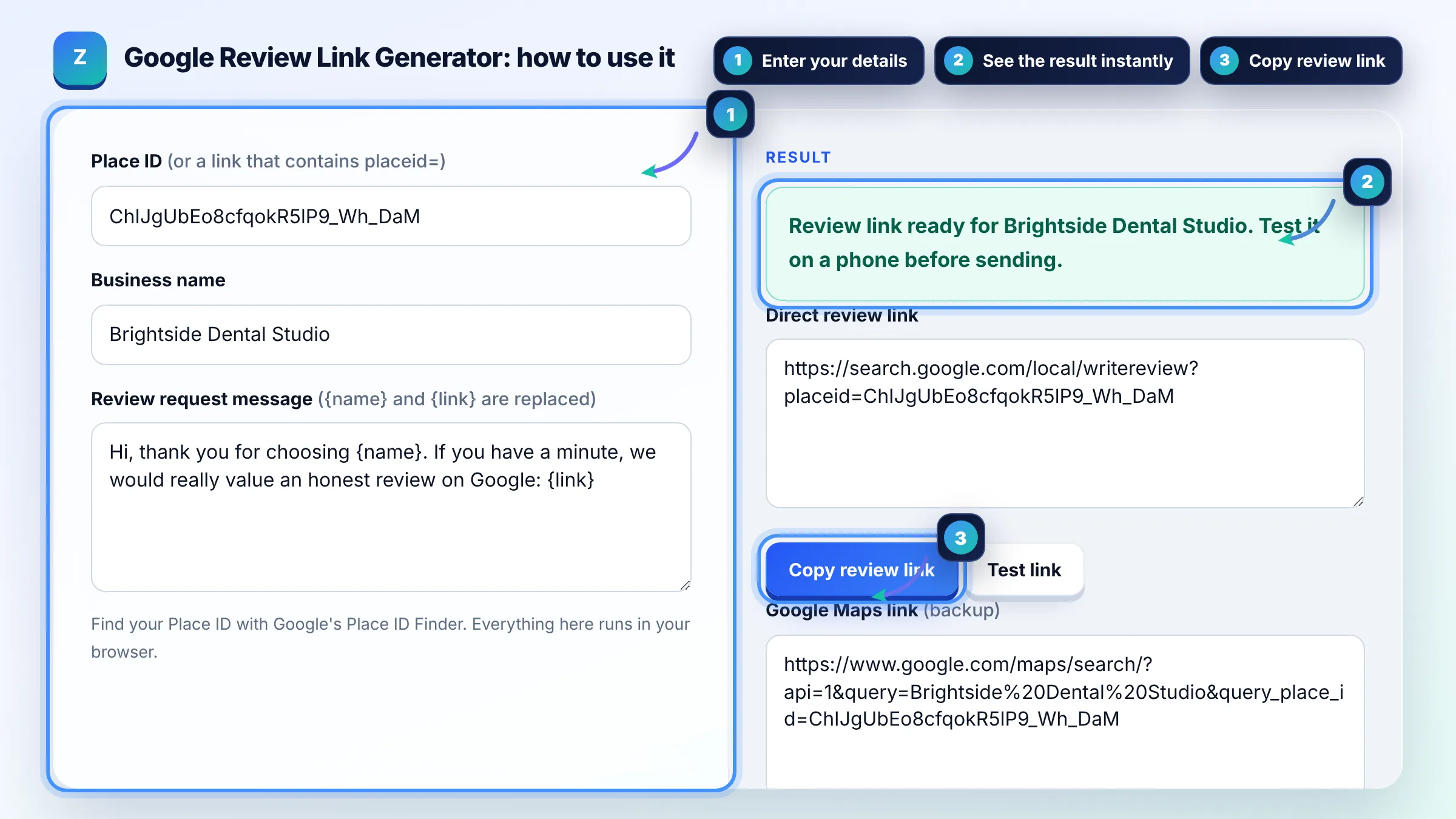
Turn your Google Place ID into a direct review link and a ready to send review request.
Find your Place ID with Google's Place ID Finder. Everything here runs in your browser.
The free google review link generator runs in your browser, needs no sign-up and never sends what you type anywhere.
A Google review link generator turns your Place ID into a link that opens the review box for your business. The quickest official route is the Ask for reviews link inside your Business Profile. Send the link to every real customer, never offer rewards for reviews, and test it on a phone first.
A Google review link generator is a tool that builds a direct review URL from a Place ID, the unique code Google Maps uses for a place. It adds the ID to the widely used writereview address that opens Google's review box (a format Google does not document), plus a documented Maps URL as a backup.
Sign in to your Business Profile, open Read reviews and choose Ask for reviews to copy Google's own link or QR code. Google explains the steps in Create a Google link or QR code to request reviews. If you only have a Place ID, this tool builds the same kind of direct link.
Search your business name in Google's Place ID Finder and copy the code shown, which usually starts with ChIJ. Google's Place ID documentation notes that IDs can change over time, so check your review link every 12 months.
Yes, Google encourages businesses to ask customers for reviews, but rewards are banned. Offering discounts, free products or money in exchange for posting, changing or removing a review is fake engagement under Google's review policy, and reviews must reflect a genuine experience.
| Link type | Format | Best use |
|---|---|---|
| Business Profile link | Copied from Ask for reviews in your profile | Official first choice, also gives a QR code |
| Direct review link | search.google.com/local/writereview?placeid=ID | Emails, SMS, WhatsApp and website buttons |
| Maps place link | google.com/maps/search/?api=1&query=Name&query_place_id=ID | Backup that shows your profile and reviews |
| QR code | Download from Business Profile on a computer | Receipts, counters, invoices and cards |
Example: with Google's sample Place ID ChIJgUbEo8cfqokR5lP9_Wh_DaM the tool gives https://search.google.com/local/writereview?placeid=ChIJgUbEo8cfqokR5lP9_Wh_DaM. Sending that link in a short thank you message right after a job, instead of telling customers to search for you, removes several taps from the review process.
The review box needs the customer to be signed in to a Google Account, and some apps open links in a limited browser. Check the Place ID is correct and complete, then test the link in Chrome and in the Google Maps app. If it still fails, use the link from your Business Profile.
Yes. The easiest method is your Business Profile: open Read reviews, choose Ask for reviews and copy the link or QR code. That link comes from Google directly and does not need a Place ID, so use it whenever you can sign in to the profile.
No. Customers must be signed in to a Google Account to post a review. Many people already are on Android phones and Gmail, but mention in your message that they may need to sign in, so nobody gives up halfway.
Yes, you can use a link shortener or a redirect on your own domain such as /review, which looks more trustworthy in SMS. Test the short link after setting it up, and keep the redirect in place as long as the link is printed anywhere.
Asking only happy customers while filtering out unhappy ones goes against the spirit of Google's rule that reviews must reflect genuine experiences. Send the same review link to every customer and reply politely to negative reviews instead.
Ask once, soon after the service is complete, while the experience is fresh. A single polite reminder a few days later is fine. A steady flow of genuine reviews over time looks more natural than a sudden burst from one campaign.
Facts checked against these official pages. Read how I check facts in my editorial policy.
A local business schema generator is a tool that writes schema.org LocalBusiness structured data in JSON-LD.…
A Google Business Profile description counter is a tool that counts the characters in your business…
A review response generator is a template tool that builds a reply to a customer review from the details you…
Coming 28 OctSend your website and I will check it for you, free.