Google Maps Embed Code Generator
A Google Maps embed code generator is a tool that builds the iframe HTML for a map from an address or place…
Type your business name or address and get a Google Maps directions link, or a search link to your listing, ready to paste on your site.
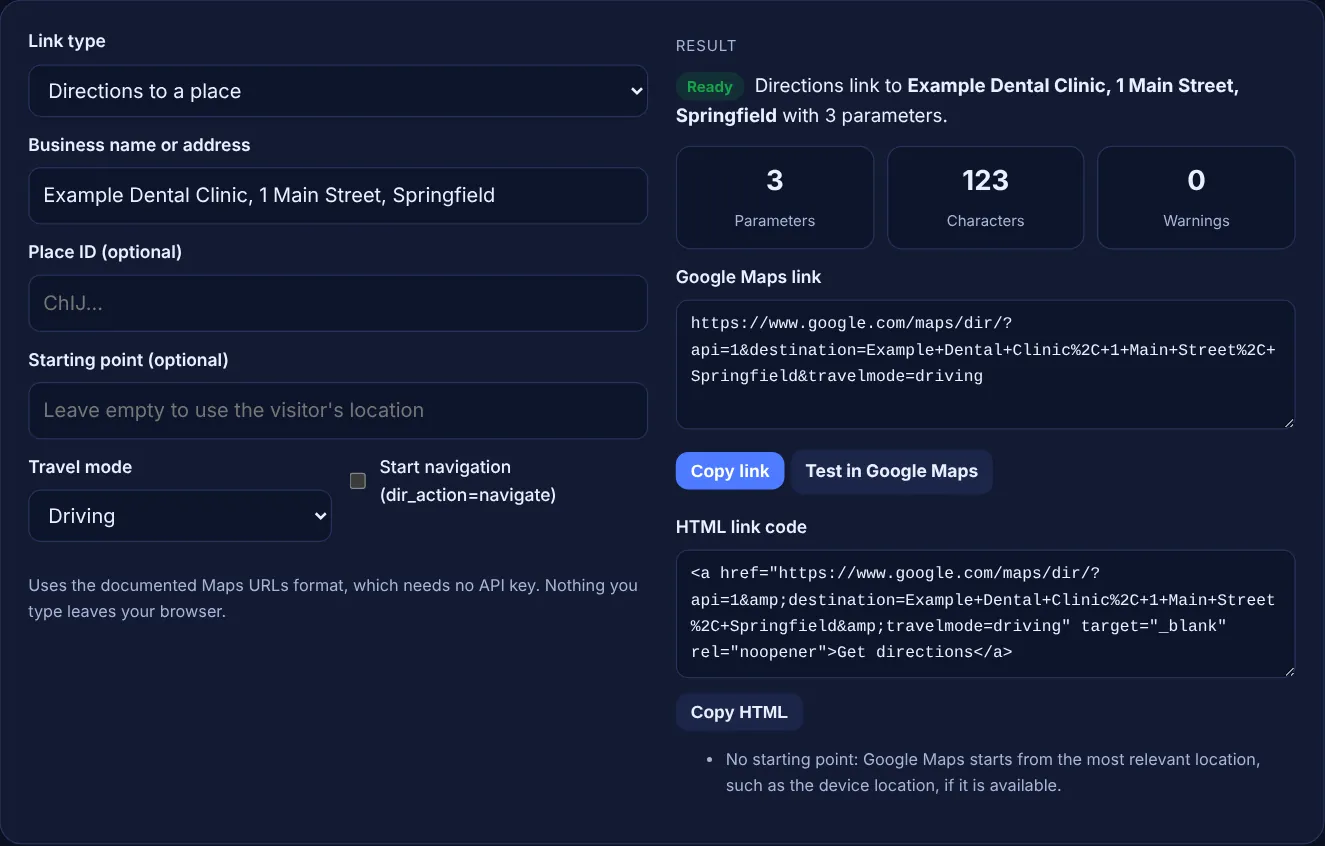
Uses the documented Maps URLs format, which needs no API key. Nothing you type leaves your browser.
The free Google Maps directions link generator builds a link that opens Google Maps with the route to your business, or a search link that opens your place. It follows Google's documented Maps URLs format and runs in your browser.
A Google Maps directions link is a URL in the form https://www.google.com/maps/dir/?api=1 followed by a destination, and optionally an origin, a travel mode and a place ID. It opens directions in the Maps app or browser. If you leave out the origin, Google starts from the visitor's location when it is available.
A Google Maps directions link is a web address that opens Google Maps with a route already set to a destination you choose. Google documents the format as Maps URLs: a directions link starts with https://www.google.com/maps/dir/?api=1, and a search link starts with https://www.google.com/maps/search/?api=1. Google says the api=1 parameter "is required in every request". The links work on phones and computers and need no API key.
Businesses put these links on contact pages, booking confirmations, emails and social profiles, so a customer gets a route in one tap. A search link is better when you want people to see your listing first, with photos, hours and reviews. If you want a map inside the page instead, use the Google Maps embed generator.
A place ID ties the link to one exact listing, so Google Maps does not have to guess between businesses with similar names. Google defines it as "a textual identifier that uniquely identifies a place" and offers a Place ID finder. A place ID never works alone: a search link must still include query, and destination_place_id must come with destination. Google also says place IDs "may change over time" and recommends refreshing IDs older than 12 months.
Usually not. If the origin is left out, Google Maps uses the most relevant starting location, such as the device location, when it is available, which is what most visitors want. Add an origin only when everyone starts from the same place, such as directions from a train station or a hotel to a venue. Without an origin and without location access, Maps may show a blank form where the visitor types a start.
Every value must be URL encoded. Google's documentation says to encode spaces as %20 or replace them with a plus sign, commas as %2C and the pipe character as %7C, and gives the example City+Hall%2C+New+York%2C+NY. Each Maps URL is limited to 2,048 characters. This tool encodes the text for you, uses plus signs for spaces and warns you if the link gets too long.
| Parameter | Used in | What it does |
|---|---|---|
| api=1 | All links | Required, without it the parameters are ignored |
| destination | Directions | End point as an address, name or coordinates |
| destination_place_id | Directions | Exact place, needs destination too |
| origin | Directions | Start point, optional |
| travelmode | Directions | driving, walking, bicycling, two-wheeler or transit |
| dir_action=navigate | Directions | Starts navigation or a route preview where available |
| query and query_place_id | Search | Text to search, with an optional exact place ID |
Example: a made-up clinic, Example Dental Clinic, 1 Main Street, Springfield. With the default settings the tool builds https://www.google.com/maps/dir/?api=1&destination=Example+Dental+Clinic%2C+1+Main+Street%2C+Springfield&travelmode=driving, which has 3 parameters, 123 characters and 0 warnings. Adding the start point "Gate 3 & 4 | North Car Park" encodes the ampersand as %26 and the pipe as %7C. Typing "hello world" as the place ID gives a warning and the ID is left out of the link.
No. Google's documentation says: "You don't need a Google API key to use Maps URLs." The link simply opens Google Maps. Keys are only needed for embedded maps or other Maps Platform services that run on your own pages.
Yes, if the app is installed. Google describes Maps URLs as universal and cross platform: on Android and iOS the link opens the Maps app when it is installed, and Google Maps in a browser when it is not. Test it on both before printing.
Search for your business in Google's Place ID finder on the Maps Platform documentation and copy the ID shown for it. Google recommends refreshing place IDs that are more than 12 months old, so check yours about once a year.
Maps URLs support waypoints separated by the pipe character, with up to three on mobile browsers and up to nine elsewhere, according to Google. This tool focuses on a single destination, which is what most business websites need.
Yes. If Google Analytics 4 enhanced measurement is on, a click on a link to another website is recorded as a click event with the link URL. Clicks on the directions button inside your Business Profile show in its own performance report.
No. The generator builds the link with JavaScript in your browser, and nothing you type is uploaded or stored. Only the Test in Google Maps button opens Google Maps, and only when you click it.
Checked 23 Oct 2026. Facts checked against these official pages. Read how I check facts in my editorial policy.
A Google Maps embed code generator is a tool that builds the iframe HTML for a map from an address or place…
A Google review link generator is a tool that builds a direct review URL from a Place ID, the unique code…
Tags Business Profile website, booking, menu and product links with UTM values for GA4.
A local citation tracker is a tool or spreadsheet for recording business listings on directories, maps and…
Send your website and I will check it for you, free.
One short email when something new goes live: articles, free SEO tools, package updates, discounts and price alerts. No spam, unsubscribe in one click.