UTM Builder
A UTM builder is a tool that appends tracking parameters to a landing page URL. It takes the base URL, keeps…
Add UTM tags to the links in your Google Business Profile so GA4 shows exactly how many visits come from your listing.
Values are case sensitive in GA4, so use the same spelling every time. Nothing you type leaves your browser.
The free Google Business Profile UTM link generator adds campaign tags to the website, booking, menu and product links in your profile, so Google Analytics 4 can report visits from your listing separately. It runs in your browser.
Google Business Profile UTM tags are utm_source, utm_medium and utm_campaign values added to the links in your profile, for example utm_source=google, utm_medium=organic and utm_campaign=gbp-listing. GA4 reads them when the visitor lands, so those visits appear as their own campaign in the Traffic acquisition report instead of blending with other Google traffic.
A Google Business Profile UTM link is the normal address of a page on your site with tracking parameters added after a question mark. When someone clicks the website button in your profile, Google Analytics 4 reads those parameters and records where the visit came from. Google's guide to URL builders and campaign data says: "When you add parameters to a URL, you should always use utm_source, utm_medium, and utm_campaign."
Without tags, a click on your profile arrives like any other visit from Google, so you cannot tell it apart from a normal search result. With tags, you can see sessions, engagement and conversions from the profile itself. For other campaigns, such as newsletters or social posts, use the general UTM builder.
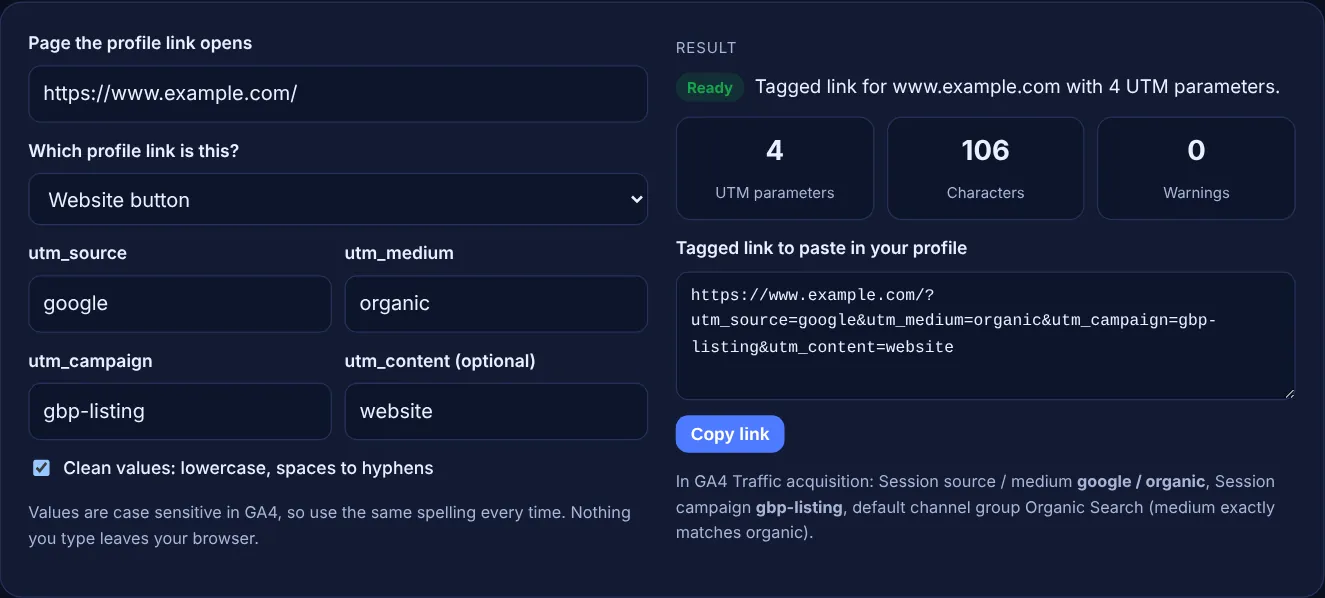
The most common setup is utm_source=google, utm_medium=organic and utm_campaign=gbp-listing, with utm_content naming the button, such as website or appointment. Google's default channel group rules put traffic in Organic Search when the medium "exactly matches organic", so these visits stay in the same channel as other unpaid Google traffic while the campaign name separates them. Whatever you choose, use the same values on every location.
GA4 treats every spelling as a different value. Google's help page says: "Parameter values are case sensitive, e.g. utm_source=google is different from utm_source=Google." A link tagged GBP-Listing and one tagged gbp-listing become two rows in your reports. Spaces are encoded as %20, which works but is hard to read and easy to mistype. Lowercase words joined by hyphens avoid both problems, which is why the clean option is on by default.
Any link you type yourself can carry UTM tags: the website link, and the menu, booking and ordering links you add in the profile. Google's help page on local business links says you can add links for actions such as "Book an appointment" and "Place a food order". Links that a booking provider adds for you are controlled by that provider, so you may not be able to tag them.
| Profile link | utm_campaign | utm_content |
|---|---|---|
| Website button | gbp-listing | website |
| Appointment or booking link | gbp-listing | appointment |
| Menu link | gbp-listing | menu |
| Product or order link | gbp-listing | product |
| Google Posts update button | gbp-post | update |
Example: with the default settings and the made-up site https://www.example.com/, the tool builds https://www.example.com/?utm_source=google&utm_medium=organic&utm_campaign=gbp-listing&utm_content=website, a 106 character link with 4 UTM parameters and 0 warnings. GA4 will show it as google / organic in the gbp-listing campaign. For https://www.example.com/book/?ref=nav&utm_source=old#top with the appointment preset, the tool keeps ref=nav and #top, replaces the old utm_source and shows 1 warning.
The tags only add a query string to the address, which Google Analytics reads when the visitor lands. The page itself does not change. Make sure the tagged link loads normally and that the page has a canonical tag pointing to the clean URL.
Either works if you stay consistent. With organic, GA4 keeps these visits in Organic Search, next to your other unpaid Google traffic. With referral, they move to the Referral channel. Most local SEO teams use organic and separate them by campaign.
Tagged visits are recorded from the first click after the new link is live on your profile. Wait until the link shows on your public profile, then check the Traffic acquisition report a few days later, once some clicks have come in.
Use the same source and medium everywhere, and add the location to the campaign or content, for example gbp-listing-leeds. That lets you compare locations while still filtering all profile traffic with one search for gbp-listing.
No. Calls and direction requests do not open your website, so GA4 never sees them. Your Business Profile performance report counts calls, direction requests and website clicks for you, and you can compare those numbers with GA4.
No. The generator runs in your browser with JavaScript. Nothing you type is uploaded or stored, so you can safely prepare links for client profiles before you change them.
Checked 23 Oct 2026. Facts checked against these official pages. Read how I check facts in my editorial policy.
A UTM builder is a tool that appends tracking parameters to a landing page URL. It takes the base URL, keeps…
Builds Google Maps directions and search links with start point, travel mode and place ID.
A Google review link generator is a tool that builds a direct review URL from a Place ID, the unique code…
Turns your Google review link or Place ID into a QR code to download as PNG or SVG.
Send your website and I will check it for you, free.
One short email when something new goes live: articles, free SEO tools, package updates, discounts and price alerts. No spam, unsubscribe in one click.