Return Policy Schema Generator
MerchantReturnPolicy JSON-LD for your store or one product, with required fields checked.
Set your destinations, rates and delivery times and get shipping JSON-LD that follows Google's current shipping policy documentation.
Mark up the same rates and times your shipping page shows. Nothing you type leaves your browser.
The free shipping details schema generator turns your shipping rates and delivery times into JSON-LD, either as a store wide ShippingService or as OfferShippingDetails for one product. It follows Google's documented types, checks your inputs and runs in your browser, so nothing you type is sent anywhere.
Shipping details schema is structured data that tells Google where you ship, what it costs and how long delivery takes. Google can show it alongside your products and in knowledge panels. Put a ShippingService under Organization on your shipping page, and use OfferShippingDetails inside an Offer only for products with different shipping.
Shipping details schema is structured data that describes your delivery terms. Google's merchant shipping policy documentation builds it from the schema.org ShippingService type, nested under Organization with hasShippingService, and says Google can "display shipping information alongside your products and in knowledge panels in Search results".
Inside the service, each ShippingConditions block holds one set of rules: destinations, an order value range, a rate and a transit time. Handling time sits on the service itself. For a single product with different shipping, Google uses OfferShippingDetails inside that product's Offer. Returns use the same two levels, and the return policy schema generator builds that half.
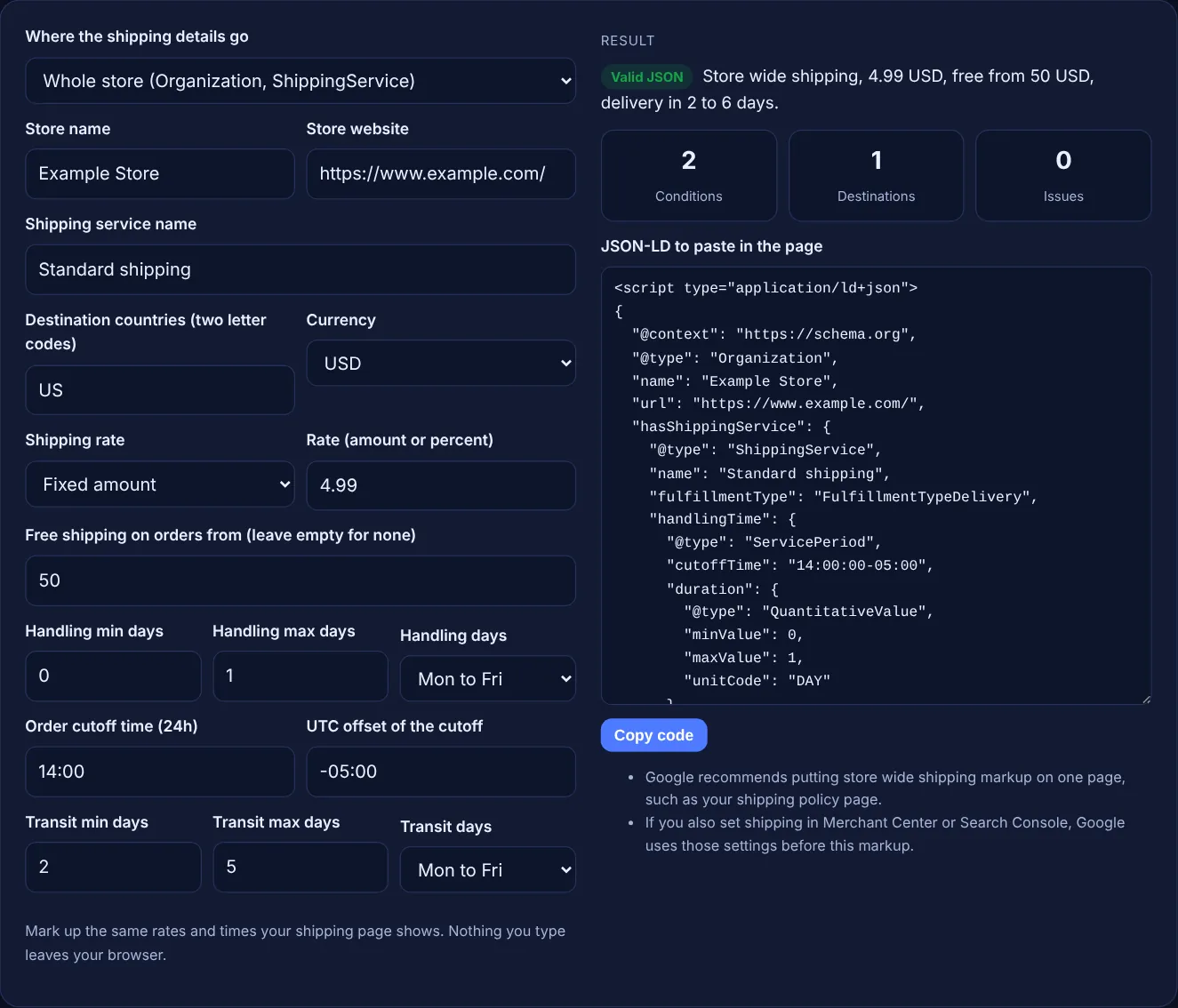
For a store wide policy, Google uses ShippingService under Organization with the hasShippingService property. Its only required property is shippingConditions. Each ShippingConditions can hold shippingDestination (DefinedRegion), orderValue, shippingRate, transitTime and doesNotShip. Handling and transit times are ServicePeriod objects with a QuantitativeValue duration. For one product, Google's merchant listing documentation uses OfferShippingDetails with a ShippingDeliveryTime.
Use two ShippingConditions with the same destination. The first has an orderValue from 0 up to just below the threshold and your normal rate. The second has an orderValue with minValue at the threshold and a shippingRate value of 0. This mirrors Google's own example, which charges 3.49 USD below 29.99 USD and ships free from 30 USD. Google says that when several conditions apply it uses the lowest shipping cost, then the fastest speed.
As whole days. Google says the unitCode "must be DAY or d", and you give either an exact value or a minValue and maxValue, not both. Handling time can include a cutoffTime in ISO 8601 format, such as 14:30:00-07:00, after which orders count as received the next day. businessDays lists the days you process orders or carriers deliver.
| Property | Where it goes | What to put in it |
|---|---|---|
| hasShippingService | Organization | One ShippingService for the store |
| shippingConditions | ShippingService | One block per set of rules (required) |
| handlingTime | ShippingService | ServicePeriod with duration, cutoffTime, businessDays |
| shippingDestination | ShippingConditions | DefinedRegion with a two letter addressCountry |
| orderValue | ShippingConditions | MonetaryAmount range with currency |
| shippingRate | ShippingConditions | MonetaryAmount value, or ShippingRateSettings orderPercentage |
| transitTime | ShippingConditions | ServicePeriod with a duration in DAY |
| shippingDetails | Offer (one product) | OfferShippingDetails with rate, destination and deliveryTime |
Example: a US online store charges 4.99 USD for standard shipping, ships free on orders from 50 USD, handles orders in 0 to 1 days with a 14:00 cutoff at UTC offset -05:00 on weekdays, and carriers take 2 to 5 weekdays. With the default values above, the tool outputs an Organization named "Example Store" with one ShippingService and 2 ShippingConditions: orders from 0 to 49.99 USD pay 4.99 USD, and orders from 50 USD pay 0. The cutoffTime is 14:00:00-05:00, the result reads delivery in 2 to 6 days, and there are 0 issues. Switching to one product drops the threshold and reports 1 issue explaining why.
Paste the store wide block into the HTML of one page, ideally your shipping policy page, which is what Google recommends. For a product with different shipping, paste the shippingDetails property inside that product's Offer in its Product markup.
Google says that if no shipping destination is specified, the shipping conditions apply to all destinations worldwide. Only leave it out if you really ship everywhere on the same terms; otherwise list each country code.
Add a ShippingConditions block for that destination with doesNotShip set to true and no rate or transit time. Google's own example uses this for orders under a set value to Mexico. This tool builds shipping rules; add that block by hand.
Yes, within limits. Google supports addressRegion for the US, Australia and Japan, and postalCode for Australia, Canada and the US, and says not to give both in one DefinedRegion. This tool works at country level.
No. The generator runs entirely in your browser with JavaScript. Nothing you type is uploaded or stored, so you can use it for client stores and shipping terms that are not live yet.
Yes. Google's order of precedence puts Content API shipping settings first, then Merchant Center or Search Console settings, then product level markup, then Organization level markup. Keep every source in agreement so the details shown are right.
Checked 23 Oct 2026. Facts checked against these official pages. Read how I check facts in my editorial policy.
MerchantReturnPolicy JSON-LD for your store or one product, with required fields checked.
A product schema generator is a tool that writes schema.org Product structured data. It combines product…
An organization schema generator is a tool that writes schema.org Organization structured data. It gathers…
A JSON-LD validator is a tool that checks structured data written in JSON for Linked Data. It first parses…
Send your website and I will check it for you, free.
One short email when something new goes live: articles, free SEO tools, package updates, discounts and price alerts. No spam, unsubscribe in one click.