Person Schema Generator
A person schema generator is a tool that writes schema.org Person structured data. It describes who someone…
Paste your profile links to clean them, flag problems and get a ready sameAs array, or merge it into JSON-LD you already have.
Everything runs in your browser. The tool checks the format of each URL, it does not visit the pages.
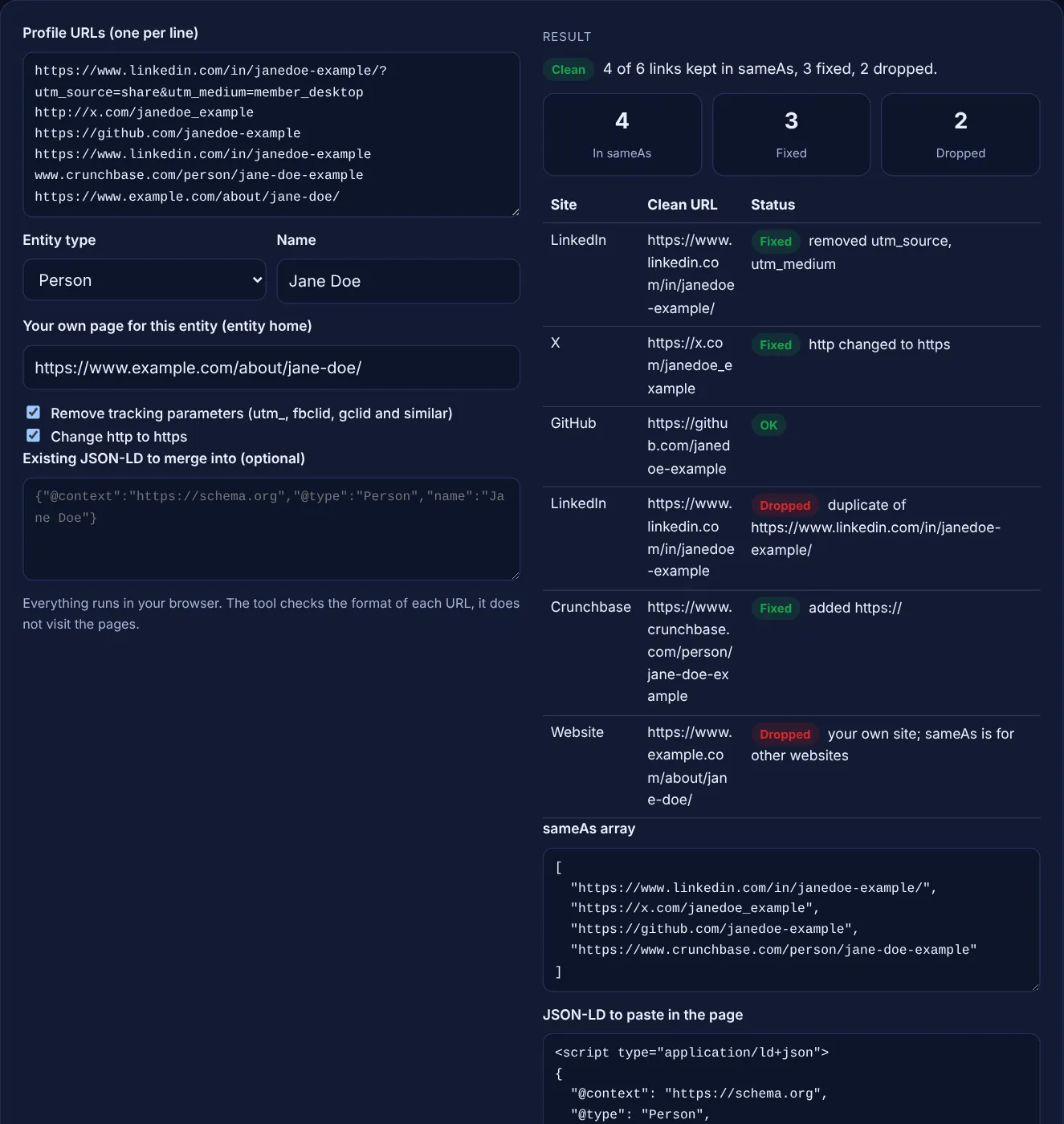
| Site | Clean URL | Status |
|---|
The free sameAs link builder takes the profile URLs you paste, cleans them, flags anything that should not be there and outputs the sameAs array for Person or Organization JSON-LD. You can also merge the links into JSON-LD you already have. It runs in your browser.
A sameAs link builder turns a messy list of profile URLs into a clean sameAs array for schema markup. It removes tracking parameters, switches http to https, drops duplicates and your own site, and flags home pages or share links. Paste the result into the Person or Organization JSON-LD on your entity home page.
sameAs is a schema.org property that lists other web pages about the same person or organization. Schema.org defines it as the "URL of a reference Web page that unambiguously indicates the item's identity", and Google's Organization structured data documentation describes it as "The URL of a page on another website with additional information about your organization". Typical values are LinkedIn, X, Facebook, YouTube, GitHub, Crunchbase, Wikipedia and Wikidata pages.
The links tie your own page to the profiles that describe the same entity elsewhere, which helps search engines and AI systems connect them. Messy links weaken that: the same profile twice, a URL with share tracking attached, an http address or your own website, which belongs in url, not sameAs. This tool fixes or flags each of those. For a full Person block with job title and image, use the Person Schema Generator; for a company, the Organization Schema Generator.
List pages that are clearly about the same person or organization: official social profiles, a Wikipedia article, a Wikidata item, a Crunchbase profile, a GitHub account or a marketplace seller profile. Google's profile page documentation describes sameAs as "The URL to other external profiles or home pages for the profile, if applicable." Leave out pages that only mention you, search results pages and share links. Fewer accurate links are better than many weak ones.
No, use url for it. Google describes the Organization sameAs value as a page "on another website", so the tool drops any link on the same domain as your entity home and puts that page in url instead. Your entity home is the one page on your own site that best describes the person or organization, usually the About, author or home page. The other profiles point back to it through sameAs.
Because the same profile with different tracking tags looks like different URLs. Links copied from apps, emails or ads often carry parameters such as utm_source, fbclid or igshid. Those tags describe how you shared the link, not who the profile belongs to. The tool removes common tracking parameters and compares links without the www prefix or trailing slash, so the same profile is listed once.
| Problem | Example | What the tool does |
|---|---|---|
| Tracking parameters | ?utm_source=share, ?fbclid=... | Removes them (or flags them if the box is off) |
| http address | http://x.com/name | Changes it to https (or flags it) |
| Missing scheme | www.crunchbase.com/person/name | Adds https:// |
| Duplicate | Same profile with and without a trailing slash | Keeps the first, drops the rest |
| Your own site | https://www.example.com/about/ | Drops it from sameAs, uses it as url |
| Not a profile | Home page, share link, search results | Keeps it but flags it to check |
Example: Jane Doe pastes 6 links. The LinkedIn link copied from the app carries utm_source and utm_medium, the X link uses http, and the Crunchbase link has no https://. LinkedIn also appears a second time without the tracking and trailing slash, and the last link is her own author page on example.com. The tool keeps 4 links in sameAs (LinkedIn, X, GitHub and Crunchbase), fixes 3 and drops 2: the duplicate LinkedIn link and her own site, which goes into url instead.
There is no required number. Add every profile that is clearly about the same person or organization and that you keep up to date. Three to eight is common for a person or small business. Do not pad the list.
There is no guarantee. Google says Organization markup can help it understand your organization and influence visual elements such as the logo in your knowledge panel, but it does not promise a panel. Accurate sameAs links are one helpful signal.
Yes, if the page is really about you or your organization. Use the article URL for Wikipedia and the item URL for Wikidata, such as wikidata.org/wiki/ followed by Q and a number. Do not link pages about someone with a similar name.
No. It checks the format of each URL in your browser and does not visit any page, so a typo in a username still passes. Open each link once before you publish the markup.
Put it inside the Person or Organization JSON-LD on your entity home, such as your About or author page. If you already have markup, paste it into the merge box and the tool adds only the new links.
No. The tool runs entirely in your browser with JavaScript. The URLs and JSON-LD you paste are never uploaded or stored, so you can use it for client brands before launch.
Checked 23 Oct 2026. Facts checked against these official pages. Read how I check facts in my editorial policy.
A person schema generator is a tool that writes schema.org Person structured data. It describes who someone…
An organization schema generator is a tool that writes schema.org Organization structured data. It gathers…
Builds short, medium and long author bios from your real details, with Person JSON-LD.
Lists named entities, dates, prices, URLs and emails in text, with schema about and mentions tips.
Send your website and I will check it for you, free.
One short email when something new goes live: articles, free SEO tools, package updates, discounts and price alerts. No spam, unsubscribe in one click.