Person Schema Generator
A person schema generator is a tool that writes schema.org Person structured data. It describes who someone…
Enter your real role, experience, credentials and profile links to get a short, medium and long author bio, plus HTML with Person markup.
The bio uses only what you type. Nothing is invented and nothing leaves your browser.
The free author bio generator turns the facts you enter about yourself, your role, years of experience, credentials, specialities, notable work and profile links, into a short, medium and long bio, plus HTML with Person markup for your author page. It adds nothing you did not type.
An author bio generator writes a short, medium and long bio from your real details: name, role, years of experience, credentials, specialities, notable work and profile links. Use the short one in bylines, the medium one under articles and the long one, with its Person JSON-LD, on your author page. Only include facts readers can check.
An author bio generator is a tool that writes a consistent author description from a few facts you enter. This one builds three lengths from the same facts, so your byline, the box under each article and your author page never contradict each other. It also outputs the long bio as HTML with a Person JSON-LD block containing name, jobTitle, url, sameAs and knowsAbout.
It is deliberately not an AI writer. Google's guidance on creating helpful, people-first content strongly encourages "accurate authorship information" and says to "avoid using deceptive authorship information". A bio that invents awards or experience does the opposite, so this tool only rearranges what you type and warns you about hype words such as "best" or "#1". To start from a full Person block instead, use the Person Schema Generator.
It helps readers judge who wrote the page, which is what Google asks you to make clear. Google says E-E-A-T "itself isn't a specific ranking factor", so a bio is not a switch that lifts rankings. Its helpful content guidance does ask: "Is it self-evident to your visitors who authored your content?" and "Do bylines lead to further information about the author or authors involved". A clear bio linked from every byline answers both questions.
The short bio is one sentence: name, role, company and years in your main speciality. It fits bylines and social profiles. The medium bio adds all specialities and credentials, and works at the end of an article. The long bio adds notable work and where readers can find you, and belongs on your author page. Keep the same facts in all three, so a reader who clicks the byline finds the same person described in more detail.
Use the Person type and keep the name clean. Google's Article structured data documentation says: "In the author.name property, only specify the name of the author", and to use the appropriate property for a job title instead. It strongly recommends the url or sameAs property, which is why the tool adds your author page as url and profile links as sameAs. Schema.org describes knowsAbout as a topic that suggests "possible expertise but not implying it".
| Bio length | Where to use it | What it contains |
|---|---|---|
| Short (1 sentence) | Byline, social profiles, guest post bylines | Name, role, company, years in main speciality |
| Medium (2 to 3 sentences) | Author box at the end of articles | Short bio plus all specialities and credentials |
| Long (paragraph) | Author page or About page | Medium bio plus notable work and profile links |
| Person JSON-LD | Author page, inside the HTML | name, jobTitle, worksFor, description, url, sameAs, knowsAbout |
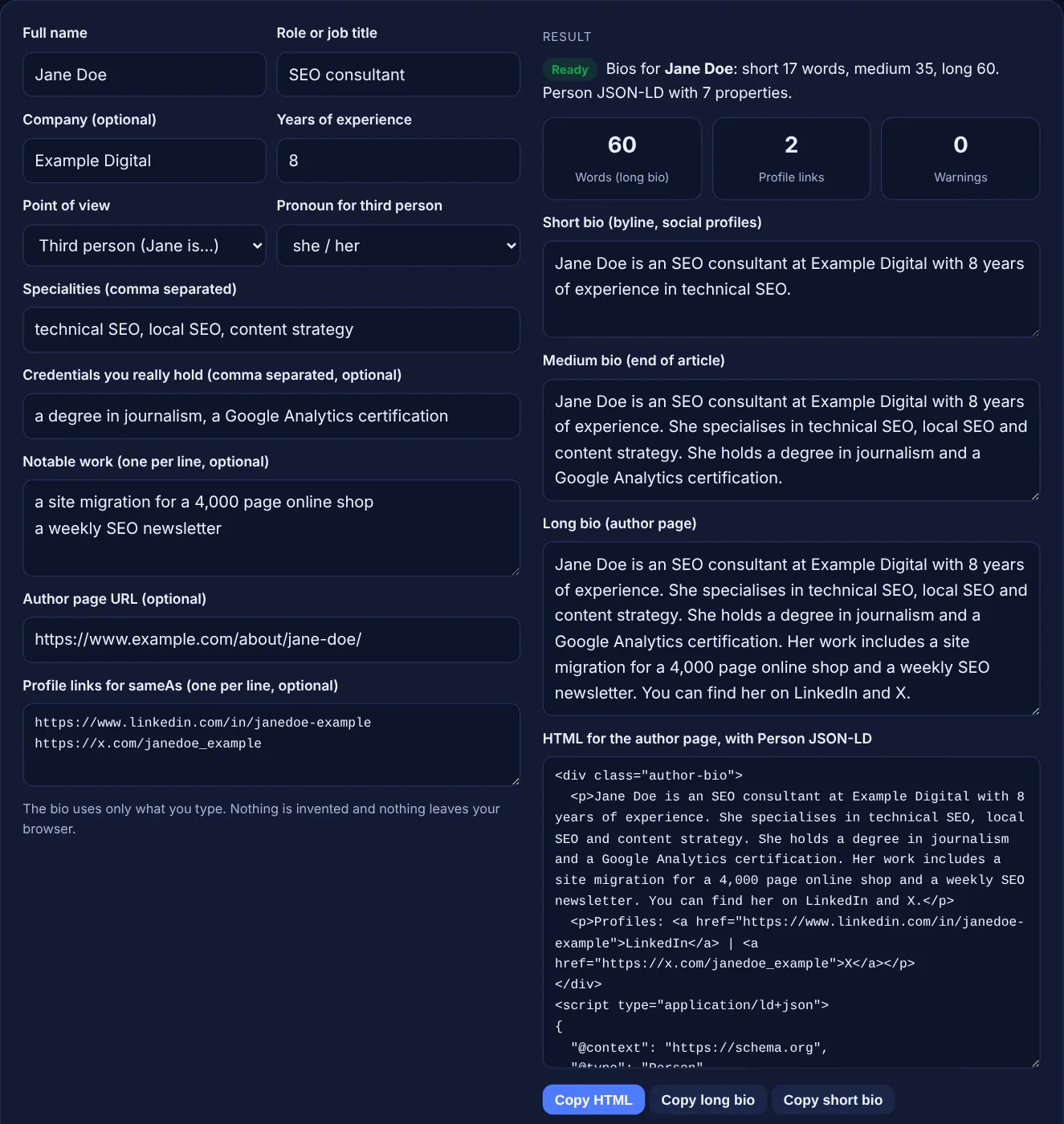
Example: Jane Doe, an SEO consultant at Example Digital with 8 years of experience, two credentials, two pieces of notable work and two profile links. With the default values above, the short bio reads "Jane Doe is an SEO consultant at Example Digital with 8 years of experience in technical SEO." (17 words). The medium bio has 3 sentences and 35 words, the long bio 5 sentences and 60 words; the long bio ends "You can find her on LinkedIn and X." The Person JSON-LD has 7 properties and 0 warnings. If you switch to first person, the short bio starts "I'm Jane Doe". If you change the role to "world's best SEO", the tool warns that "best" is a claim readers cannot check.
Either works. Third person reads naturally in bylines and on sites with several authors. First person suits a personal site or a freelancer's own blog. Pick one for each place and keep it consistent across the site.
There is no official length. One sentence fits a byline, two or three sentences fit an author box, and a paragraph fits an author page. What matters is that it says who you are and why you know the topic.
Yes, if you say so. Write "a Semrush certification (expired 2025)" or leave it out. Presenting an expired credential as current is misleading, and readers who check will trust the rest of the bio less.
No. It arranges the facts you enter into fixed sentence patterns with JavaScript in your browser. It never adds achievements, numbers or awards, so the bio is only as strong and as true as your inputs.
Paste it into the HTML of your author page, the page your bylines link to. On WordPress, use a custom HTML block or a header code plugin for that page only. Then check it in the Schema Markup Validator.
No. The generator runs entirely in your browser. Nothing you type is uploaded or stored, so you can draft bios for clients or colleagues before they are published.
Checked 23 Oct 2026. Facts checked against these official pages. Read how I check facts in my editorial policy.
A person schema generator is a tool that writes schema.org Person structured data. It describes who someone…
A ProfilePage schema generator is a tool that writes schema.org ProfilePage markup in JSON-LD. It wraps a…
Cleans profile URLs, flags duplicates and tracking, and outputs a sameAs array for JSON-LD.
Lists named entities, dates, prices, URLs and emails in text, with schema about and mentions tips.
Send your website and I will check it for you, free.
One short email when something new goes live: articles, free SEO tools, package updates, discounts and price alerts. No spam, unsubscribe in one click.