Q&A Page Schema Generator
A QA page schema generator is a tool that writes QAPage JSON-LD from your question and answers. It nests one…
Describe one forum thread and its replies to get DiscussionForumPosting JSON-LD with nested comments, checked against Google's required fields.
Mark up replies in the order they appear on the page. Write [deleted] as the text of a removed reply to mark it Deleted. Nothing you type leaves your browser.
The free DiscussionForumPosting schema generator turns one forum thread, its replies and their authors into JSON-LD with nested comments, then checks it against the properties Google lists as required and recommended. It runs in your browser and never sends what you type anywhere.
DiscussionForumPosting schema is JSON-LD that describes a user-generated forum thread: the first post with its author, date and full text, plus the replies nested as comments. Google uses it to find forum discussions. It requires author name, datePublished and text, image or video. Threads that are mainly one question with answers should use QAPage instead.
DiscussionForumPosting schema is structured data for a post in an online discussion, built on the schema.org type that is described simply as "A posting to a discussion forum." It sits under SocialMediaPosting, so a social platform can use the parent type with the same rules. The markup holds the first post and nests every reply under it as a Comment, each with its own author, date, text and like count.
Google's discussion forum documentation is strict about who it is for: "Only use DiscussionForumPosting markup to describe a user-generated post on a website." An article written by your own team does not qualify, even when readers can comment on it. For a blog post, use the Article Schema Generator instead.
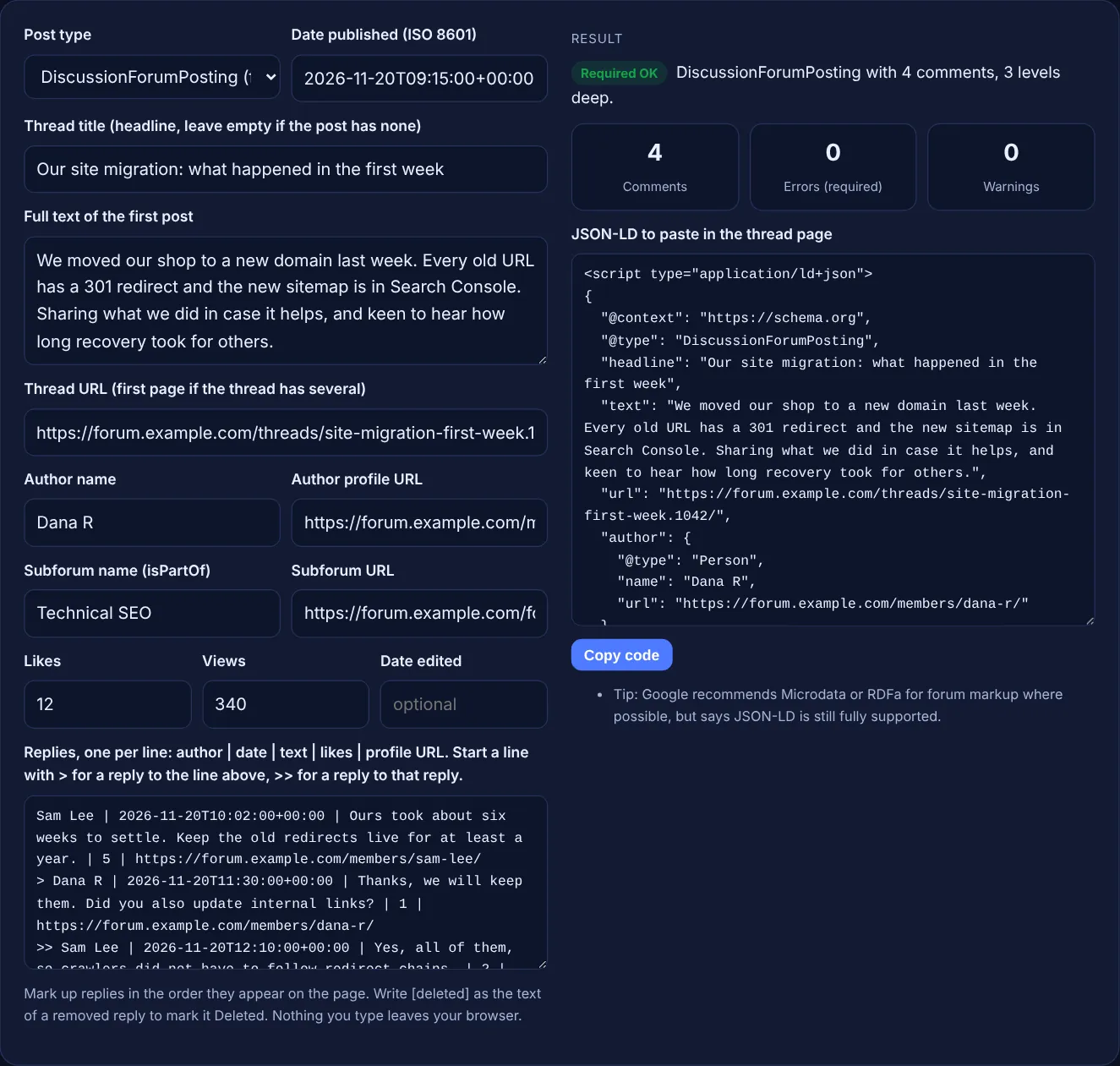
Google requires three things on the first post: author with author.name, datePublished in ISO 8601 format, and at least one of text, image or video. Each Comment needs the same: an author, a date and its content. Everything else is recommended, including author.url, headline, url, commentCount, interactionStatistic, isPartOf and creativeWorkStatus. The tool counts a missing required field as an error and a missing recommended field as a warning, and leaves out any reply that lacks a required field.
Nested. Google says "In general, we recommend nesting comments under the post they relate to." For a linear forum, where every reply simply follows the first post, Google says to "nest them all under the original post as comments." For a threaded forum, put each reply inside the comment it answers. Google also asks you to "Mark up comments in the order in which they appear on the page." In this tool, a line with no > is a direct reply to the first post, > replies to the line above, and >> goes one level deeper.
Use QAPage when the thread is one question that users answer. The discussion forum page says: "If the structure of the forum website is primarily questions with answers, we recommend that you use Q&A markup instead." Google's Q&A page documentation adds that QAPage "is for pages where the focus of the page is a single question and its answers" and that "Users must be able to submit answers to the question." The tool shows a tip when the thread title ends with a question mark. For those threads, use the QA Page Schema Generator.
| Property | What to put in it | Google status |
|---|---|---|
| author.name | The display name of the person who posted | Required |
| datePublished | ISO 8601 date and time of the post | Required |
| text, image or video | The full text of the post (at least one of the three) | Required |
| headline | The thread title, only if it has one | Recommended |
| url | Canonical URL, first page of a multi-page thread | Recommended |
| comment | Replies as nested Comment items | Recommended |
| interactionStatistic | Likes, views and other counts as InteractionCounter | Recommended |
| creativeWorkStatus | Deleted, for a removed post kept for threading | Recommended |
Example: a thread on forum.example.com titled "Our site migration: what happened in the first week", posted by Dana R with 12 likes and 340 views in the Technical SEO subforum, has 4 replies. With the default values, the tool outputs DiscussionForumPosting JSON-LD with commentCount 4, nested 3 levels deep: Sam Lee replies, Dana answers Sam, and Sam answers Dana, while Priya N replies to the first post. The result shows 0 errors and 0 warnings. Clear the author name, type "yesterday" as the date and empty the text, and the tool reports the missing required fields as errors.
Google lists it for its Discussions and Forums feature, which uses the markup to help identify online discussions. Treat it as eligibility, not a promise. The markup still makes the thread, its authors and its replies clear to search engines.
No. Google lists an article or blog written by an agent for the website as invalid, even with comments. Use Article markup for the post. DiscussionForumPosting is only for posts written by users of the site.
Use the URL of the first page as the url property, as Google advises for multi-page threads. Set commentCount to the number of comments on the post, which is useful when not every comment is included in the markup.
Keep it in the markup if it stays on the page for context or threading, and set creativeWorkStatus to Deleted. In this tool, type [deleted] as the reply text and the status is added automatically.
Google recommends Microdata or RDFa for forum markup where possible. It also says this is just a recommendation and that JSON-LD is still fully supported, so the JSON-LD from this tool is a valid choice for any forum.
No. The generator runs entirely in your browser with JavaScript. Nothing you type is uploaded or stored, so you can safely test threads from a private or members-only forum before you publish the markup.
Checked 23 Oct 2026. Facts checked against these official pages. Read how I check facts in my editorial policy.
A QA page schema generator is a tool that writes QAPage JSON-LD from your question and answers. It nests one…
An article schema generator is a tool that writes schema.org Article structured data in JSON-LD. It collects…
A JSON-LD validator is a tool that checks structured data written in JSON for Linked Data. It first parses…
Pulls every JSON-LD, microdata and RDFa item out of pasted HTML and locates parse errors.
Send your website and I will check it for you, free.
One short email when something new goes live: articles, free SEO tools, package updates, discounts and price alerts. No spam, unsubscribe in one click.