ROAS Calculator
A ROAS calculator is a tool that measures how much revenue each unit of ad spend brings back. ROAS = ad…
Enter one order's price and costs to see the lowest ROAS that still covers them, the matching ACoS and CPA, and the ROAS you need for a profit target.
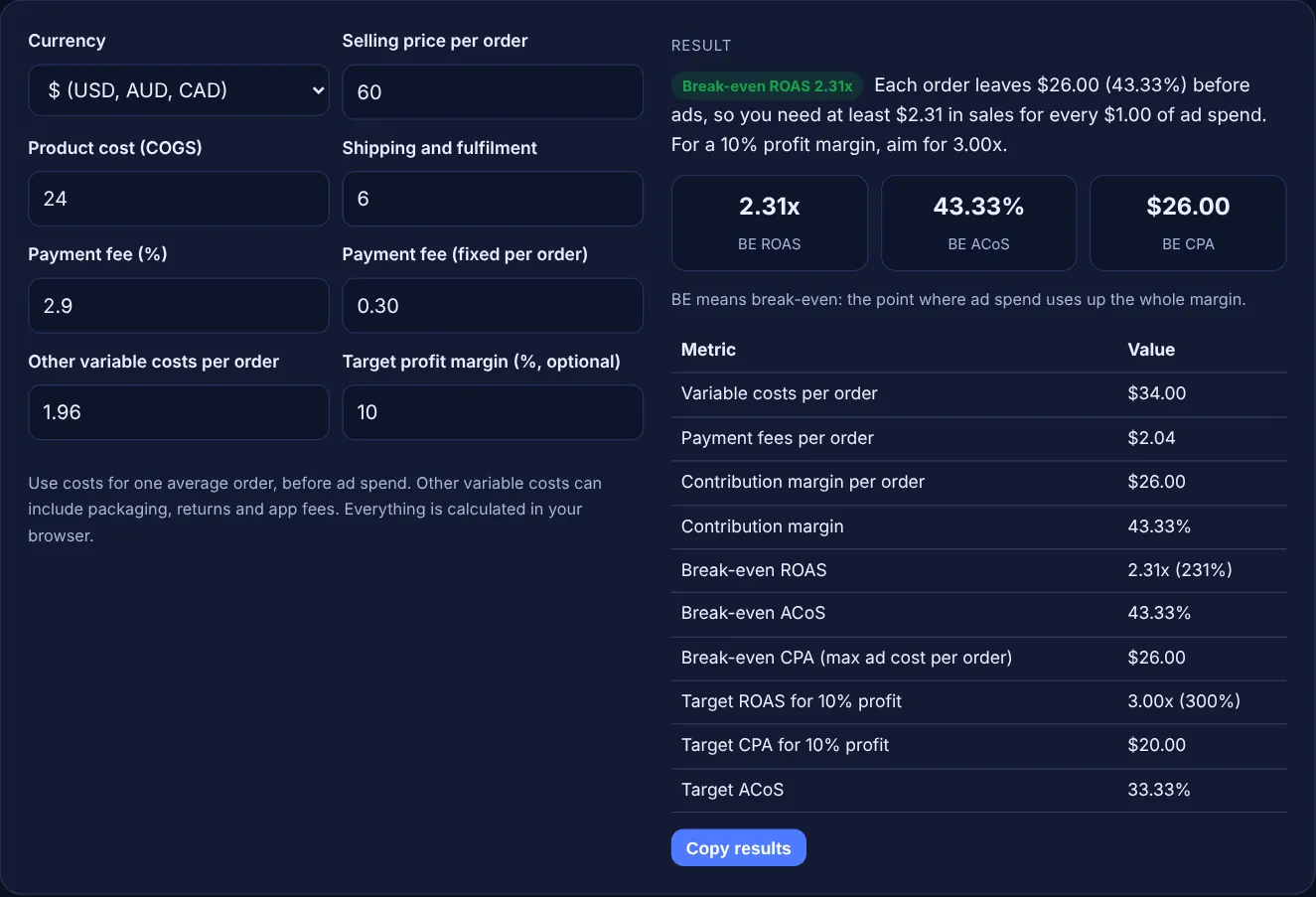
Use costs for one average order, before ad spend. Other variable costs can include packaging, returns and app fees. Everything is calculated in your browser.
BE means break-even: the point where ad spend uses up the whole margin.
| Metric | Value |
|---|
The free break even roas calculator works out the lowest return on ad spend at which an order still covers its product cost, shipping, payment fees and other variable costs. It also shows break-even ACoS and CPA, and the ROAS you need to keep a profit margin you choose.
Break-even ROAS is the revenue you must earn per unit of ad spend to make zero profit on an order. Divide 1 by your contribution margin: with a 40% margin you need 2.5x, or 250% in Google Ads terms. Below that ROAS each sale loses money; above it, ads add profit before fixed costs.
A break-even ROAS calculator is a tool that finds the minimum return on ad spend a campaign needs before it starts to lose money on each order. ROAS is ad revenue divided by ad spend. Google Ads expresses a ROAS goal as a percentage: its Target ROAS help page describes the target as "the average conversion value (for example, revenue) you'd like to get for each dollar you spend on ads" and shows $5 in sales for $1 of spend as a 500% target.
A high ROAS is not automatically profitable. If your product cost, shipping and fees take 60% of the price, only 40% is left to pay for ads, so any ROAS below 2.5x loses money. This calculator starts from your own costs per order, so the number it gives is specific to your margin, not a general benchmark.
Divide 1 by your contribution margin as a decimal. First subtract every variable cost of an order (product cost, shipping, payment fees, packaging) from the price, then divide what is left by the price to get the margin. A $60 order with $34 of variable costs leaves $26, a 43.33% margin, so break-even ROAS is 1 / 0.4333 = 2.31x, which is 231% in Google Ads.
Break-even ACoS equals your contribution margin, and it is the reciprocal of break-even ROAS. Amazon Ads defines ACOS as "(ad spend ÷ ad revenue) x 100" and says ROAS "is the inverse of Amazon ACOS". So a 43.33% margin gives a break-even ACoS of 43.33% and a break-even ROAS of 2.31x. ACoS above your margin means ads lose money.
Target ROAS is the return you aim for so that a chosen profit remains after ad spend, so it is always higher than break-even ROAS. Subtract your target profit margin from your contribution margin, then divide 1 by the result. With a 43.33% margin and a 10% profit goal, 33.33% is left for ads, so target ROAS is 3.00x. Google says a target set too high "may limit the amount of traffic your ads may get".
| Contribution margin | Break-even ROAS | In Google Ads (%) | Break-even ACoS |
|---|---|---|---|
| 20% | 5.00x | 500% | 20% |
| 25% | 4.00x | 400% | 25% |
| 33.33% | 3.00x | 300% | 33.33% |
| 40% | 2.50x | 250% | 40% |
| 50% | 2.00x | 200% | 50% |
| 60% | 1.67x | 167% | 60% |
| 75% | 1.33x | 133% | 75% |
Example: an online shop sells an order for $60. The product costs $24, shipping $6, the payment fee is 2.9% plus $0.30 ($2.04) and packaging adds $1.96, so variable costs are $34.00. That leaves $26.00 per order, a 43.33% contribution margin. Break-even ROAS is 2.31x (231%), break-even ACoS is 43.33% and break-even CPA is $26.00. With a 10% profit target, target ROAS is 3.00x (300%) and target CPA is $20.00.
A good ROAS is any figure above your own break-even ROAS, plus enough to cover fixed costs and profit. There is no universal number, because a 2x ROAS is profitable at a 60% margin and loses money at a 30% margin. Work out your break-even first.
No. Enter costs before advertising. The calculator works out how much of each order is left to pay for ads, and that amount is the break-even CPA. Adding ad spend to the costs would count it twice.
No. It uses variable costs per order only, so it shows the point where each ad-driven sale stops losing money. To cover fixed costs as well, enter a target profit margin and use the target ROAS instead.
Your variable costs are equal to or higher than the selling price, so every order loses money before any ad spend. No amount of ad revenue fixes that. Raise the price, cut product or shipping costs, or raise the order value first.
Google Ads takes target ROAS as a percentage. Multiply the ROAS shown here by 100, so 3.00x becomes 300%. Google advises basing the target on your business goals and your historical ROAS, so start near the figure your campaigns already achieve.
No. The calculator runs entirely in your browser with JavaScript. Your prices and costs are never uploaded or stored, so you can use real product margins safely.
Checked 23 Oct 2026. Facts checked against these official pages. Read how I check facts in my editorial policy.
A ROAS calculator is a tool that measures how much revenue each unit of ad spend brings back. ROAS = ad…
AOV from revenue and orders, period change, revenue per visitor and a what-if uplift.
A customer acquisition cost calculator is a tool that adds every cost of winning customers (ad spend, SEO and…
A PPC budget calculator is a tool that turns traffic goals into an ad budget. Monthly budget = target clicks…
Send your website and I will check it for you, free.
One short email when something new goes live: articles, free SEO tools, package updates, discounts and price alerts. No spam, unsubscribe in one click.