
Technical SEO
Which Rich Results Google Still Shows in 2026 (and What Went)
Which rich results Google still shows in 2026: the 25 features in Google's search gallery, the ones retired since 2023 with exact…
Read article
This guide is for site owners, bloggers and marketers who keep hearing about sitemaps and want to know which kind their site actually needs. You will learn the real difference in the HTML sitemap vs XML sitemap question, what Google’s own documentation says about each, and how to build both in a few minutes with free tools.
An XML sitemap is a file for search engines that lists the URLs you want crawled, with limits of 50,000 URLs or 50MB per file. An HTML sitemap is a normal page of links for visitors that crawlers can also follow. Most sites benefit from an XML sitemap; an HTML sitemap helps large or deep sites.
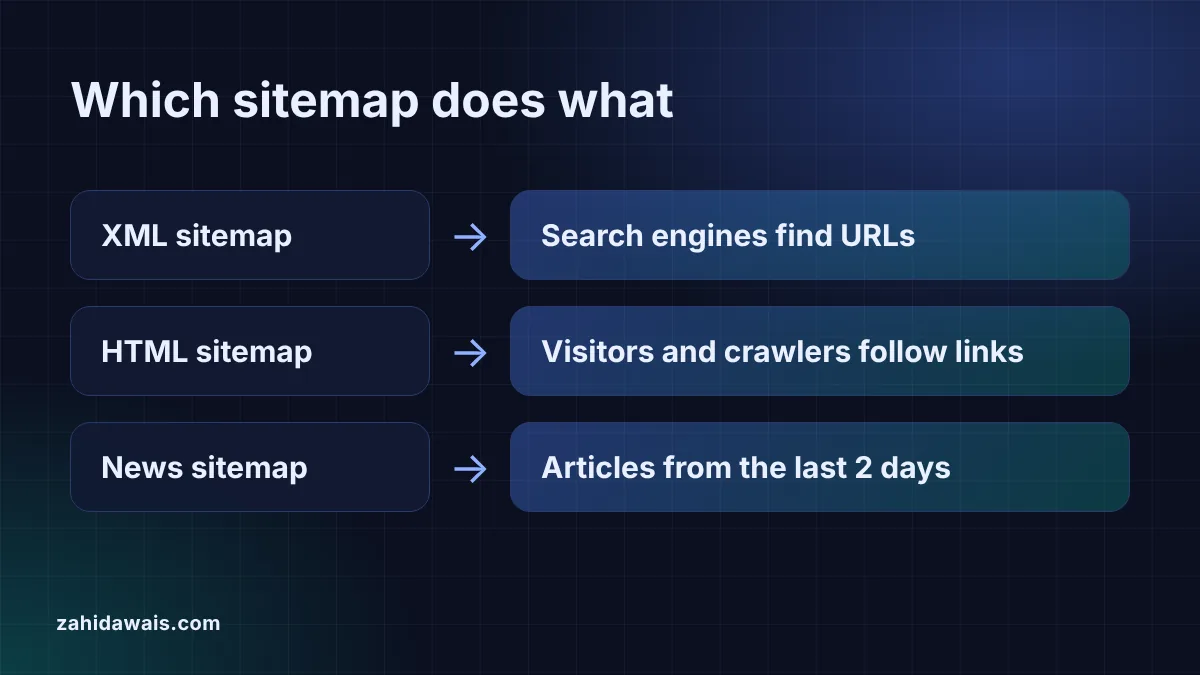
The difference is the audience. An XML sitemap is a machine readable file, usually at /sitemap.xml, that tells search engines which URLs exist. Google’s sitemap overview defines a sitemap as “a file where you provide information about the pages, videos, and other files on your site”. An HTML sitemap is an ordinary page, often at /sitemap/, that lists your important pages as links grouped by section so visitors can find them.
They also work differently. Search engines read an XML sitemap directly, and you can submit it in Search Console. An HTML sitemap is never submitted: crawlers find it like any other page and follow its links. Visitors never see the XML file, while the HTML page is part of your site and should look like it.
| Point | XML sitemap | HTML sitemap |
|---|---|---|
| Main audience | Search engines | Visitors, and crawlers through its links |
| Format | XML file with url and loc tags | Normal web page with a links |
| Usual location | /sitemap.xml, submitted in Search Console | /sitemap/, linked in the footer |
| Size rules | 50,000 URLs or 50MB uncompressed per file | No Google limit, keep it usable |
| Anchor text | None, URLs only | Matters, should be descriptive |
| Special versions | News, image and video sitemaps | None |
| Who needs it | Large, new, media heavy or news sites most | Large or deep sites |
No, but most sites gain from one and it costs little. Google says you might need a sitemap if “your site is large”, if “your site is new and has few external links to it”, or if it has a lot of rich media or is shown in Google News. Google calls a site small if it has “about 500 pages or fewer” that should appear in search, and says such a site may not need one if it is “comprehensively linked internally”.
Even then, a sitemap is not a guarantee. Google says a sitemap “doesn’t guarantee that all the items in your sitemap will be crawled and indexed”. It helps discovery; it does not force indexing. If Search Console says it could not read your file, the guide on fixing a sitemap that could not be fetched covers the usual causes.
It helps in one specific way: it gives every listed page an internal link that crawlers can follow. Google’s SEO starter guide says “Google primarily finds pages through links from other pages it already crawled”, and Google’s link best practices add that “every page you care about should have a link from at least one other page on your site”. A sitemap page linked from the footer gives deep pages that link in one step.
The links must be real links. Google says it “can only crawl your link if it’s an <a> HTML element” with an href, and that good anchor text is “descriptive, reasonably concise, and relevant”. The HTML sitemap generator builds exactly that from a URL list: grouped, nested lists of plain links with anchor text from your titles or slugs. It is not a ranking boost on its own, and it does not replace good menus and links inside your content.
Use both when the site is large or deep. An online shop with hundreds of categories, a blog with years of archives or a service business with many location and service pages all benefit: the XML sitemap tells Google about every indexable URL, and the HTML sitemap helps people and crawlers reach pages that sit four or five clicks from the home page. A small site with a clear menu usually needs only the XML file, which many content management systems create automatically.
News sites need a third kind. A news sitemap lists only recent articles, and Google says to “only include recent URLs for articles that were created in the last two days”, with up to 1,000 news:news tags per file. The Google News sitemap generator applies both rules for you. Image and video sitemaps are covered in do you need an image or video sitemap, and whether you appear in Google News at all is covered in how to check if a site is on Google News.
For the XML sitemap, start with your CMS. Many systems, WordPress included, publish one automatically. If yours does not, paste your URLs into the sitemap generator from a URL list, then check the result with the sitemap XML validator. Google’s build and submit a sitemap page sets the rules: “use fully-qualified, absolute URLs”, the file “must be UTF-8 encoded”, and “all formats limit a single sitemap to 50MB (uncompressed) or 50,000 URLs”. Bigger sites split the list, as explained in XML sitemap size limits.
For the HTML sitemap, export your important URLs with their titles, paste them into the HTML sitemap generator, copy the code into a page such as /sitemap/ and link to that page from your footer. Leave out filtered, sorted and thank you pages, which add links without helping anyone.
<priority> and <changefreq> values”, so do not spend time tuning them.Example: a services site on www.example.com has 10 important pages: Home, About us, Contact, a services page with Technical SEO and Link building under it, and a blog with three articles in SEO and Design folders. The XML sitemap lists all 10 URLs for Google. Pasted into the HTML sitemap generator with their titles, the same list becomes 10 links in 3 groups: Main pages, Our services and Blog, with Blog nested into SEO and Design. The generator skips /blog/?page=2, a duplicate URL and a line that is not a URL, so the visitor page shows only real content pages.
Not really. An HTML sitemap gives crawlers links to follow, but it cannot be submitted in Search Console and does not carry lastmod dates or news, image and video details. Keep the XML sitemap for search engines and add an HTML sitemap if visitors need it.
Yes, keep it indexable and linked from the footer so crawlers reach it and follow its links. It rarely ranks for anything itself, and that is fine. Its job is to connect deep pages, not to bring traffic directly.
Usually not. If every page is reachable from the menu in two or three clicks, an HTML sitemap adds little. Google says small, well linked sites may not even need an XML sitemap, although adding one does no harm.
Google sets no limit for an HTML sitemap page, but a page with thousands of links is hard to use. On big sites, make one sitemap page per section, such as products, guides and locations, and link those pages together.
It is an XML sitemap with extra news tags for each article: publication name, language, publication date and title. Google asks you to list only articles from the last two days, so it is kept separate from the main sitemap or updated constantly.
Submit the XML sitemap in the Sitemaps report in Google Search Console, and you can also add a Sitemap: line with its full URL to robots.txt. An HTML sitemap is not submitted; link to it from your site instead.
This guide is part of my technical SEO guides.
Checked 23 Oct 2026. Facts checked against these official pages. Read how I check facts in my editorial policy.
Want your sitemaps and site structure checked by hand? See my technical SEO service.
Which rich results Google still shows in 2026: the 25 features in Google's search gallery, the ones retired since 2023 with exact…
Read article
Do you need an image sitemap or a video sitemap? When Google says they help, which tags it still supports, the limits,…
Read article
XML sitemap size limit explained: 50,000 URLs or 50MB uncompressed per file, what happens above it, and how to split a big…
Read articleSend your website and I will reply with a free audit.